Shuriken Particles & Shader Graph

Hi,

After my post on using Shader Graph with Low Level Graphics API for Indirect & Procedural Rendering, I’d like to follow up with some specifics about using Shader Graph with Shuriken Particles.

Like with that other post, I’m going to split this up and use this first post as a table of content.

I hope this helps and look forward to getting feedback.

Ps: the examples described in this thread are available here.

11 Likes

Authoring shader graphs for use with Shuriken Particles using GPU Instancing will have us take a deep look into how things work.

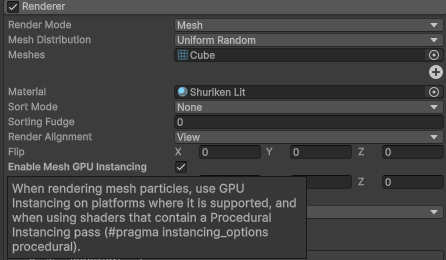
First of all, the Particle Renderer will only use GPU Instancing if the shader features the Keyword PROCEDURAL_INSTANCING_ON.

While we can – for the purpose of branching – use this Keyword as Predefined in Shader Graph, we cannot just add it to the Blackboard as Multi-Compile, or else we’ll get the error:

“UNITY_INSTANCING_PROCEDURAL_FUNC must be defined.”

The only way to feature this Keyword is to inject the Pragma

#pragma instancing_options procedural:<funcname>

To do this we can use the technique described here, using a Custom Function Node in String Mode, with the following:

#pragma instancing_options procedural:ParticleInstancingSetup

Out = In;

We then need another Custom Function Node, in File Mode, referencing a Shader Include that contains that function.

void ParticleInstancingSetup()
{
}

But let’s skip that for now.

Particle Instancing

Looking at the documentation, we can see the example custom shader includes “UnityStandardParticleInstancing.cginc”.

This example is suited for Built-In Render Pipeline only.

If you include this in a shader using URP, you will get an error such as:

Shader error in ‘Shader Graphs/Master’: unrecognized identifier ‘fixed4’ at …/Editor/Data/CGIncludes/UnityStandardParticleInstancing.cginc(120) (on d3d11)

TL/DR, long ago, fixed4 was meant for optimization purposes, but SRPs use the more modern float4 or half4.

Should you want to take a look at what’s in it, you can get the Unity shaders source from the archives page.

But we can also look at how things are set up in URP’s default particles shaders here:

Packages/com.unity.render-pipelines.universal/ShaderLibrary/ParticlesInstancing.hlsl

And this is what we’ll be using to easily set things up with URP.

1 Like

Should you need to work with URP alone and want a quick and easy setup, this post will walk you through the shortcuts.

Key Takeaways:

  • Use a Custom Function Node to inject instancing pragmas
    • #pragma instancing_options procedural:ParticleInstancingSetup
    • #pragma multi_compile_instancing in editor passes only
  • Use another Custom Function Node to reference an HLSL file
  • Include “Packages/com.unity.render-pipelines.universal/ShaderLibrary/ParticlesInstancing.hlsl”
  • Add functions to fetch particles’ colors and flipbook UVs, similar to those in Packages/com.unity.render-pipelines.universal/ShaderLibrary/Particles.hlsl

Particle Instancing & Transforms

URP sets particles instancing setup in this file:

“Packages/com.unity.render-pipelines.universal/ShaderLibrary/ParticlesInstancing.hlsl”

This file contains everything we need to handle particle instancing – and nothing else – so we can easily just include it in an HLSL file.

The only thing we’ll add for now is a function to reference it from the shader graph.

#ifndef SHADERGRAPH_PARTICLESINSTANCING_URP_ONLY_INCLUDED
#define SHADERGRAPH_PARTICLESINSTANCING_URP_ONLY_INCLUDED

#include "Packages/com.unity.render-pipelines.universal/ShaderLibrary/ParticlesInstancing.hlsl"

void IncludeInstancingSetup_float(float3 In, out float3 Out)
{
    Out = In;
}

void IncludeInstancingSetup_half(half3 In, out half3 Out)
{
    Out = In;
}

#endif // SHADERGRAPH_PARTICLESINSTANCING_URP_ONLY_INCLUDED

Then using two Custom Function Nodes, one to inject the pragma and the other to include the ParticleInstancingSetup function, you can already get GPU instancing support that will handle particle transforms for you.

Note that particles’ transforms account for particles’ position, rotation and size.

Editor Passes

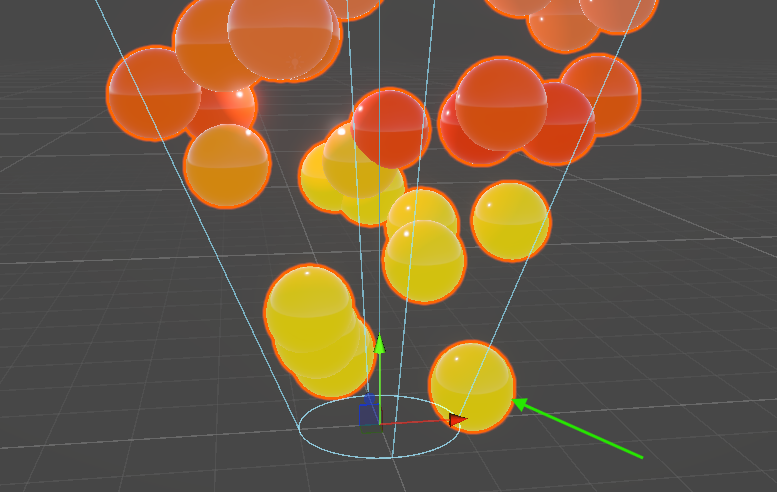
The default implementation of ScenePicking and SceneSelection passes in URP shader graphs don’t account for GPU Instancing. As a result

  • The scene view outline will display the particle mesh at the world center.
  • The Particle System cannot be selected in Scene View by picking a particle.

But we can easily work around this by adding the missing pragma, for those passes only, since it’s already in other passes.
In the Custom Function Node that adds the instancing pragma, we’ll add the multi_compile_instancing pragma for those passes.

#if defined(SCENEPICKINGPASS) || defined(SCENESELECTIONPASS)
#pragma multi_compile_instancing
#endif

#pragma instancing_options procedural:ParticleInstancingSetup

Out = In;

Particle Color

To get the particle’s color, you can have a look at how URP does it here:

Packages/com.unity.render-pipelines.universal/ShaderLibrary/Particles.hlsl (line 172)

half4 GetParticleColor(half4 color)
{
#if defined(UNITY_PARTICLE_INSTANCING_ENABLED)
#if !defined(UNITY_PARTICLE_INSTANCE_DATA_NO_COLOR)
    UNITY_PARTICLE_INSTANCE_DATA data = unity_ParticleInstanceData[unity_InstanceID];
    color = lerp(half4(1.0, 1.0, 1.0, 1.0), color, unity_ParticleUseMeshColors);
    color *= half4(UnpackFromR8G8B8A8(data.color));
#endif
#endif
    return color;
}

This file contains a lot of what we need for things like particles’ colors and texture coordinates, but it also features many includes and things we don’t need.
Also, the function above cannot be referenced in a Custom Function Node, because

  • typed return functions aren’t supported, ‘out’ parameters are used instead.
  • _float and/or _half suffixes are required for precision implementations.

There are two ways to use this code in a Custom Function Node.

File Mode

You may add both _float and _half functions in the HLSL file, then reference it from the Custom Function Node in File Mode, and set the Function Name to “ParticleColor” without suffix.

void ParticleColor_float(float4 In, out float4 Out)
{
#if defined(UNITY_PARTICLE_INSTANCING_ENABLED)
    UNITY_PARTICLE_INSTANCE_DATA data = unity_ParticleInstanceData[unity_InstanceID];
    Out = lerp(float4(1.0, 1.0, 1.0, 1.0), In, unity_ParticleUseMeshColors);
    Out *= float4(UnpackFromR8G8B8A8(data.color));
#else
    Out = In;
#endif
}
void ParticleColor_half(half4 In, out half4 Out)
{
#if defined(UNITY_PARTICLE_INSTANCING_ENABLED)
    UNITY_PARTICLE_INSTANCE_DATA data = unity_ParticleInstanceData[unity_InstanceID];
    Out = lerp(half4(1.0, 1.0, 1.0, 1.0), In, unity_ParticleUseMeshColors);
    Out *= half4(UnpackFromR8G8B8A8(data.color));
#else
    Out = In;
#endif
}

String Mode

You may also just use the function body in a Custom Function Node in String Mode.

In both cases, we can use the Vertex Colors for input and wrapping this in a shader subgraph allows reusing.

For particles’ attributes, I prefer the String Mode as it allows reusing them in any other graphs that may use a different include file.

Texture Coordinates

You may just sample a texture with UV0, but should you want to use Texture Sheet Animation, you’ll need to offset the coordinates based on the number of rows and columns, and current animation frame.

While we could fetch the animation frame and implement flipbook UVs in the shader graph, we’re going to do it in a way that we don’t have to manage the number of rows and columns.

First, copy/paste the whole GetParticleTexcoords function from

“Packages/com.unity.render-pipelines.universal/ShaderLibrary/Particles.hlsl” (line 184).

void GetParticleTexcoords(out float2 outputTexcoord, out float3 outputTexcoord2AndBlend, in float4 inputTexcoords, in float inputBlend)
{
    …
}

Then add the Shader Graph compliant versions of GetParticleTexcoords().

void GetParticleTexcoords_float(float2 inputTexcoord, out float2 outputTexcoord)
{
    float3 dummyTexcoord2AndBlend = 0.0;
    GetParticleTexcoords(outputTexcoord, dummyTexcoord2AndBlend, inputTexcoord.xyxy, 0.0);
}

void GetParticleTexcoords_half(half2 inputTexcoord, out half2 outputTexcoord)
{
    half3 dummyTexcoord2AndBlend = 0.0;
    GetParticleTexcoords(outputTexcoord, dummyTexcoord2AndBlend, inputTexcoord.xyxy, 0.0);
}

Or just like with Color, you can use a Custom Function Node in String Mode instead, and can also wrap this in a subgraph.

You can then use it with UV0 for input and use its output to sample a flipbook texture.

To save on the fragment shader, we can store it in a Custom Interpolator.

Using this function, the flipbook UVs will be offset based on the Texture Sheet Animation module settings.

In the next post, I’ll touch on Custom Vertex Stream, and how to use them to get other particles’ attributes such as Age or Speed, and implement Flipbook Blending, as mentioned in the documentation.

6 Likes

Before I go ahead and post about using Custom Vertex Stream and Particle Data Struct, I’m sharing here a package repo containing some examples.

It features examples of the URP Only “easy” setup described above, with GPU Instancing support, particles’ attributes access (color, age, speed, stable random, custom) and flipbook blending.

9 Likes

Custom Vertex Streams, as detailed in the documentation, allow us to pass a wider range of data into our custom Shaders.

This works differently when using Billboards – or Meshes with GPU Instancing disabled – and using Meshes with GPU Instancing enabled.

Billboards, or Meshes with GPU Instancing disabled

When using billboards or meshes with GPU instancing disabled, all mesh transformations are done on the CPU, every particle’s mesh vertex data (position, normal, tangent) are already in Object Space and other data are stored in Vertex Color and Texture Coordinates (UV).

Meshes with GPU Instancing enabled

When using meshes with GPU instancing enabled, the particles’ positions and other data are passed in a StructuredBuffer filled with a customizable particle data struct.

This struct shall contain the ObjectToWorld matrix for the particle, as a float3x4 that accounts for position, rotation and size, and all other particles’ attributes.

All mesh transformations are then expected to happen on the GPU in the ParticleInstancingSetup function, and the particles’ Mesh data remains the same as the original mesh reference.

Now let’s see how this works with a practical example by creating a new shader graph that supports Flipbook Blending, just like the URP Particles Shaders.

Flipbook Blending

If you look in the GetParticleTexcoords() function body, you’ll see references to _FLIPBOOKBLENDING_ON.

This is a keyword you can find the definition of in

Packages\com.unity.render-pipelines.universal\Shaders\Particles\ParticlesLit.shader

as

#pragma shader_feature_local _FLIPBOOKBLENDING_ON

To implement this optional flipbook blending behavior, we need to

  1. Add this keyword to the shader graph blackboard,
  2. Enable it on the material instance,
  3. Get the secondary UVs and Blend amount,
  4. Blend between two texture samplers,
  5. As explained in the documentation, add the UV2 and AnimBlend streams,
  6. Add a custom particle instance data struct to feature animBlend

Adding the Keyword

As in the URP Particle Shaders, we’ll add the keyword to the Blackboard, as a Local – not Overridable – Shader Feature keyword, leave it available on both Vertex and Fragment stages, make it generate a material property, and leave its default value to disabled.

Enable Blending on the Material

On the material instance, we’ll then enable it.

Get Secondary UVs and Blend Amount

We also need to change the implementation of our GetParticleTexcoords() functions, to output the secondary UV and blend value.

Note we’re now taking UV0 as float4 and will need to change the Custom Function Node input type from Vector2 to Vector4. We’re also outputting the secondary UVs (UVs at frame n+1), and blend amount.

void GetParticleTexcoords_float(float4 inputTexcoord, float inputBlend, out float2 outputTexcoord, out float2 texcoord2, out float blend)
{
    float3 dummyTexcoord2AndBlend = 0.0;
    GetParticleTexcoords(outputTexcoord, dummyTexcoord2AndBlend, inputTexcoord, inputBlend);
    texcoord2 = dummyTexcoord2AndBlend.xy;
    blend = dummyTexcoord2AndBlend.z;
}
void GetParticleTexcoords_half(half4 inputTexcoord, half inputBlend, out half2 outputTexcoord, out half2 texcoord2, out half blend)
{
    half3 dummyTexcoord2AndBlend = 0.0;
    GetParticleTexcoords(outputTexcoord, dummyTexcoord2AndBlend, inputTexcoord, inputBlend);
    texcoord2 = dummyTexcoord2AndBlend.xy;
    blend = dummyTexcoord2AndBlend.z;
}

Blend between frame and frame n+1

We can then sample the texture twice, with the two UV sets, and interpolate between the results using the blend amount.

We also branch, using the keyword, between the single texture sample, and the interpolated samples.

Add Custom Vertex Streams

This would already work when GPU instancing is enabled, but wouldn’t otherwise as we need to feed the AnimBlend value.

We need to enable Custom Vertex Streams and add:

  • Normal, to support lighting
  • Tangent, if we need normal mapping
  • Color
  • UV
  • UV2, that’s UVs at frame n+1
  • AnimBlend, that’s the linear interpolation factor between frame n and n+1
  • AnimFrame, this is the frame in the flipbook

Make sure to set UV and UV2 so they land in TEXCOORD0.xy and TEXCOORD0.zw.

It doesn’t really matter if AnimFrame comes first or second to AnimBlend.

We just need to make sure we fetch it properly in the shader graph. Here from UV1.x.

Note:
The mesh UV1 shall be the same as UV0 for this to work.

Define a custom Particle Data Struct

Since we added AnimBlend to the Vertex Streams, we need to add it to the particle instance data struct for this to work when GPU Instancing is enabled.

The benefit of using a define for the particle data struct, is that we can easily change its definition, given we implement the members already in use.

Here we add it before including particle instancing, so that it prevails.

Here we need to add the animBlend before the animFrame, to respect the ordering.

#ifndef UNITY_PARTICLE_INSTANCE_DATA
#define UNITY_PARTICLE_INSTANCE_DATA CustomParticleInstanceData
struct CustomParticleInstanceData
{
    float3x4 transform;
    uint color;
    float animBlend;
    float animFrame;
};
#endif

#include "Packages/com.unity.render-pipelines.universal/ShaderLibrary/ParticlesInstancing.hlsl"

Particle Age & Speed

Custom Vertex Streams can be used to fetch any particle attribute.

Let’s take a look at how we can use the particle’s age and speed.

We begin by adding AgePercent and Speed, two scalar values.

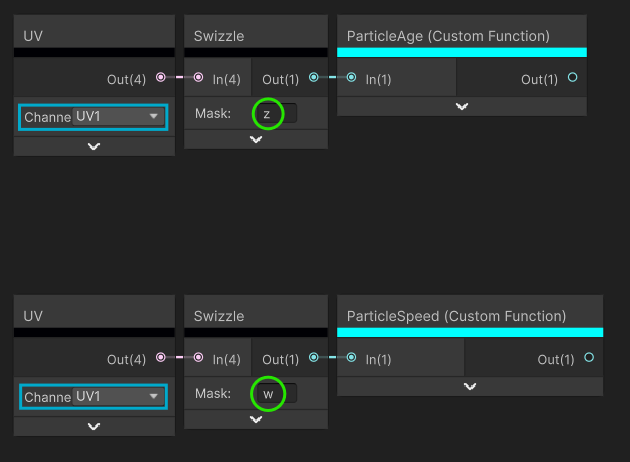
When adding them, it’s useful to turn GPU Instancing off to preview where in vertex data those attributes will be stored. Here in TEXCOORD1.z and TEXCOORD1.w.

Then we need to add them to the particle data struct.

#ifndef UNITY_PARTICLE_INSTANCE_DATA
#define UNITY_PARTICLE_INSTANCE_DATA CustomParticleInstanceData
struct CustomParticleInstanceData
{
    float3x4 transform;
    uint color;
    float animBlend;
    float animFrame;
    float agePercent;
    float speed;
};
#endif

And custom functions to fetch the values.

One for the Age.

#if defined(UNITY_PARTICLE_INSTANCING_ENABLED)
    UNITY_PARTICLE_INSTANCE_DATA data = unity_ParticleInstanceData[unity_InstanceID];
    Out = data.agePercent;
#else
    Out = In;

And one for the Speed.

#if defined(UNITY_PARTICLE_INSTANCING_ENABLED)
    UNITY_PARTICLE_INSTANCE_DATA data = unity_ParticleInstanceData[unity_InstanceID];
    Out = data.speed;
#else
    Out = In;

And eventually using the proper UV channel data as default for when instancing is disabled.

For more information on available particle data, see the documentation.

Vertex Stream Source

To help with Vertex Streams, we can create a subgraph with dropdowns, one for the UV channel, the other for the component.

It makes it easier than using UV and Swizzle nodes altogether.

That is all for now.
I shall follow up with more details on Cross Pipeline Setup, but should you use HDRP, I highly recommend using VFX Graph instead anyway.
4 Likes

And now, with all the above technical details exposed, I’d like to gather some feedback on potential improvements.

Should you want to upvote – or provide feedback – please use our new Product Roadmap here.

Thanks!

2 Likes

Now that we’ve covered the ‘basics’ of particles instancing with URP, here’s a simple – yet non-optimal – way of making it work with both URP and HDRP.

Particle Instancing Include

First of all, the ParticlesInstancing.hlsl file we’re referencing needs to be available when the URP package is not in the project. There’s nothing specific to URP in it and we may duplicate it, but there is already a copy of that file in the Shader Graph package that we can use.

So we can simply replace the include:

#include "Packages/com.unity.render-pipelines.universal/ShaderLibrary/ParticlesInstancing.hlsl"

with:

#include "Packages/com.unity.shadergraph/Editor/Generation/Targets/BuiltIn/ShaderLibrary/ParticlesInstancing.hlsl"

Transform matrices redefinition

In HDRP, the matrices unity_ObjectToWorld and unity_WorldToObject are ‘hidden’ behind macros. Those macros are read-only. Which makes it impossible for the ParticleInstancingSetup function to modify them for each particle instance.

The hack here is to redefine them. And to do so only when using HDRP, we’re using the define SHADEROPTIONS_PRE_EXPOSITION we know to be specific to HDRP.

#if SHADEROPTIONS_PRE_EXPOSITION // this asserts we're using HDRP
#define unity_ObjectToWorld unity_ObjectToWorld
#define unity_WorldToObject unity_WorldToObject
#endif

We add this right before the include.

Editor Passes

And last thing we need to do is to not add the #pragma multi_compile_instancing in editor passes for HDRP, as HDRP Shader Graph targets already does.

So in the pragma injection custom function nodes, we add:

#if !defined(SHADEROPTIONS_PRE_EXPOSITION) && (defined(SCENEPICKINGPASS) || defined(SCENESELECTIONPASS))
#pragma multi_compile_instancing
#endif

Everything covered in previous posts will work the same.

1 Like

Now let’s take a look at how to achieve the same thing without writing to uniforms (unity_ObjectToWorld and unity_WorldToObject matrices).

To do this, we’re going to write our own ProceduralInstancing HLSL include.

At its core, here’s what’s required:

#ifndef SHADERGRAPH_PARTICLESINSTANCING_INCLUDED
#define SHADERGRAPH_PARTICLESINSTANCING_INCLUDED

#if defined(UNITY_PROCEDURAL_INSTANCING_ENABLED) && !defined(SHADER_TARGET_SURFACE_ANALYSIS)
#define UNITY_PARTICLE_INSTANCING_ENABLED
#endif

#if defined(UNITY_PARTICLE_INSTANCING_ENABLED)

#ifndef UNITY_PARTICLE_INSTANCE_DATA
#define UNITY_PARTICLE_INSTANCE_DATA DefaultParticleInstanceData
#endif

struct DefaultParticleInstanceData
{
    float3x4 transform;
    uint color;
    float animFrame;
};

StructuredBuffer<UNITY_PARTICLE_INSTANCE_DATA> unity_ParticleInstanceData;
float4 unity_ParticleUVShiftData;
half unity_ParticleUseMeshColors;

#endif // UNITY_PARTICLE_INSTANCING_ENABLED

void ParticleInstancingSetup() {}

#endif //SHADERGRAPH_PARTICLESINSTANCING_INCLUDED

Simply put, this

  • Only enables particle instancing if it is supported and enabled.
  • Defines a default particle data struct.
  • Adds a StructuredBuffer for the particles data and a couple of other uniforms needed to store Particle Systems data.

This also contains a ParticleInstancingSetup function, required for the #pragma instancing_options procedural:ParticleInstancingSetup, which is needed for Shuriken Particle Systems to enable Particle Instancing, but left empty as we’re going to set things up in Shader Graph.

Particle Transform

As detailed in this other post, Shader Graph targets expect Vertex Data (Position, Normal and Tangent) in Object Space.

By default, the matrices unity_ObjectToWorld and unity_WorldToObject of Particles Systems are set to identity, in other words, they don’t apply any transformation.

When the Particle System is set to Billboard, or Mesh but with GPU Instancing disabled, the mesh contains all particles. All vertices are already transformed and in World Space.

When GPU Instancing is enabled, the Mesh vertices come in Object Space, and have to be transformed per-particle (per-instance), from Object (Mesh) Space to World Space.

The ParticleInstancingSetup function in URP’s ParticlesInstancing.hlsl does that by overwriting the unity_ObjectToWorld and unity_WorldToObject matrices with the particle’s transform, which are ultimately used to transform every vertex.

Instead of overwriting those matrices, we’re going to transform the vertices’ position, normal and tangent, from Object Space to World Space and feed the results in Shader Graph’s Vertex Stage inputs.

First, we want to be able to get the particle’s transformation matrix.

To do that, we add a function tapping in the StructuredBuffer using the unity_InstanceID.

void ParticleTransform_float(out float4x4 transform)
{
#if defined(UNITY_PARTICLE_INSTANCING_ENABLED)
    UNITY_PARTICLE_INSTANCE_DATA data = unity_ParticleInstanceData[unity_InstanceID];
    transform = float4x4(data.transform, 0, 0, 0, 1);
#else
    transform = float4x4(1,0,0,0,0,1,0,0,0,0,1,0,0,0,0,1);
#endif
}

Since Shuriken stores it as a float3x4, and Shader Graph only supports float3x3 or float4x4, we convert the float3x4 to float4x4.

We need to initialize the transform matrix for when particle instancing is not enabled, although this will never be used as we’re going to put this behind a Keyword.

With this we can create a shader subgraph to handle vertex position, normal and tangent.

Using the Keyword PROCEDURAL_INSTANCING_ON as Predefined, allows us to switch between Object Space Inputs and Transformed Inputs.

For Normal and Tangent, we can use a Custom Function Node in String Mode to simply cast the float4x4 to a float3x3, thus dropping the translation.

We can wrap all this in a subgraph, including the pragma injection custom function node.

All there is to do then is to use this subgraph node in our main graph to handle GPU instancing transformations.

The inputs use Custom Bindings to make them default to Object Space, but allows applying pre-transformations.

Particle UVs

To get the particles’ texture coordinates properly, we can copy/paste the GetParticleTexcoords function from earlier in the same HLSL file, and use the same Custom Function Nodes and Subgraphs as before.

Custom Particle Data Struct

To customize the Particle Data, we just need to create another HLSL file, just like we did before, with an include for this new instancing setup.

#ifndef UNITY_PARTICLE_INSTANCE_DATA
#define UNITY_PARTICLE_INSTANCE_DATA CustomParticleInstanceData

struct CustomParticleInstanceData
{
    float3x4 transform;
    uint color;
    float animFrame;
#ifdef _FLIPBOOKBLENDING_ON
    float animBlend;
#endif
};
#endif

#include “ShurikenDefault.hlsl”

To make sure it gets included first, we reference it with a passthrough like this.

And everything else will work the same.

2 Likes

In Unity 6.6 (6000.6.0a5), we’re adding Preprocessor Directives to Shader Graph, allowing you to add Pragmas, Defines and Includes to the shader without relying on Custom Function Nodes.

Here’s a concrete example of how you can use this to enable GPU instancing on a Particle Shader.

TL;DR; While shader graph shaders do support GPU instancing, they don’t implement Procedural instancing. As a result, when used on a Particle System set to Mesh Render Mode, GPU Instancing is disabled, and Dynamic Batching is used instead, which hits performance pretty badly as vertices are transformed on the CPU.

With the new Preprocessor Directives, you can :

  1. Add the pragma:

instancing_options procedural:ParticleInstancingSetup

The function ParticleInstancingSetup is located in URP’s ShaderLibrary.

  1. Include the file

Packages/com.unity.render-pipelines.universal/ShaderLibrary/ParticlesInstancing.hlsl

When instancing is enabled, the Particles Color is not stored in Vertex Color, but in Particle Data.

This requires using a Custom Function Node to get the particle’s color.

#if defined(UNITY_PARTICLE_INSTANCING_ENABLED)
#if !defined(UNITY_PARTICLE_INSTANCE_DATA_NO_COLOR)
UNITY_PARTICLE_INSTANCE_DATA data = unity_ParticleInstanceData[unity_InstanceID];
color = lerp(half4(1.0, 1.0, 1.0, 1.0), color, unity_ParticleUseMeshColors);
color *= half4(UnpackFromR8G8B8A8(data.color));
#endif
#endif
Color = color;

As a result, the Particle System is rendered with GPU Instancing instead of Dynamic Batching, which is a lot more efficient.

We shall update graph templates and samples to take advantage of this.

I’ll share more details later.

4 Likes

Hi,

in Unity 6.6 (6000.6.0a8) we improved URP Particle Shaders, fixing some issues and exposing a few Particle specific functions to Shader Graph.

Particle Shaders Improvements

Bug Fixes

Deferred/Deferred+

When using Deferred or Deferred+, Particles Lit shaders (Lit and Simple Lit) were missing Rendering Layers, which made them miss lighting when rendered against the background, or when SSAO was enabled.

Also, when using Deferred or Deferred+ and Particle Systems set to Mesh Render Mode with GPU Instancing enabled, Particles Lit wasn’t using the Particle Color.

These fixes were also backported to 6000.5.1f1, 6000.4.13f1, 6000.3.19f1 and 6000.0.78f1.

Shadows

Particle Shaders had no ShadowCaster pass. As a result, the Particle System Renderer module “Cast Shadows” setting had no effect.

VertexStreams Requirements

The list of Custom Vertex Streams required by a Material would suggest fixing Particle Systems using GPU Instancing when a mix of Systems set to using Mesh and Billboards were found in the scene, and would eventually misconfigure them.

Improvements

Mutualization

ParticlesInstancing.hlsl and Particles.hlsl from URP ShaderLibrary were split, so as to share core functionality with Shader Graph.

Both files now exist in RP Core package ShaderLibrary, and are included in the original files which only implement the URP specifics.

Particle functions relevant to Shader Graph were made compatible and available as nodes using the new Shader Function Reflection API. See Shader Graph Nodes.

CBuffer Write & DXC Compliance

ParticlesInstancing.hlsl was writing to unity_ObjectToWorld and unity_WorldToObject to apply Particle Transforms to vertices’ position, normal and tangent.

ParticleInstancingSetup() is now a no-op (empty) function, and vertex data transformations are applied with a new function in the Vertex stage.

That new function is exposed to Shader Graph as Particle Transforms.

As a result, the pragma never_use_dxc was also removed from the Particle shaders.

Note that some platform specific includes still use never_use_dxc.

Shader Graph Nodes

Using any of the following nodes will result in including ParticleInstancing.hlsl and so requires adding the following pragma to the Preprocessor Directives in the Graph Settings.

instancing_options procedural:ParticleInstancingSetup

Particle Graph Templates

Shader Graph Templates ‘Particle Unlit’ and ‘Particle Lit’ were updated to take advantage of GPU Instancing by default.

Particle Transforms

Path: VFX/Particles/Transforms

When using Mesh Render Mode with GPU Instancing enabled, the Particle Transforms node transforms vertex data from Object (Particle) Space to Object (System) Space.

Particle Color

Path: VFX/Particles/Color

When the Particle System uses Billboard Render Mode (or Mesh with GPU Instancing disabled), it simply outputs what is connected to its input (defaults to Vertex Color).
When the Particle System uses Mesh Render Mode with GPU Instancing enabled, it multiplies the input by the Particle Color stored in the Particle Data Structured Buffer.

Texture Sheet Animation & Particle UV

Path: VFX/Particles/Texcoords

When the Particle System is using a Texture Sheet Animation module, the Particle Texcoords Node provides per particle Texture Coordinates to sample a flipbook texture.

Flipbook Mode

Provides UVs for the current particle animation frame.

Flipbook Blending Mode

Provides UVs for the current and next particle animation frames and the blend factor between the two.

It is expected to be fed the UV0 as UV source, and the Vertex Stream source for the Blend Amount (usually UV1.x but depends on Vertex Streams layout).

Note: This node is for advanced use cases where users would want to explicitly use the two UV coords and blend factor. It is otherwise much easier to use the Particle Flipbook Blending subgraph.

The node also expects a _FLIPBOOKBLENDING_ON keyword to be set and enabled. It will otherwise just provide UVs for the current particle animation frame.

When using Mesh Render Mode with GPU Instancing enabled, AnimBlend and UV2 are not required in the Vertex Steams.

Instead, AnimFrame is used.

Note: when using Mesh Render Mode with GPU Instancing enabled, the mesh is expected to feature UV2 that matches UV.

Particle Flipbook Blending

Path: VFX/Particles/Flipbook Blending

When the Particle System is using a Texture Sheet Animation module, the Particle Flipbook Blending subgraph samples the same texture twice, using the Particle UV of the current and next frames, and blends them using the blend factor.

It is expected to be fed the Vertex Stream source for the Blend Amount (usually UV1.x).

The subgraph also adds a _FLIPBOOKBLENDING_ON Shader Feature Keyword.

When left disabled (default) it will just sample the texture with the UVs of the current animation frame.

Note: the up-to-date version of this subgraph comes in 6000.7.0a1 and 6000.6.0b2.

AnimFrame

Path: Input/Particles/AnimFrame

Provides the current Texture Sheet Animation frame.

Custom Particle Data

Should you want to use custom particle data in a shader graph, while using Mesh Render Mode with GPU Instancing enabled, you need to customize the ParticleData struct.

Here’s an example of a custom ParticleData include that features Particle Age:

#ifndef CUSTOM_PARTICLESINSTANCING_INCLUDED
#define CUSTOM_PARTICLESINSTANCING_INCLUDED

#ifndef UNITY_PARTICLE_INSTANCE_DATA
#define UNITY_PARTICLE_INSTANCE_DATA CustomParticleInstanceData
#define UNITY_PARTICLE_INSTANCE_DATA_NO_ANIM_FRAME
#endif

struct CustomParticleInstanceData
{
    float3x4 transform;
    uint color;
    float agePercent;
};

#include "Packages/com.unity.render-pipelines.core/ShaderLibrary/ParticlesInstancing.hlsl"

///<funchints>
///     <sg:ProviderKey>Custom.Particles.AgePercent</sg:ProviderKey>
///     <sg:DisplayName>Particle Age</sg:DisplayName>
///     <sg:SearchCategory>Input/Particles</sg:SearchCategory>
///     <sg:SearchName>Age</sg:SearchName>
///     <sg:SearchTerms>Particle, Age</sg:SearchTerms>
///</funchints>
UNITY_EXPORT_REFLECTION
void GetParticleAge(inout float agePercent)
{
#if defined(UNITY_PARTICLE_INSTANCING_ENABLED)
    UNITY_PARTICLE_INSTANCE_DATA data = unity_ParticleInstanceData[unity_InstanceID];
    agePercent = data.agePercent;
#endif
}

#endif // CUSTOM_PARTICLESINSTANCING_INCLUDED

  1. Wrap everything in a define check so as to prevent redefinitions

  2. Check that UNITY_PARTICLE_INSTANCE_DATA isn’t already defined

  3. Define it using your custom struct name

  4. If it doesn’t contain AnimFrame, define UNITY_PARTICLE_INSTANCE_DATA_NO_ANIM_FRAME

  5. Add a function with an `inout` parameter, meant to be fed the VertexStream source in case GPU Instancing is disabled, and overwrite it when it is enabled.

  6. Add the reflection API include, macro and hints to make it available in Shader Graph.

Then in a Shader Graph:

  1. In Preprocessor Directives

    1. add the instancing_options pragma

    2. Include your custom HLSL file to make sure it is included first

  1. Add a Particle Transforms node and connect its outputs to the Vertex Stage inputs.

  2. Use your custom data node in the graph.

On the Particle System, set up the Custom Vertex Stream to match your Particle Data struct.

Normal is only required for Lit shaders.
Tangent is only required for Lit shaders using Normal Maps.
AnimFrame is only required for Texture Sheet Animation UVs when using GPU Instancing.
AnimBlend is otherwise required for Texture Sheet Animation UVs when not using GPU Instancing.

Samples

We’ve updated samples to reflect those improvements.

Particle Shader Graph sample moved from the HDRP package to Shader Graph, and includes examples of shader graphs supporting GPU Instancing, Flipbook Blending, Soft Particles, Camera Fading, Distortion and Custom Particle Data. They work with both URP and HDRP.

The sample update landed in 6000.7.0a2 and is being backported to 6000.6.0b2.

1 Like

Is there a page in which I can find the differences between VFX and particle system, because as far as I know I usually use VFX only and Particle System when my particles needs to perform collisions checks.

BTW nice to hear that the sample update landed 6000.7.0a2 because is not even public yet but I guess it will be soon.

1 Like

Hi,

There’s this doc page.

Oops :sweat_smile: Yeah, 6000.7.0 alpha should be available really soon.

In general, when a version releases as final, the next enters Beta, and the next enters Alpha. And 6.5 just released, so.

1 Like

Thank you, would be technically possible in the future to have VFX also managing particles by CPU, so we can leverage the same graph tool and basically have the same tool to manage both worlds?

That is our goal.

3 Likes