I know Unity has a built in image projector but I am writing my own to learn how it works.
My implementation mostly works but I am seeing some weirdness.
Essentially I have created a script attached to my projector object that creates a view and projection matrix that I pass to all the projector receiver objects, (IE. Plane_1 and Plane_2) and then have a shader that calculates where the new uvs.
So my hierarchy looks like
If I translate or rotate my Projector object, the image is projected correctly onto the planes.
If I only translate my World object, again, the the image is still projected correctly.
However if I rotate my World object, the projected image is skewed.
If a picture is worth 1000 words, a video will be worth 1,000,000 so take a look here.
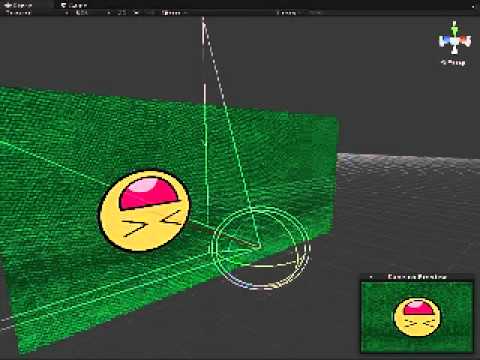
My code looks like so
using UnityEngine;
using System.Collections;

public class ImageProjector : MonoBehaviour
{
    public Texture ProjectionTexture = null;
    public GameObject[] ProjectionReceivers = null;
    public float Angle = 0.0f;

    Vector4 Vec3ToVec4(Vector3 vec3, float w)
    {
        return new Vector4(vec3.x, vec3.y, vec3.z, w);
    }

    // Use this for initialization
    void Start()
    {

    }

    // Update is called once per frame
    void Update()
    {
        Matrix4x4 matProj = Matrix4x4.Perspective(this.camera.fieldOfView, 1, this.camera.nearClipPlane, this.camera.farClipPlane);

        Matrix4x4 matView = Matrix4x4.identity;
        matView = Matrix4x4.TRS(Vector3.zero, this.camera.transform.rotation, Vector3.one);

        float x = Vector3.Dot(this.camera.transform.right,      -this.camera.transform.position);
        float y = Vector3.Dot(this.camera.transform.up,         -this.camera.transform.position);
        float z = Vector3.Dot(this.camera.transform.forward,    -this.camera.transform.position);

        matView.SetColumn(3, new Vector4(x, y, z, 1));
        matView = matView.transpose;

        Matrix4x4 LightViewProjMatrix = matView * matProj;

        if (ProjectionReceivers == null || ProjectionReceivers.Length <= 0)
        {
            return;
        }

        foreach (GameObject imageReceiver in ProjectionReceivers)
        {
            ProjectionTexture.wrapMode = TextureWrapMode.Clamp;
            imageReceiver.renderer.sharedMaterial.SetTexture("_ShadowMap", ProjectionTexture);
            imageReceiver.renderer.sharedMaterial.SetMatrix("_LightViewProj", LightViewProjMatrix);
            imageReceiver.renderer.sharedMaterial.SetFloat("_Angle", Angle);
        }
    }

    void OnDrawGizmos()
    {
        Gizmos.color = Color.red;

        Gizmos.DrawLine(this.camera.transform.position, this.camera.transform.position + (this.camera.transform.forward * 100.0f));
    }
}
My shader is
Shader"Custom/DiffuseWithShadow"
{
    Properties
    {
        _MainTex ("Main Texture", 2D) = "white" {}
        _ShadowMap ("Shadow Map", 2D) = "white" {}
        _Angle ("Angle", Float) = 0.0
    }
    SubShader
    {
        Tags { "RenderType"="Opaque" }
        LOD 200

        Pass
        {
            CGPROGRAM
            // Upgrade NOTE: excluded shader from OpenGL ES 2.0 because it does not contain a surface program or both vertex and fragment programs.
            #pragma exclude_renderers gles

            #pragma vertex v
            #pragma fragment p

            uniform sampler2D _MainTex;
            uniform sampler2D _ShadowMap;
            uniform float4x4 _LightViewProj;
            uniform float _Angle;


            struct VertexOut
            {
                float4 position : POSITION;
                float2 uv : TEXCOORD0;
                float4 proj : TEXCOORD1;
            } ;

            VertexOut v( float4 position : POSITION, float2 uv : TEXCOORD0 )
            {
                VertexOut OUT;

                OUT.position =  mul( UNITY_MATRIX_MVP, position );
                OUT.uv = uv;
                OUT.proj = mul( mul( _Object2World, float4(position.xyz, 1)), _LightViewProj );

                return OUT;
            }

            struct PixelOut
            {
                float4    color : COLOR;
            } ;

            PixelOut p(VertexOut IN)
            {
                PixelOut OUT;

                float2 ndc = float2(IN.proj.x/IN.proj.w, IN.proj.y/IN.proj.w);
                float2 uv = (1 + float2( ndc.x, ndc.y)) * 0.5;

                float theta = _Angle*3.14159/ 180;
                float2x2 matRot = float2x2( cos(theta), sin(theta),
                                            -sin(theta), cos(theta) );
                uv = mul( uv, matRot);

                float4 c = tex2D( _ShadowMap, uv );

                if( uv.x < 0 || uv.y < 0 ||
                    uv.x > 1  || uv.y > 1 || c.a <= 0.00f )
                    {
                        c = tex2D(_MainTex, IN.uv);
                    }

                OUT.color = c;

                return OUT;
            }

            ENDCG
        }

    }
    FallBack"Diffuse"
}
Any clues as to what I might be doing wrong? Thanks!