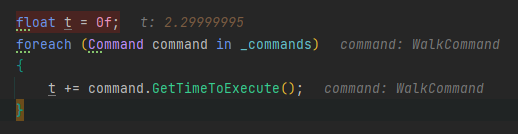
I am aware of the inability of floats to represent each number exactly but I would like to ask about a behavior that is new to me.
As you can see in the image I have a character that has a list of commands on them. One of those is a WalkCommand for example that moves the character in a direction. The player can move the character and the commands are recorded accordingly so a move can be undone and the whole movement can be played back later on.
Anyhow, the WalkCommand should move a character for 0.2f units (that is the distance). Internally this is represented as 0.20000003f. The execution time is half a second per unit so the time to move 0.2f units is calculated as 0.5f * 0.2f (see screenshot below, the result is 0.100000001f).
Now I want to calculate the whole time all commands would need to be executed so I can playback other characters’ commands up until a specific point in time. For example, if character 1 has walked 10 steps, that equals to 2 units of movement and 1 second execution time. I then can instruct character 2 to execute all its commands until it also reaches 1 second in total (although there might be more commands on character 2).
Now to the mystery… the time for each command is 0.100000001f seconds and if I sum up 23 commands you can see in the first screenshot above, the sum t is 2.29999995f but it should be 2.3f in theory and in practice a bit above that. So why is it less even if all summands are greater than 0.1f? The first additions work well but at some point, they fall under the expected sum. And how can I prevent that? Should I maybe store the execution time in ints as milliseconds and use rounding?
(side note: sadly this messes up my logic to a degree that a character won’t move anymore because the next move would be above the estimated threshold, because, in addition to the above, somehow 2.29999995f compared to 2.29999995f is not equal as well)
So my two questions would be:
why is the sum less than expected and how can I sum reliably (LINQs Sum() does not work either, there is even a cast to double involved)
how should I remodel the problem, are ints a possible solution?
I do not need high precision but a reliable summation and comparison.
If you absolutely must count, such as “make 10 moves,” then count them with an integer. That’s really the only reliable way.
The reason you add 1.0000003 some 23 times and end up with 29.999995 or whatever is because, as a very wise user once said:
“Think of [floating point] as JPEG of numbers.” - orionsyndrome on the Unity3D Forums
1.0000003 + 1.0000003 is not even guaranteed to be 2.0000006
Basically, consider everything after a few decimal places to just be luck when it comes to floating point, much like if you look at a very fine sharp black / white line boundary in a JPEG image there’s all kinds of pixel noise / errors right around any supposedly “perfect” line.
Alternately, you can consider your integers to be what is called fixed-point arithmetic / fixed-point representation.
This means you agree in advance that a particular integer represents something else when ultimately used.
It’s the equivalent of saying instead of “I owe you one-point-zero-one dollars”, instead say that “I owe you 101 cents.”
So you would track it as an integer, but divide it by 100.0f before you display it.
Thanks, the JPEG analogy is nice
I can’t just count the moves because there are several commands (Walk, Use, Take, Wait…) that all implement GetExecutionTime so that option is out.
So I will try the integer route, naming my method GetExecutionTimeInMilliseconds or so. I will maybe have rounding errors somewhere as well but at least adding will work deterministically.
For every operation you do with floating point numbers, the result needs to be rounded to the closest representable floating point number. If you do a lot of successive operations, this rounding error can accumulate and leads to the behavior you’re seeing. Your 23 additions end up rounding down more often than up and you end up with a number below 2.3.
This is why it’s often better to make absolute calculations. This way, even if you repeat the calculation over and over, the error will stay the same. However, if you repeatedly re-use the result of floating point calculations to do new calculations (e.g. accumulate something over many frames, add deltaTime repeatedly etc), the error will accumulate as well.
But in the end it’s really just a question of how accurate you need your results to be. 2.29999995f is equivalent to 2.3f for most situations and there’s e.g. Mathf.Approximately(2.29999995f, 2.3f) that will return true. You just need to be mindful that results can have some error and account for that in your comparisons.
Not sure how exactly you’re comparing them but 2.29999995f == 2.29999995f is true. One of the two values is likely not exactly 2.29999995f?
It is a bit hard to explain and I haven’t debugged it fully but basically, I am doing this:
calculate the total time character 1 needs for its command sequence including the last move initiated by the player and store it in “targetTime”
then I simulate all other characters from their start-up until the targetTime.
for that I keep a timer variable for every character and increase it with each command that gets simulated
I do that as long as there are characters with the condition: characterTimer + nextCommandExecutionTime <=targetTime, meaning: can a character still make a move without going over the target time
For step 4, I am using a LINQ expression using .Where(…). And it is really absurd, you are right, in the debugger, if I compare characterTimer + nextCommandExecutionTime <= targetTime when both sides are 2.2999995f it evaluates to true. But inside the .Where(…) it does not seem to do so because it does not deliver me a character although it exists.
Like I said, hard to explain without the whole context and code but it felt like a nest for bugs so I asked here and now I feel more comfy using integers.