I have an open, textured, 3D mesh that I would like to render with an Unlit shader that allows transparency by adjusting alpha. My problem is that with various transparency shaders at certain angles I can see artifact from pieces of the mesh that are behind the camera-visible pieces of mesh, even when alpha is 1.
Is this a shader problem? Or something inherent to transparency?
One option I was thinking may be to use a geometry shader to only render triangles that are visible to the camera such as described (in part) in this post . Thank you for your input!
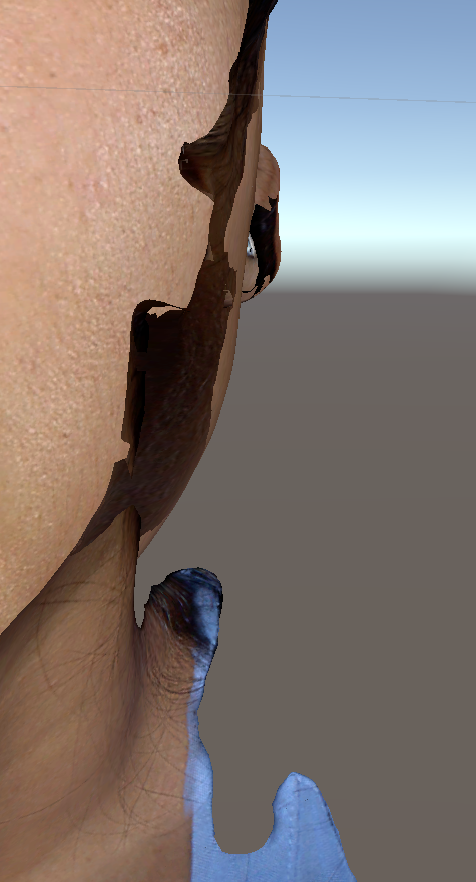
And this is an example of the artifact I am seeing. What you see is the artifact of the backface of the mesh as it wraps behind the visible mesh, this should look like the side of a cheek looking toward the ear.
Yes this is an issue with basic transparency rendering. Transparent materials are rendering in the forward Transparency queue and thus don’t write to the depth buffer, so faces behind other faces can’t be culled in by the depth buffer. This generally isn’t too much of an issue for separate transparent objects, since they can get rendered in back to front order. But for faces of a mesh, it’s more complicated to create a solution for that and any solution has performance drawbacks and is not perfect until you get to straight up raytracing.
Is there a reason your whole mesh needs to have a transparent material? Generally in game dev you simply split your mesh into separate submeshes with different materials. One material would specifically be for transparent parts and one for opaque. Then you don’t run into the issue much in most cases.
There are more complicated rendering setups and materials that can be scrounged from the net for getting order-independent transparency but they can be a hassle and generally the above solution should be good for most cases.
Thank you for this explanation, this makes sense and trimming the mesh down as much as I can minimizes the effect. But it is still visible while viewing the model in profile view (ie looking at the left side of the face in profile is interfered by the backface of the right half of the face).
I’m working on a medical project using the HoloLens, and we are trying to render a 3D scan of a face that can be viewed from 180 degrees and “dimmed” with transparency.
It’s not about trimming down the mesh, it’s breaking it up into multiple meshes & game objects so that Unity can sort them individually. The easiest solution would be to break up the mesh into contiguous chunks using a grid. But that doesn’t fix everything as areas like ears or noses with a lot of overlapping geometry in a small area will still have the problem.
Geometry shaders won’t help you here since they only know about a single triangle at a time, so you can’t really check for occlusion. Not that you’d want to since when it’s partially transparent you presumably want to see “through” it to other parts. You can avoid emitting triangles outside of the view frustum, but realistically you’ve already paid most of the cost of that triangle by that point and the GPU’s own frustum culling will be way more efficient.
The only real solution is to sort all of the triangles manually every frame from the camera’s point of view. The problem is you’re on HoloLens and that’s likely going to be way too expensive to do on the relatively high poly models you’re likely to have. The other option would be to do it with a compute shader, but the Intel IGP on the HoloLens isn’t great at that either, and it greatly increases the complexity of how you go about rendering things.
The last and “easiest” solution would be to make use of dithered opacity. Specifically using some kind of 3D screen space noise, like what’s done with stochastic alpha blending or hashed alpha testing.