trouble getting UVs working correctly with procedural meshes

I would appreciate any help that anyone could provide here.
I’ve included a very simplified version of the problem I am having.
I am creating meshes procedurally and the mesh itself forms correctly but I have a problem getting the UVs and textures to behave around the seam.

private var mesh         : Mesh;
private var sphere      : vsphere;

transform.rotation = Quaternion.identity;

class neighbor
{	
	var xv        : int   = 0;
	var yv        : int   = 0;
		
	function neighbor(i : int, j : int)
	{	
		xv  = i;
		yv  = j;
	}
};

class sphereVertex
{	
	var hgt        : float   = 0.0;	
	var xv         : int     = 0;
	var yv         : int     = 0;
	var pos        : int     = 0;
	var divisions  : int     = 40;
	var hdivisions : int     = 0;    
	var rot        : Quaternion;
	var neighbors  : neighbor[] = new neighbor[9];
		
	function sphereVertex(x : int, y : int, s : int, s2 : int,xdeg : float,ydeg : float)
	{	
		xv         = x;
		yv         = y;
		divisions  = s;
		hdivisions = s2;
		pos = (y * divisions) + x;
		rot = Quaternion.Euler (ydeg,xdeg,0);
		
		setNeighbors();
	}
		
	function setNeighbors()
	{
		var yval  : int;
		var yhval : int;
		var ysval : int;		

		var xval  : int;
		var xhval : int;
		var xsval : int;

		xval  = testValue(yv - 1,hdivisions,xv - 1,divisions);
		xhval = testValue(yv,    hdivisions,xv,    divisions);
		xsval = testValue(yv + 1,hdivisions,xv + 1,divisions);

		yval  = yv - 1;
		yhval = yv;
		ysval = yv+1;							

		neighbors[0] = new neighbor(xval,yval);
		neighbors[1] = new neighbor(xval,yhval);
		neighbors[2] = new neighbor(xval,ysval);
				
		neighbors[3] = new neighbor(xhval,yval);
		neighbors[4] = new neighbor(xhval,yhval);
		neighbors[5] = new neighbor(xhval,ysval);
				
		neighbors[6] = new neighbor(xsval,yval);
		neighbors[7] = new neighbor(xsval,yhval);
		neighbors[8] = new neighbor(xsval,ysval);
	}
	
	function testValue(val1 : int, div1 : int,val2 : int, div2 : int) : int
	{
		if(val2 < 0)
			return(div2 - 1);
		
		if(val2 >= div2)
			return(0);
	
		return(val2);
	}
};

class vsphere
{	
	private var divisions   : int;
	public  var tmatrix     : Array;

	var verts      : Vector3[];
	var uvs        : Vector2[];
	var uvScale    : Vector2;
	var triangles  : Array;	
			
	var divs : int;
	var div2 : int;
	
	function vsphere(div : int, pole : boolean,fromFile : boolean)
	{
		var x    : int;
	    var y    : int;
		var xdeg : float;
		var ydeg : float;
	    var vtx  : sphereVertex;

		divs = div;
		div2 = divs/2;
			    		
		verts     = new Vector3[divs  * div2];
	    uvs       = new Vector2[divs  * div2];
	    
	    uvScale   = new Vector2(.9 / divs, .9 / div2);		

		divisions  = divs;
	   	
	   	tmatrix = new Array(divs);
		
		pinchedSphere();			
	}

	function pinchedSphere()
	{
		var x : int;
		var y : int;
		
		var deg = 360.0/divs;
		
		// this is basically building a  20 x 40 grid and deforming to the shape of a sphere

		for (x=0;x<40;x++)
		{
			tmatrix[x] = new Array(1);
			xdeg = x * deg;
			for (y=0; y < 20; y++)
			{
				ydeg = y * deg;
				vtx = new sphereVertex(x,y,divs,div2,xdeg,ydeg);
				vtx.hgt =  1.0;
				tmatrix[x][y] = vtx;

				verts[vtx.pos] = vtx.rot * Vector3(0,vtx.hgt,0); 
				uvs[vtx.pos]   = Vector2.Scale(Vector2 (vtx.xv, vtx.yv), uvScale);  //<----  this leaves a line of distortion through sphere along seam
			}
		}
		
		//for (var i=0;i<verts.Length;i++)
        //	uvs[i] = Vector2 (verts[i].x, verts[i].z);      //<--- this leaves larger areas of distortion around equator
	}
		
	function triangulate()
	{	
	    var x : int;
	    var y : int;
	    
	    triangles = new Array();
		
		var vtx  : sphereVertex;
		var nbrs : neighbor[];
				
		var tri1 : int;
		var tri2 : int;
		var tri3 : int;
		var tri4 : int;

				
		for(x=0;x<divs;x++)   
		{
			for (y=2; y < div2; y++)
			{
				vtx  = tmatrix[x][y];
				nbrs = vtx.neighbors;
				
				tri1 = tmatrix[nbrs[0].xv][nbrs[0].yv].pos;
				tri2 = tmatrix[nbrs[1].xv][nbrs[1].yv].pos;
				tri3 = tmatrix[nbrs[4].xv][nbrs[4].yv].pos;
				tri4 = tmatrix[nbrs[3].xv][nbrs[3].yv].pos;

				triangles.Push(tri1,tri2,tri3);
				triangles.Push(tri3,tri4,tri1);
			}
		}
	}
};

function Start()
{
	gameObject.AddComponent(MeshFilter);
	
	mesh  = GetComponent(MeshFilter).mesh;
	
	sphere = new vsphere(40,false,false);
	
	mesh.vertices  = sphere.verts;
	mesh.uv        = sphere.uvs;
	
	sphere.triangulate();
	
	mesh.triangles = sphere.triangles;
	mesh.RecalculateNormals();
    mesh.Optimize();
    
	GetComponent(MeshCollider).sharedMesh = mesh;	

}
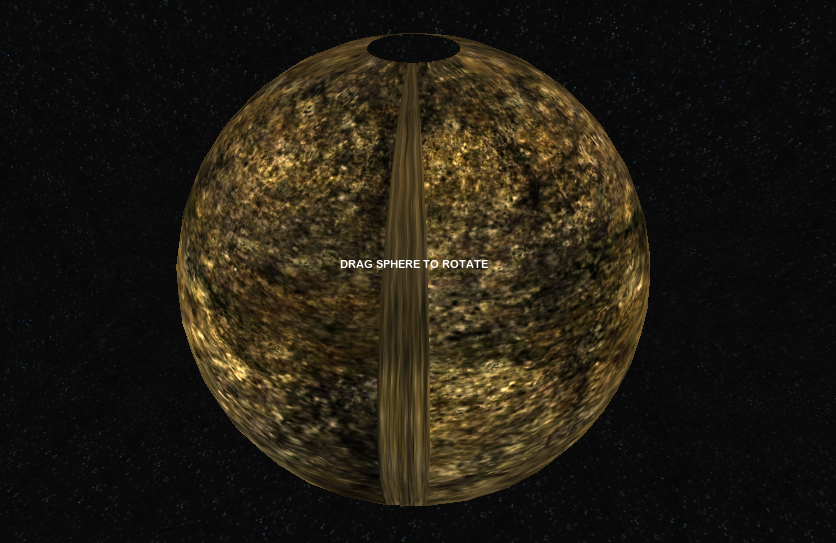
Anybody?

Your texture is being repeated at the seam because you re-use the vertices of the first line for the final line. Since the first line has tex coordinates around 0, the texture is repeated in the last set of triangles (which need the last line to have texture coordinates around 1 for correct texture wrapping).

You will need to duplicate the first line of vertices, giving them only a different texture coordinate (i.e. 1 instead of 0) and use those to connect the last triangles to.

Thank you!

Related question:

In order to get rid of the pinching that is inherent in sphere meshes, I translated a tessellation program into unity. The mesh forms correctly but I have a lot of distortion of the texture around the equator of the sphere. I’m thinking that it is also uv related because I can get the distortion to change orientation depending on how I write the code for the uvs. I know there is a problem with duplication of vertices when the mesh forms, I’m working on a remedy for that.

Any ideas here?

function Start()
{
    gameObject.AddComponent(MeshFilter);
		 
    mesh  = GetComponent(MeshFilter).mesh;
		 
    rat_draw_sphere();
		 
    mesh.vertices  = verts;
    mesh.uv        = uvs;		 
    mesh.triangles = triangles;
    mesh.normals   = verts;
		 
    mesh.RecalculateNormals();
    mesh.Optimize(); 		    
    GetComponent(MeshCollider).sharedMesh = mesh;		 
}


var icosa_indices =
[ 
[0.0,4.0,1.0], [0.0,9.0,4.0],  [9.0,5.0,4.0],
[4.0,5.0,8.0], [4.0,8.0,1.0],  [8.0,10.0,1.0],
[8.0,3.0,10.0],[5.0,3.0,8.0],  [5.0,2.0,3.0],
[2.0,7.0,3.0], [7.0,10.0,3.0], [7.0,6.0,10.0],
[7.0,11.0,6.0],[11.0,0.0,6.0], [0.0,1.0,6.0], 
[6.0,1.0,10.0],[9.0,0.0,11.0], [9.0,11.0,2.0],
[9.0,2.0,5.0], [7.0,2.0,11.0]
];

var icosa_verts =
[
		 [-A_val,0.0,B_val],[A_val,0.0,B_val], [-A_val,0.0,-B_val],[A_val,0.0,-B_val],    
[0.0,B_val,A_val], [0.0,B_val,-A_val],[0.0,-B_val,A_val], [0.0,-B_val,-A_val],    
[B_val,A_val,0.0], [-B_val,A_val,0.0],[B_val,-A_val,0.0], [-B_val,-A_val,0.0] 
];

var radius : float = 1;

function draw_recursive_tri(a : float[],b : float[],c : float[],div : int)
{
		 if (div==0)
		 {
		 		 uvScale      = new Vector2(.45, .45);
		 		 		 
		 		 var vect1 : Vector3 = Vector3(a[0],a[1]*radius,a[2]);
		 		 var vect2 : Vector3 = Vector3(b[0],b[1]*radius,b[2]);
		 		 var vect3 : Vector3 = Vector3(c[0],c[1]*radius,c[2]);
		 		 
		 		 vect1.Normalize();
		 		 vect2.Normalize();
		 		 vect3.Normalize();

		 		 verts.Push(vect1);
		 		 verts.Push(vect2);
		 		 verts.Push(vect3);
		 		 
		 		 		 		 
		 		 triangles.Push(num+2,num+1,num);
		 		 //Debug.Log(verts[num+2] + "  " + verts[num+1] + "  " + verts[num]);
		 		 num=num+3;
		 }
		 else
		 {
		 		 var ab : float[] = new float[3];
		 		 var ac : float[] = new float[3];
		 		 var bc : float[] = new float[3];
		 		 var div1 : int = div-1;
		 		 
		 		 for (var i : int =0; i<3; i++)
		 		 {
		 		 		 ab[i] = (a[i]+b[i]) * 0.5;
		 		 		 ac[i] = (a[i]+c[i]) * 0.5;
		 		 		 bc[i] = (b[i]+c[i]) * 0.5;
		 		 }

		 		 draw_recursive_tri(a, ab,ac,div1);
		 		 draw_recursive_tri(b, bc,ab,div1);
		 		 draw_recursive_tri(c, ac,bc,div1);
		 		 draw_recursive_tri(ab,bc,ac,div1);
    }
}

function rat_draw_sphere()
{
		 var i : int;
		 var detail : int = 3;
		 		 
		 for (i=0; i<20; i++)
		 		 draw_recursive_tri( icosa_verts[icosa_indices[i][0]],icosa_verts[icosa_indices[i][1]],icosa_verts[icosa_indices[i][2]],detail);
		 
		 uvScale   = new Vector2(.55, .55);
		 
		 for (i=0;i<verts.length;i++)
		 {
		 		 
    		 uvs[i] = Vector2.Scale(Vector2 (verts[i].x,verts[i].z), uvScale);
		 }
}

The way you calculate your texture coordinates in that code, the texture is projected onto the sphere along the y-axis. This results in the texture being stretched over a triangle depending on it’s angle with the y-axis.

This means that triangles that don’t directly face the y-axis get stretched coordinates, with the extremes at your equator, where triangles are barely visible along the y-axis.

For a more uniform uv-mapping on your sphere, check

That makes sense. Thanks for your reply.

Thank you both Joe and Tom. These examples have proved very useful: I am able to draw a subdivided icosahedron mesh and its triangles correctly. I have attempted to add UV mapping following those equations on the wikepedia entry, as suggested by Joe.

When simply applying the equations, the texture was mapping to only 1/4 of the sphere. It turns out that these were producing uvs in the range of -1 to 1. Where only 1/4 of the points had both u > 0 and v > 0;

I then tried scaling everything from 0 to 1. This works better in that the entire surface of the sphere is covered. However the texture is tiled twice, so that when you look at the sphere from one side you see the entire texture, and when you look at it from the other you also see the entire texture.

I would greatly appreciate any help as to how to modify either the equation or the scaling so that the image texture is wrapped once across the entire sphere.

Thank you.

// Attach this to the an empty game object and assign a texture on the tex property.

// adapted from : 
// [url]http://forum.unity3d.com/viewtopic.php?p=157677&highlight=#157677[/url]
// and
// [url]http://www.opengl.org.ru/docs/pg/0208.html[/url]
// The strange numbers A_val and B_val are chosen so that the distance from the origin to any of the vertices of the icosahedron is 1.0. 

// assign a square texture to this in the property inspector
var tex : Texture;

var subdivisions : int = 2;

private var A_val : float =  .525731112119133606;
private var B_val : float =  .850650808352039932;

private var icosa_indices =
[
[0.0,4.0,1.0], [0.0,9.0,4.0], [9.0,5.0,4.0],
[4.0,5.0,8.0], [4.0,8.0,1.0], [8.0,10.0,1.0],
[8.0,3.0,10.0],[5.0,3.0,8.0], [5.0,2.0,3.0],
[2.0,7.0,3.0], [7.0,10.0,3.0], [7.0,6.0,10.0],
[7.0,11.0,6.0],[11.0,0.0,6.0], [0.0,1.0,6.0],
[6.0,1.0,10.0],[9.0,0.0,11.0], [9.0,11.0,2.0],
[9.0,2.0,5.0], [7.0,2.0,11.0]
];

private var icosa_verts =
[
[-A_val,0.0,B_val],[A_val,0.0,B_val], [-A_val,0.0,-B_val],[A_val,0.0,-B_val],
[0.0,B_val,A_val], [0.0,B_val,-A_val],[0.0,-B_val,A_val], [0.0,-B_val,-A_val],
[B_val,A_val,0.0], [-B_val,A_val,0.0],[B_val,-A_val,0.0], [-B_val,-A_val,0.0]
];


private var num : int = 0;

private var verts : Array = new Array();
private var uvs : Array = new Array();
private var triangles : Array = new Array();
private var mesh : Mesh;

private var myGameObject : GameObject;

function Start()
{
	
	gameObject.AddComponent(MeshFilter);
	gameObject.AddComponent(MeshCollider);
	gameObject.AddComponent(MeshRenderer);
	
	gameObject.renderer.material.SetTexture("_MainTex", tex);
	gameObject.renderer.material.mainTexture.wrapMode = TextureWrapMode.Clamp;
	
	mesh = gameObject.GetComponent(MeshFilter).mesh;
	
	//DrawSimpleIcosahedron();
	DrawSubdividedIcosahedron();
	
	mesh.vertices = verts;
	mesh.uv = uvs;
	mesh.triangles = triangles;
	
	mesh.RecalculateNormals();
	mesh.Optimize();
	
	gameObject.GetComponent(MeshCollider).sharedMesh = mesh;
}

/*
	Test to see if the simple non-subdidivided approach works.
*/
function DrawSimpleIcosahedron()
{
	for (var i : int = 0; i< 20; i++)
	{
		var index1 : int = getIndex(i, 0);
		var index2 : int = getIndex(i, 1);
		var index3 : int = getIndex(i, 2);
		
		var vect1 : Vector3 = getVector(index1);
		var vect2 : Vector3 = getVector(index2);
		var vect3 : Vector3 = getVector(index3);
		
		drawTriangle(vect1, vect2, vect3);
	}
	calculateUVs();
}

/*
	The real deal.
*/
function DrawSubdividedIcosahedron()
{
	for (var i : int = 0; i< 20; i++)
	{
		var index1 : int = getIndex(i, 0);
		var index2 : int = getIndex(i, 1);
		var index3 : int = getIndex(i, 2);
		
		var vect1 : Vector3 = getVector(index1);
		var vect2 : Vector3 = getVector(index2);
		var vect3 : Vector3 = getVector(index3);
		
		subdivide(vect1, vect2, vect3, subdivisions);
	}
	calculateUVs();
}


function getIndex(a : int, b : int) : int
{
	var indices_level1 : Array = icosa_indices[a];
	var index : int = indices_level1[b];
	return index;
}

function getVector(index : int) : Vector3
{
	var vertices : Array = icosa_verts[index];
	var vx : float = vertices[0];
	var vy : float = vertices[1];
	var vz : float = vertices[2];
	var vector : Vector3 = new Vector3(vx, vy, vz);
	return vector;
}

function calculateUVs()
{
	
	var maxU : float = 0;
	var maxV : float = 0;
	var minU : float = 0;
	var minV : float = 0;
	
	//var lg : String = "";

	for (i=0;i<verts.length;i++)
	{
		var vector : Vector3 = verts[i];
		
		// using [url]http://en.wikipedia.org/wiki/UV_mapping[/url] equations 
		
		var squareRootSum : float = Mathf.Sqrt(   (vector.x * vector.x) + (vector.y * vector.y) + (vector.z * vector.z)   ) ;
		
		var u : float = vector.x / squareRootSum ;
		var v : float = vector.z / squareRootSum ;
		
		var uv : Vector2 = new Vector2 ( u, v );
		
		uvs[i] = uv;
		
		
		// record minima and maxima
		if (u > maxU) maxU = u;
		
		if (v > maxV) maxV = v;
		
		if (u < minU) minU = u;
		
		if (v < minV) minV = v;
		
		//lg += (uv.x + "\t" + uv.y +"\n");
		
	}
	
	// calculate the difference between min and max, for both us and vs
	var dU = maxU - minU;
	var dV = maxV - minV;


	// rescale the uvs to be within 0-1
	for (var uv : Vector2 in uvs)
	{
		var newU = (uv.x - minU) / dU;
		var newV = (uv.y - minV) / dV;
		
		uv.x = newU;
		uv.y = newV;
		
		
	}
	//Debug.Log(lg);
}


function drawTriangle(vect1 : Vector3, vect2 : Vector3, vect3 : Vector3)
{
	vect1.Normalize();
	vect2.Normalize();
	vect3.Normalize();
	
	verts.Push(vect1);
	verts.Push(vect2);
	verts.Push(vect3);
	
	
	// works for tiling the same image on all the triangles :
	// var a : int = 0;
	// var b : float  = 0.2;
	//
	// uvs.Push( new Vector2 (a,a) );
	// uvs.Push( new Vector2 (b,a) );
	// uvs.Push( new Vector2 (a,b) );
	
	triangles.Push(num+2,num+1,num);
	num=num+3;
}

function subdivide(vert1 : Vector3, vert2 : Vector3, vert3 : Vector3, depth : int)
{
	
	if (depth == 0) {
		drawTriangle(vert1, vert2, vert3);
		return;
	}
	
	var vert12 : Vector3 = (vert1 + vert2) * 0.5;
	var vert23 : Vector3 = (vert2 + vert3) * 0.5;
	var vert31 : Vector3 = (vert3 + vert1) * 0.5;
	
	var depthMinusOne : int = depth - 1;
	
	subdivide(vert1, vert12, vert31, depthMinusOne);
	subdivide(vert2, vert23, vert12, depthMinusOne);
	subdivide(vert3, vert31, vert23, depthMinusOne);
	subdivide(vert12, vert23, vert31, depthMinusOne);
	
}

165208--5949--$from_the_pole_155.png
165208--5950--$from_equator_209.png