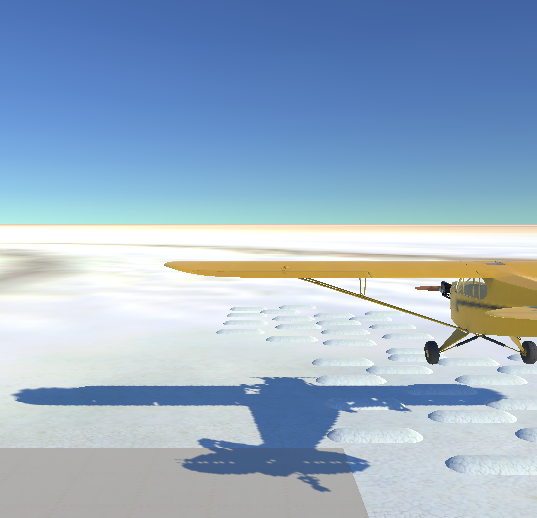
Using Unity 2017 beta (and U5) real-time lighting. How to change shadow colour? is there a way via editor or scripting? I’m using the Unity calibration scene. I boost the light indirect multiplier up to 1 but the shadows are not blue as I expected. Are grey because of the walls, I take out the walls and are working fine but I wish to boost the colour intensity. Probably one solution is to boost the skybox and colour post process?
I try to add a second directional light opposite to sun with opposite blue colour (probably old, now not a good decision) but shadows do not collect this second direct light colour. Also now I have 2 suns white spot in my objects. How to take it out for the second directional light spot from game objects render?
Unity Asset Store - The Best Assets for Game Making a free asset, but I am not sure if it will help. Personally, we play with ambient colour but as you know, that affects the lighting of the model too.
I don’t think it will work with 5 very well but it might offer a basis to work with legacy shaders. For 5, I think you will need another approach. Hopefully someone wiser than me will come and post…
1 Like
Thx Great Man! The asset is working in Unity 2017.
But the light source is a problem. Is not possible to push down the light intensity value and up the real-time shadow strength because of Unity limit the max shadow value to 1. But I just push the colour of the skybox better and apply colour correction in a post process effect.
Unfortunately have to move the thread to graphics forum as it is not possible to request features in the unity 2017 beta forum: Welcome to the 2017.1 beta forum. Forum guidelines inside. - Unity Engine - Unity Discussions - the purpose is to fix any remaining issues.
1 Like
Yes sorry, I was not smart. Thanks for moving this thread.
Shadow colour calibration advice: In the calibrator scene, the big white walls illuminate and affect radically the shadows and turns the shadow colour to light grey. For calibrating the intensity of the shadows (shadows strength) my advice is to hide all objects around so that it capture the environment and skybox.