Well, Unity doesn’t have a tradition of coming up with fancy names like Unreal. Their names are always technically to-the-point.
5 Likes
Oh I don’t have a problem with the name. ^^
Will Unity Graph Toolkit require Unity 6.2 as minimum version in the future too? Or is this just because things need to be solved during experimental phase?
Everything looking great! I love it!
I have 2 thoughts to share:
1. Multiline text
context.AddInputPort<string>(IN_PORT_DIALOGUE_NAME).Build();
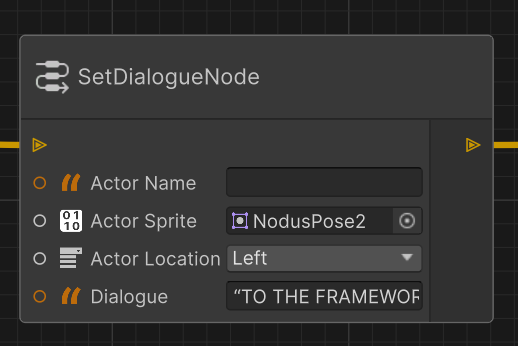
It would be convenient to have a way to add the “multiline” attribute to the TextField. This can be useful for instance in graphic novels, where breaklines might be important.
2. Fallback field position
The horizontal “real state” for the form controls feels quite cramped. It might be a good idea to offer (at least the option) to have the control located under the port name, instead on the side.
Example from a project of mine:

3 Likes
I am not saying that it needs to be fancy, far from it, and it’s not that I don’t like it either, it is the fact that it’s taken by one of the most widespread libraries in existence, making search engine optimisation of this a nightmare.
This would be analogous to Unity releasing the Graph Charting Component and calling it GCC, Googling i is going to be swamped by results that have nothing to do with it, unless explicitly filtered by website.
2 Likes
I cant find API for creating nodes via code. I wanted to populate graph using existing SOs in project.
Is it not there yet or I am just missed it?
I’ve spent some time testing it, and so far it seems like a really powerful and promising tool! However, I did miss a few features, and I’m not sure whether they’re currently possible or planned for the future, for example, support for array-type variables and struct-type variables with serialization of default values.
Right now, it doesn’t seem possible to create a ‘PlayRandomSound’ node that takes an array of audio clips as input. Or a ‘PlayComplexSound’ node that uses a custom variable type like ‘AudioData’ (a struct containing variables such as audio clip, volume, and pitch) as input.
From what I saw in the documentation, it looks like it’s possible to create custom variable nodes for my own types, maybe that would help solve the ‘PlayComplexSound’ point, but I have to admit I haven’t been able to get that working yet.
1 Like
GTK and samples run just fine in 6.1 - So what’s up with the 6.2 dependency? You want us to test the beta? 
1 Like
You might have to do a data structure “SoundArray” or “SoundPalette” and create a custom port for it.
Or even a cooler idea:
Have a “random item node”, that receives an “IEnumerable” as input, and outputs a random value from that array. It would be super reusable.
1 Like
@Brad-Newman , we can’t speak to any plans for VFX Graph yet but we’d certainly love for that to happen eventually.
1 Like
We genuinely assumed Unity 6.2 would be a hard requirement and there are not plans to backport anything. If it works with earlier versions, amazing, but that’s not recommended.
1 Like
@dbugger , amazing feedback! Thank you. We’ll keep this on our radar as we discuss our plans moving forward.
1 Like
I only tested it for a bit, but it looks really cool already! 
My only concern is it’s extremely high-level.
I know it’s only an experimental version, but can you share your plans for more low-level functionalities?
I’m mostly thinking about stuff like:
- Direct access to visual elements and the editor window.
- More manual control over available node types and variable types.
- Maybe being able to start making a tool from a deeper layer, for a more “opt in” development.
7 Likes
@PaulMDev , thank you for the feedback. This is the type of stuff where we wouldn’t know how much to provide until we released it. We can definitely consider this for future releases. Keep the feedback coming!
3 Likes
How should we work with it when everything is internal? I can give myself internal access but I’m actually getting really annoyed that you are not able to make public APIs at Unity. If there is, of course I take it back and I’m sorry for the offensive language. 
I have a really complex GraphView project I want to port, so creating a few Nodes, Blocknodes and Context doesn’t cut it. Not even slightly. I’m looking at a long list so I’ll start small.
- how would I restrict a BlockNode to be unique in a context? I see in
BlockNodeModel.cs
public virtual bool IsCompatibleWith(ContextNodeModel context) => true;
but no real way to override it.
2) on adding a BlockNode, if it conflicts with another BlockNode, one should be removed.
3) No compact nodes with values? I can have compact nodes I have to click on so I can change the value in an inspector? Not cool.
I like GraphView because it’s low level and you can implement pretty much anything with enough patience. This looks very high level and I’m totally missing how it’s extendable.
6 Likes
Another thing I noticed in the YouTube video that Unity just posted is that “Portals” can be used to forward a value to multiple ports (one-to-many), without having to draw wires all over.
But… is the opposite also true? Could multiple portals lead to the same input port? (many-to-one)
I have a use case in my Conversa Dialogue System:

In here, the purple nodes are “bookmarks” and the red ones are jump nodes, that bring you to a specific bookmark. Many different conversation branches might lead you to the same point later on.
So, would it be possible for an input (with Capacity.Multiple, or however is called) to accept multiple portals?
And if so, would it be possible to name them, so the “bookmark” can be easily interpreted without having to look at the whole graph?
4 Likes
Yes, we are aiming to support the standard Unity attributes and multiline will be one of the priority.
4 Likes
I’d wish it was back ported to lower versions, 6.2 Beta is way too experimental version and means you can’t immediately use it in a real project.
2 Likes
Here is the documentation to create nodes by code.
Now if you’re talking about creating graphs by code (i.e: creating graphs, instantiating nodes and connecting them by code) then that it is not possible right now but it’s on our roadmap to enable this.
1 Like
@INeatFreak unfortunately that’s how we need to work to be able to add new features. Unity 6.3 will be the next LTS by the way if that helps. Graph Toolkit is also in an experimental release state. So all of this is kind of a sneak peak and preview. We do intend to go from experimental to pre-release, and release with the Graph Toolkit package as quickly as we can if that helps.
We also aim to get it in your hands as quick as possible to get feedback and iterate!
2 Likes
While attributes are great, I think a “builder” workflow would be a nice addition for more control.
I don’t think you’ll like having everyone give you their preferred implementation, but this came up in my mind and I had to share it.
Feel free to completely disregard it if it doesn’t fit your vision.
Hopefully this also highlight the customization I would like to have.
You could have an OnBuild virtual method in Graph with this implementation:
protected virtual void OnBuild(IGraphDefinitionContext context)
{
     context.DefaultFromAttributes().Build();   // Current behavior using attributes
}
So we could override it (if needed) in our graph like this:
protected override void OnBuild(IGraphDefinitionContext context)
{
     context.DefaultFromAttributes()
          .AddNode<MyCustomNode>()   // Add a node from a different assembly
          .RemoveVariableType<int>()   // Remove a type that was added automatically from attributes
          .SetEditorWindow<MyEditorWindow>()   // Override the editor window script used by the graph
          .RemoveOverlay<GraphMinimapOverlay>()   // Remove default overlay
          .AddOverlay<MyGraphOverlay>()   // Add custom overlay
     // ...
          .Build();

     // Direct access to properties like "context.Nodes" would be great to allow custom extension methods
}
Of course, you’re the one knowing what would and wouldn’t be possible with your architecture and Unity’s design guide.
But this workflow would give a lot more control for advanced use cases, while keeping it simple for simpler ones, and I wish Unity used it more instead of attributes.
3 Likes