I am new in world of shaders, and I don’t find good docs of shaders explaning line by line how shaders works, so I did the following shader with Position OBJECT and move 10 points in X axis:
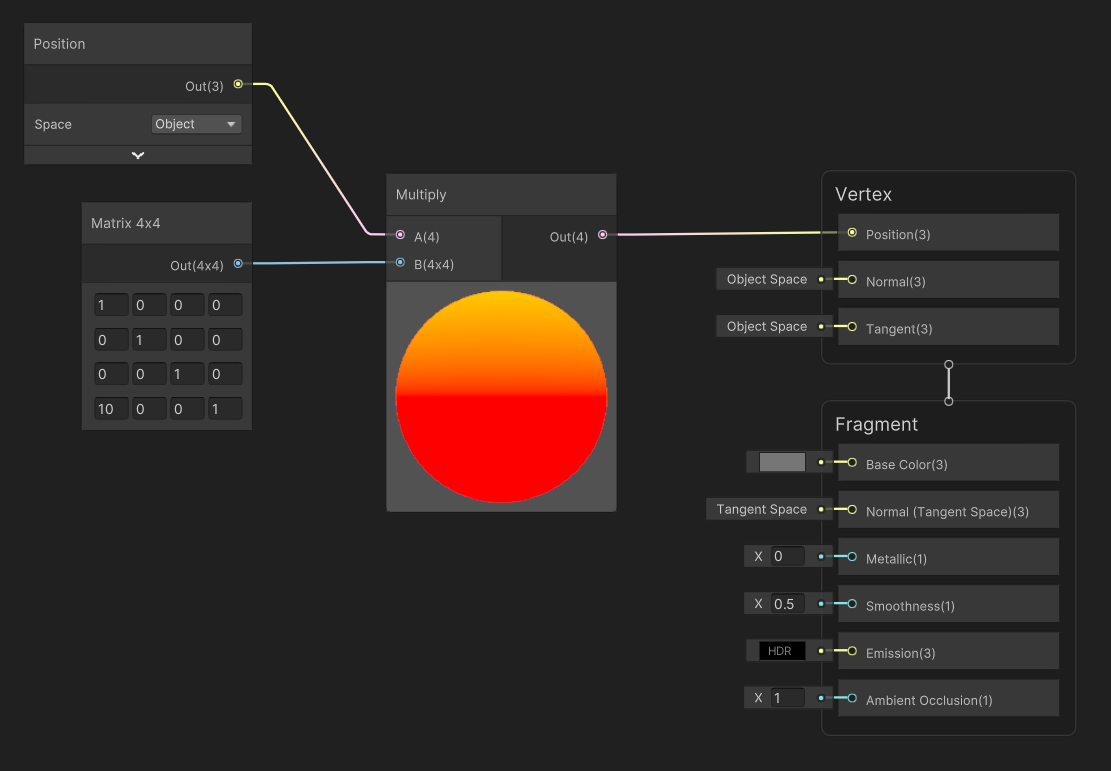
So in Scene view I can see the GameObject is 0,0,0 but the mesh is 10,0,0. That’s correct:

And if I move the GameObject always the mesh is rendered 10 points away in X axis from the real position of GameObject.
Now I change the Shader, changing Position Node to WORLD, and I back to Scene view, if my GameObject is 0,0,0 the mesh is rendering in 10,0,0 but if I put the GameObject 10,0,0 then the mesh in rendered in 30,0,0 and if I put the GameObject in 20,0,0 the mesh is rendered in 50,0,0


Why this happens?