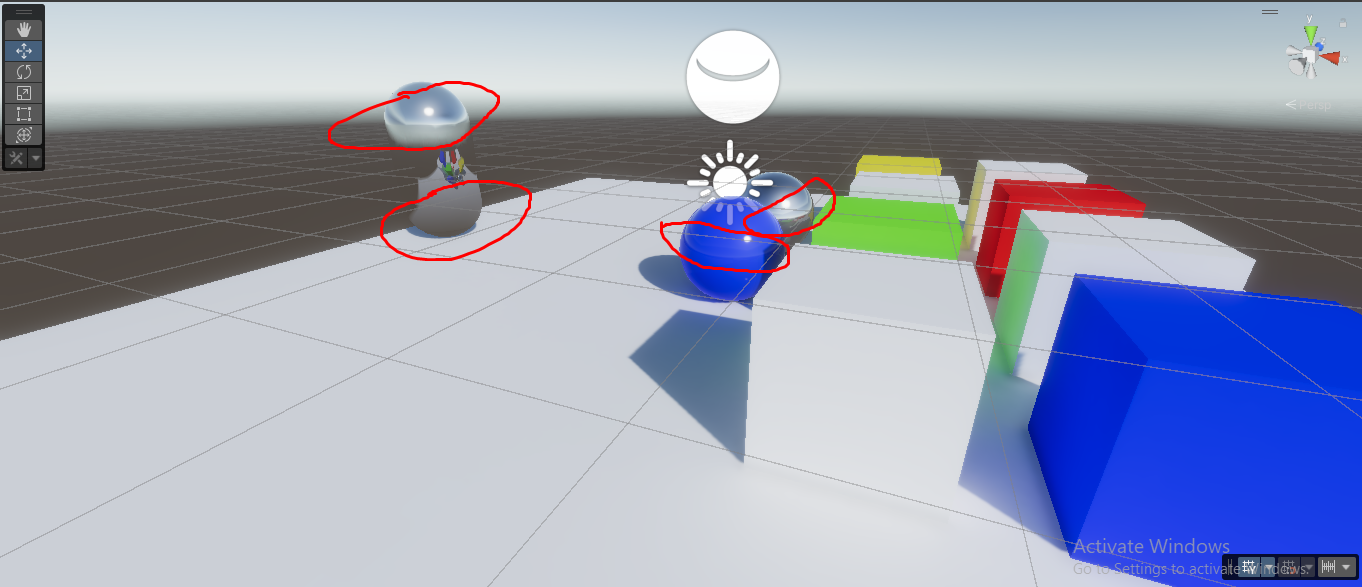
Normaly when you are inside a reflection probe zone you have 100% influence from it but in urp somehow it blends 50-50 with the world/environment probe.
Do you have box projection enabled on your reflection probe? Also, just to confirm; do you have both reflection probe blending and box projection settings disabled on the URP asset? In the first screenshot it looks as if probe blending is enabled on the asset.
Upgrade from 2021.2 alpha to beta breaks planar reflections in my project but I haven’t looked at probes yet. I’m pretty sure I did confirm Screen Position node in Shader Graph was working but didn’t dig further into what’s wrong - I have other upgrade issues that I think are already being worked on so I’m sticking with alpha for the moment, but figured I’d mention I do also see reflection-related issues (at least in my project) despite not being related to probes, could be due to the same underlying cause and maybe that gives someone a bit more to go on.
Edit: The issue noted above only happens in builds (tested in WebGL). It works fine in the editor.
@Jebtor
In the first screenshot all settings are on but you can see that is blending 2 reflection probes together instead of having the full influence of only 1
Edit: I think is something to do with the blending distance. Is like you start blending from the middle of the reflection probe and not from the edges of the volume
This is by design. The blend distance in URP is designed to work inwards instead of outwards as seen in built-in. This change was made to position us in a better spot for future work in this area. You will also notice that in URP the blend weight between probes is per pixel instead of uniform across the whole object (in the case of forward).
In your case you should get similar results if you extend the probe volume by the blend distance in every direction. Alternatively you can play around with the blend distance.
We have docs explaining all of this in the pipeline but there is a rather big backlog due to the big feature set for this URP release. Apologies for the wait.
Hmm well in certain conditions you will have reflection leaks because of the reflection probe boundry being to close to a surface and it gets cought in the reflection blend zone.
0.3 blend distance
this is with the standard rp.
Well It is what it is.
This is why I suggested extending the probe volume with the blend distance in every direction. It is important to understand the volume works slightly different between built-in and URP. When considering only a single probe;
The volume in built-in signifies the volume in which the probe is fully weighted in.
The volume in URP signifies the volume in which the probe weight is non-zero. You can get the volume where the probe weight is 100% by moving into the volume according to the blend distance.
To follow up my earlier post in this thread, it turned out to be a known issue with normal map textures being loaded through Addressables in WebGL builds (…and the normal map is used in my water shader to influence the reflection). In the import settings of the texture, switching from Normal to Default solved it.
Extending the probe volume isn’t an ideal option for me. I want to use box projection and align the volume to the walls of an interior space, but needing to extend the volume means I can’t line up the box projection with the interior walls
We have the same issue and we can’t extend the volume downwards because with this projection enabled it means the ground isn’t aligned with the.. ground! This could be solved with per axis blend distances?