OWS\system32\cmd.exe
AMPLITUDE_API_KEY = 28f3cae0b33b8b3702120c9ed1a935aa
LOGONSERVER = \DESKTOP-8EGCT80
PSModulePath = C:\Program Files\WindowsPowerShell\Modules;C:\WINDOWS\system32\WindowsPowerShell\v1.0\Modules;C:\Program Files (x86)\AWS Tools\PowerShell
PUBLIC = C:\Users\Public
SystemRoot = C:\WINDOWS
NUMBER_OF_PROCESSORS = 8
WOOTRIC_CLIENT_TOKEN = NPS-aa8be4c3
JAVA_TOOL_OPTIONS = -Dfile.encoding=UTF-8
DEBUG_ENV_VAR = UnityHub
TMP = C:\Users\ADMIN\AppData\Local\Temp
AMPLITUDE_TOKEN_YELLOWBUCKET_PROD = UYDQtPOw83dIfVy3SrW5oMyo7ru4PRkV
FPS_BROWSER_APP_PROFILE_STRING = Internet Explorer
TEMP = C:\Users\ADMIN\AppData\Local\Temp
Path = C:\Program Files\Common Files\Oracle\Java\javapath;C:\Program Files (x86)\Common Files\Oracle\Java\javapath;C:\ProgramData\Oracle\Java\javapath;C:\WINDOWS\system32;C:\WINDOWS;C:\WINDOWS\System32\Wbem;C:\WINDOWS\System32\WindowsPowerShell\v1.0;C:\WINDOWS\System32\OpenSSH;C:\Program Files\PuTTY;C:\Users\ADMIN\AppData\Local\Programs\Python\Python312\Scripts;C:\Users\ADMIN\AppData\Local\Programs\Python\Python312;C:\Users\ADMIN\AppData\Local\Packages\PythonSoftwareFoundation.Python.3.11_qbz5n2kfra8p0\LocalCache\local-packages\Python311\Scripts
USERNAME = ADMIN
COMPUTERNAME = DESKTOP-8EGCT80
AMPLITUDE_API_KEY_REDBUCKET_PROD = ca12bb461ea96f9bdf5df4ded7d52994
AMPLITUDE_API_KEY_YELLOWBUCKET_PROD = e03a9bbe92dc38a88cdb068d24c65b46
PATHEXT = .COM;.EXE;.BAT;.CMD;.VBS;.VBE;.JS;.JSE;.WSF;.WSH;.MSC
ALLUSERSPROFILE = C:\ProgramData
SystemDrive = C:
windir = C:\WINDOWS
AMPLITUDE_TOKEN_REDBUCKET_PROD = jTIgKs5KTZOjiqEEVdZFbgo_VRhABduL
FPS_BROWSER_USER_PROFILE_STRING = Default
AMPLITUDE_TOKEN_GREENBUCKET_DEV = 84H2gMm_FJzhr3mBaX1lM1JVukmCM7d9
AMPLITUDE_API_KEY_STAGING = 83ee04fccc67e4fcc7dd527c4c6f1e21
CommonProgramFiles(x86) = C:\Program Files (x86)\Common Files
APPDATA = C:\Users\ADMIN\AppData\Roaming
DriverData = C:\Windows\System32\Drivers\DriverData
PROCESSOR_LEVEL = 6
CommonProgramW6432 = C:\Program Files\Common Files
ProgramFiles(x86) = C:\Program Files (x86)
SESSIONNAME = Console
AMPLITUDE_TOKEN_YELLOWBUCKET_DEV = wKi8foVigDditGFvmZewRFWsEbX9Y0YO
AMPLITUDE_API_KEY_YELLOWBUCKET_DEV = 48835b4d1f5e342aefe5f016324d296a
LOCALAPPDATA = C:\Users\ADMIN\AppData\Local
HOMEPATH = \Users\ADMIN
ProgramData = C:\ProgramData
HOMEDRIVE = C:
USERDOMAIN_ROAMINGPROFILE = DESKTOP-8EGCT80
AMPLITUDE_DEPLOYMENT_KEY_RED_BUCKET_PROD = client-zH8Y7OK1i331EKuG77C6UxN8ygcM6LzS
ORIGINAL_XDG_CURRENT_DESKTOP = undefined
stderr[
FAILURE: Build failed with an exception.
-
Where:
Build file ‘D:\FooyaAndroid06-08-24\fooyaiostoandroidbuilderror9\fooyaandtoios\Temp\gradleOut\unityLibrary\build.gradle’ line: 79
-
What went wrong:
Could not compile build file ‘D:\FooyaAndroid06-08-24\fooyaiostoandroidbuilderror9\fooyaandtoios\Temp\gradleOut\unityLibrary\build.gradle’.
startup failed:
build file ‘D:\FooyaAndroid06-08-24\fooyaiostoandroidbuilderror9\fooyaandtoios\Temp\gradleOut\unityLibrary\build.gradle’: 79: unexpected token: in @ line 79, column 5.
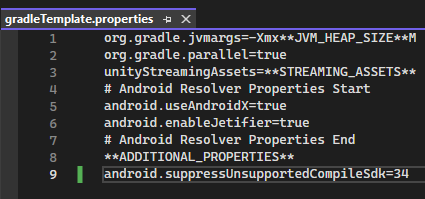
in that addorg.gradle.jvmargs=-XmxM
^
1 error
BUILD FAILED in 1s
Picked up JAVA_TOOL_OPTIONS: -Dfile.encoding=UTF-8
]
stdout[
Configure project :launcher
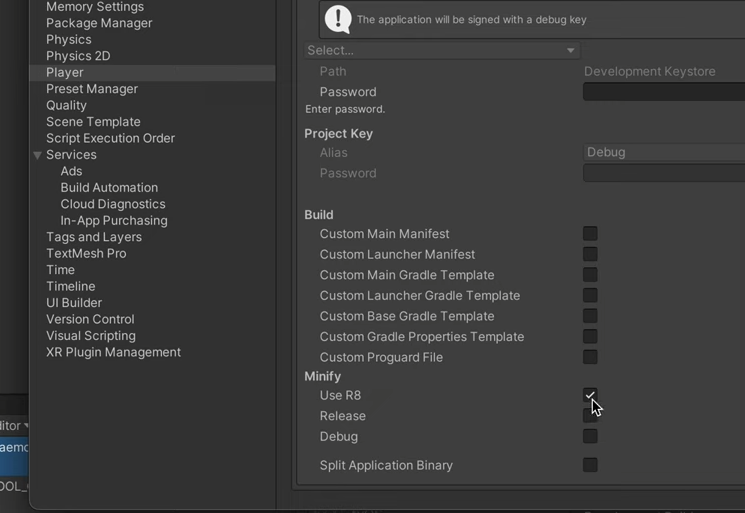
WARNING: The option setting ‘android.enableR8=false’ is deprecated.
It will be removed in version 5.0 of the Android Gradle plugin.
You will no longer be able to disable R8
]
exit code: 1
UnityEditor.Android.Command.WaitForProgramToRun (UnityEditor.Utils.Program p, UnityEditor.Android.Command+WaitingForProcessToExit waitingForProcessToExit, System.String errorMsg) (at <22b0bbbaead14b9cb1b4d2a9a9cd4275>:0)
UnityEditor.Android.Command.Run (System.Diagnostics.ProcessStartInfo psi, UnityEditor.Android.Command+WaitingForProcessToExit waitingForProcessToExit, System.String errorMsg) (at <22b0bbbaead14b9cb1b4d2a9a9cd4275>:0)
UnityEditor.Android.Command.Run (System.String command, System.String args, System.String workingdir, UnityEditor.Android.Command+WaitingForProcessToExit waitingForProcessToExit, System.String errorMsg) (at <22b0bbbaead14b9cb1b4d2a9a9cd4275>:0)
UnityEditor.Android.AndroidJavaTools.RunJava (System.String args, System.String workingdir, System.Action1[T] progress, System.String error) (at <22b0bbbaead14b9cb1b4d2a9a9cd4275>:0) UnityEditor.Android.GradleWrapper.Run (UnityEditor.Android.AndroidJavaTools javaTools, System.String workingdir, System.String task, System.Action1[T] progress) (at <22b0bbbaead14b9cb1b4d2a9a9cd4275>:0)
Rethrow as GradleInvokationException: Gradle build failed
UnityEditor.Android.GradleWrapper.Run (UnityEditor.Android.AndroidJavaTools javaTools, System.String workingdir, System.String task, System.Action`1[T] progress) (at <22b0bbbaead14b9cb1b4d2a9a9cd4275>:0)
UnityEditor.Android.PostProcessor.Tasks.BuildGradleProject.Execute (UnityEditor.Android.PostProcessor.PostProcessorContext context) (at <22b0bbbaead14b9cb1b4d2a9a9cd4275>:0)
UnityEditor.Android.PostProcessor.PostProcessRunner.RunAllTasks (UnityEditor.Android.PostProcessor.PostProcessorContext context) (at <22b0bbbaead14b9cb1b4d2a9a9cd4275>:0)
Rethrow as BuildFailedException: Exception of type ‘UnityEditor.Build.BuildFailedException’ was thrown.
UnityEditor.Android.PostProcessor.CancelPostProcess.AbortBuild (System.String title, System.String message, System.Exception ex) (at <22b0bbbaead14b9cb1b4d2a9a9cd4275>:0)
UnityEditor.Android.PostProcessor.PostProcessRunner.RunAllTasks (UnityEditor.Android.PostProcessor.PostProcessorContext context) (at <22b0bbbaead14b9cb1b4d2a9a9cd4275>:0)
UnityEditor.Android.PostProcessAndroidPlayer.PostProcess (UnityEditor.BuildTarget target, System.String stagingAreaData, System.String stagingArea, System.String playerPackage, System.String installPath, System.String companyName, System.String productName, UnityEditor.BuildOptions options, UnityEditor.RuntimeClassRegistry usedClassRegistry, UnityEditor.Build.Reporting.BuildReport report) (at <22b0bbbaead14b9cb1b4d2a9a9cd4275>:0)
UnityEditor.Android.AndroidBuildPostprocessor.PostProcess (UnityEditor.Modules.BuildPostProcessArgs args, UnityEditor.BuildProperties& outProperties) (at <22b0bbbaead14b9cb1b4d2a9a9cd4275>:0)
UnityEditor.PostprocessBuildPlayer.Postprocess (UnityEditor.BuildTargetGroup targetGroup, UnityEditor.BuildTarget target, System.String installPath, System.String companyName, System.String productName, System.Int32 width, System.Int32 height, UnityEditor.BuildOptions options, UnityEditor.RuntimeClassRegistry usedClassRegistry, UnityEditor.Build.Reporting.BuildReport report) (at <683db824f2154b7c9f84bd4e86ddfe9f>:0)
UnityEngine.GUIUtility:ProcessEvent(Int32, IntPtr, Boolean&)
I have attached the error file in notepad also.
builderror.txt (6.7 KB)