Basically my player character should hold items so I am using the ChainIkConstraint from the Animation Rigging package on the left and right arms, and moving the target to the designated position when they need to hold an item. It should look like this:

However, in practice, this is what it looks like at first:

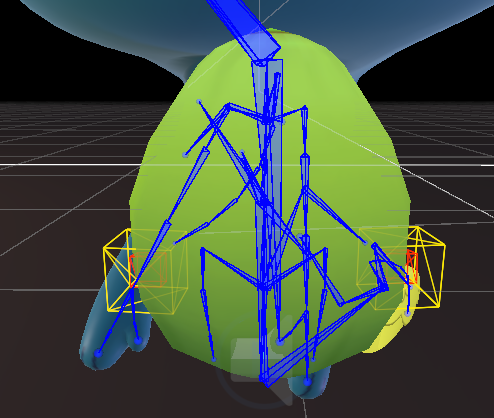
The yellow box gizmo represents where the ChainIk’s Target is, and the Red box is the position I passed to it.
As you can see, the target marked by the yellow box is in the right place, but the arm is way off!
I tried a bunch of different fixes and eventually noticed that it had something to do with the Animator. After clicking the “Preview” button, in any animation, and then deselecting it, suddenly the ChainIK fixes itself:


I figured, what the preview button probably did here was call Rig.Build(). After testing calling Rig.Build() in code, the result is exactly the same, the arm positioning gets fixed.
But now my character cannot move or rotate anymore! I can’t move/rotate it neither with my game controls, nor by dragging in the inspector. It gets completely frozen:
So TLDR two problems:
- A) The ChainIKConstraint is initially way off the target transform, and even moving the target around does not fix this,
- B) The character’s position & rotation are completely frozen if Rig is rebuilt.
PS: All the animations have WriteToDefaults enabled. Disabling didn’t do anything either.