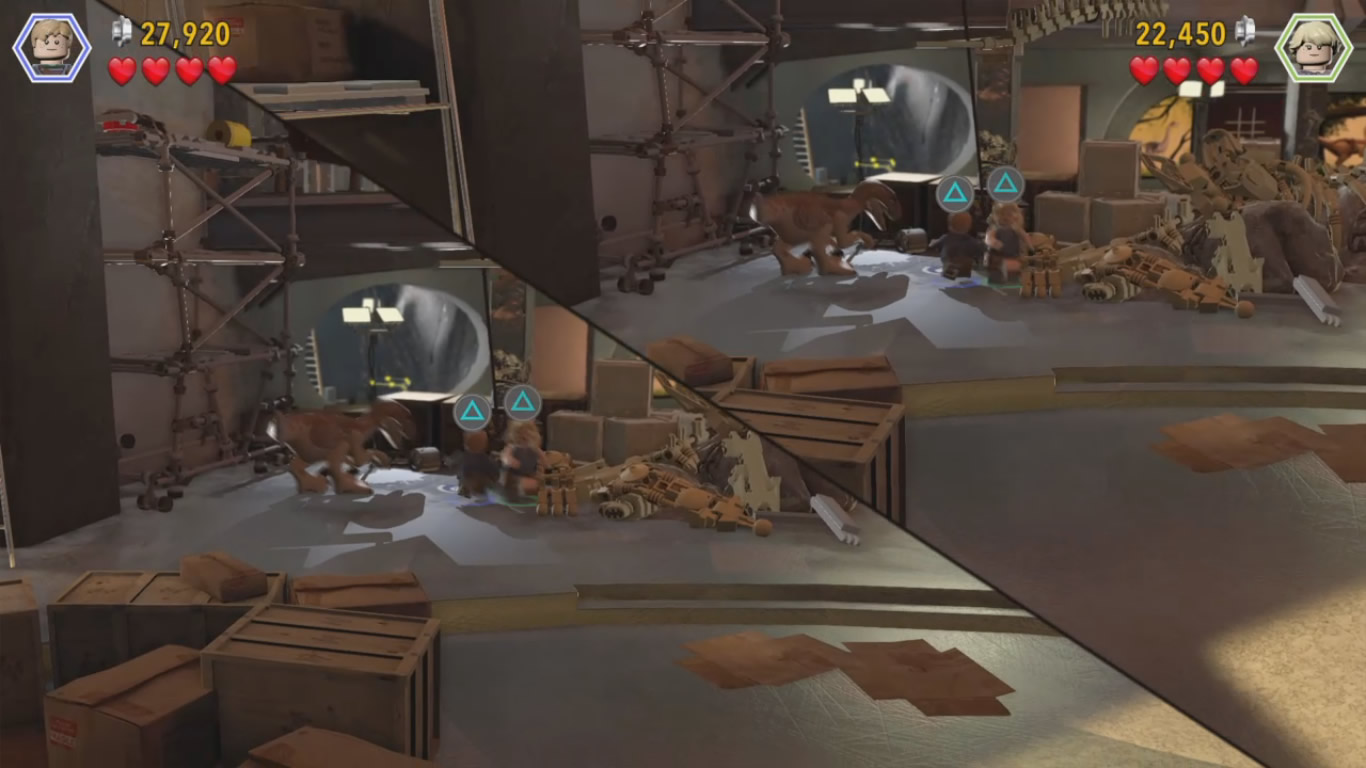
You’ve kind of got the 3 viable options down. There are other options, but they’re insane things like modifying all of the geometry in real time.
Some random thoughts before we get further in.
Dynamically modifying masked area is a completely separate topic, and kind of doesn’t matter for which method you use. All 3 options you list can use a dynamic mesh or texture mask constructed on the CPU, or use a shader to create the shape on the surface of a static mesh. What you do and how you do it really comes down to the specific question of what exactly do you want to do. “Modify the masked area at runtime” is a very open ended phrase that could mean a lot of things.
An advantage of the render texture based approach is you can do soft masks. If that’s something you’re interested in doing, then it’s the only option for doing that.
An advantage of the ZTest & stencil based approaches is you don’t need a render texture, which can make some things a little cheaper when rendering.
You can use the ZTest or stencil based approach to help speed up the render texture approach, they’re not mutually exclusive.
You can use stencils and ZTest together to make some parts of rendering the Z mask easier, or allow for more complex interactions with the “mask” and the world, like for portals. But that’s probably not applicable here.
None of these techniques will prevent objects within the camera view frustum, but not visible due to the mask, from rendering. For the most part this shouldn’t be a concern, but this does mean you’re still paying the CPU cost of sending those objects to the GPU to render, and the GPU cost of calculating the vertex positions. There are ways to optimize this, but this is again another topic entirely.
You mentioned split screen as your end goal. If you’re thinking about doing something along the lines of a dynamic split screen like TT Games’ Lego games, then all 3 options are perfectly viable.
Ignoring the complications of figuring out the best position for each camera, or the angle to split the view along, all you need for the effect to work is an otherwise boring quad mesh that’s aligned to the camera(s) that you either move around in view space to create the “slice” or use an alpha tested shader.
Generally speaking I would avoid the “basic” stencil based approach as, like you said, you’d need to use custom shaders for everything as the only way to clip something with a stencil is for that shader to be stencil aware. At least for the built in rendering path. It might be possible to force all objects in the scene to use a stencil comparison regardless of if the shader is doing them. But there’s really no reason to go that route since a ZTest based approach can do everything you need without using stencils.
For the ZTest approach, really what you’re doing is rendering an object to cover the screen as close to the camera as possible. You can do this by just putting an invisible object as close to the camera as possible, or you can use a custom shader that always outputs its depth at the camera’s near plane.
Shader "Near Plane Depth Mask" {
  SubShader {
    Tags { "Queue" = "Background-999" }
    Pass {
      ZTest Always
      Cull Off
      ColorMask 0 // only render to depth or stencil
CGPROGRAM
#pragma vertex vert
#pragma fragment frag
#include "UnityCG.cginc"

float4 vert(float4 vertex : POSITION) : SV_Position
{
    float4 clipPos = UnityObjectToClipPos(vertex);
    // most graphics APIs, the near clip space plane is at w
    // so we need to be just slightly less than that
    clipPos.z = clipPos.w * 0.999999;
    #if !defined(UNITY_REVERSED_Z)
    // openGL the near plane is at -w
    clipPos.z = -abs(clipPos.z);
    #endif
    return clipPos;
}

// frag doesn't need to do anything, so it doesn't
void frag() {}
ENDCG
    }
  }
}
Slap that on any mesh and it’ll stop anything that doesn’t use ZTest Always from rendering where that mesh is on screen. For split screen you’d use a second camera that has its Clear Flags set to Depth Only and then render a mesh that covers the parts of the screen that weren’t covered in the first camera. Render UI on top of that and you’re done. To get the TT Games look you’d also draw a thick black line across the split screen edge.
For more complex shaped split screens you could use stencils, but only to mask the depth mask shader. You’d render an invisible object that writes to the stencil buffer, then render the depth mask either only where the stencil was written to only where the stencil wasn’t written to. Otherwise the setup is the same.