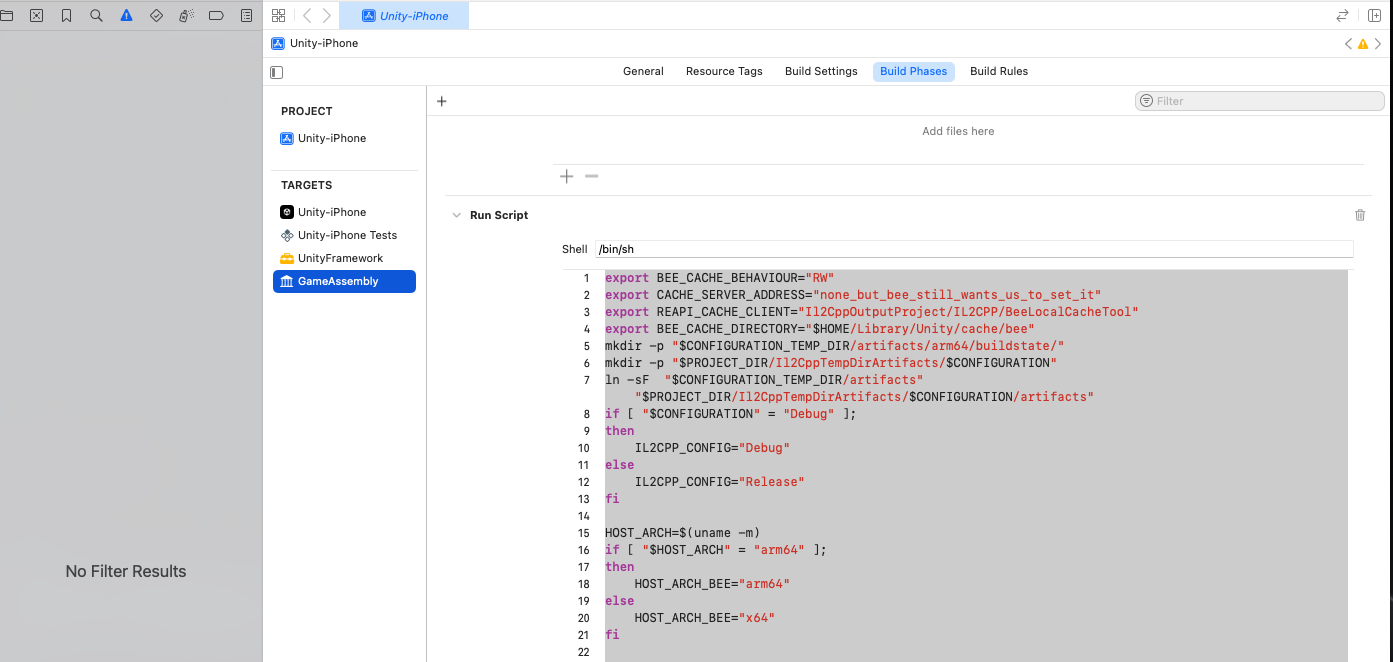
till today I had no problems to build and run my project via Xcode on a iPadPro. But now, after Unity is finished, XCode starts and shows this:
“Unexpected duplicate tasks: WriteAuxiliaryFile /Users/MyName/Library/Developer/Xcode/DerivedData/Unity-iPhone-hgmepjuucxmvytadtadsnjiirqky/Build/Intermediates.noindex/Unity-iPhone.build/Debug-iphoneos/GameAssembly.build/Script-C62A2A42F32E085EF849CF0B.sh”
AI says there are duplicate build scripts or tasks. This can happen after a Unity update, a new plugin or a build cleanup. The path points to a temporary script in the DerivedData folder - i.e. a build artifact.
I did not update Unity. But there was this general iOS and macOS update in the last days. I did not know, this would affect this.
deleting the whole folder with the iOS build, re-start the Build and Run in Unity and suddenly it works.
How can I manage to not always have to manually delete that iOS folder first?
Any solution? This is really annoying, having to delete my game’s Xcode directory on every build and re-enter the provisioning profile in Xcode each time. I’m using Unity 2022.3.47f1
EDIT:
Hello, in my case I have discovered what the problem was.
I updated my game’s provisioning profile and installed it in XCode, but I didn’t update it in Unity’s build settings. That’s what caused the conflict.
I hope this helps someone with the same problem.
I am also encountering this error. I tried coming back to an old project and have seen it in 2022 and Unity6 LTS and now the latest version (Unity 6000.1.3f1)
The first build of the project works fine, but in the second build these scripts appear twice:
Unfortunately if I remove any of them I get new errors. Like
UnityFramework:
Command Ld failed with a nonzero exit code
or GameAssembly: Framework Not Found (or something similar)
To be clear:
A new install of Unity6
A new project
Build project first time: works (only one of above scripts added)
Build project second time: Duplicate run scripts (above), remove either of them, more problems arise.
Have tried deleting derived data and cleaning xcode build extensively.
Have tried 2022.1.10f1, 2022.3.52f1. 6000.0.48f1 and 6000.1.3f1.
Have tried opening in new xcworkspace
MacBook M3 Max Sequoia 15.2, Xcode Version 16.3 (16E140)
It seems to be incremental build that makes it happen. Only fix I found is to make a completely clean build, with a custom script that cleans the entire build folder.
its not fixed and still appears in Unity 6000.0.49f1 and Unity 6000.1.4f1 on second Build - The first works fine, the second has an Duplicated Run Script in Xcode->GameAssembly->BuildPhases
Hey @valentinwinkelmann , if you read the issue tracker, it says it’s “Fixed in 2022.3.63f1, 6000.0.50f1, 6000.1.5f1, 6000.2.0b2”, so it’s simply unreleased as of yet.
It happended exactly same to me suddenly! Up to yesterday I was building without any problem! but now I recieve Unexpected duplicate tasks and then for just testing some small modifications I have to go through this exhusting process! Is there any update? If the patch of the unity is problem, so why I did not face it up to now and suddenly it happended? Thank you in advance!
The issue has been fixed in version 2022.3.63f1, but it is only available with the Enterprise and Industry passes. Hope it will be fixed in the general version as well.
Any fix for this in 2022? You can’t intoduce a build breaking bug and then only patch it for enterprise. Builds worked fine before. No updates from staff since April?