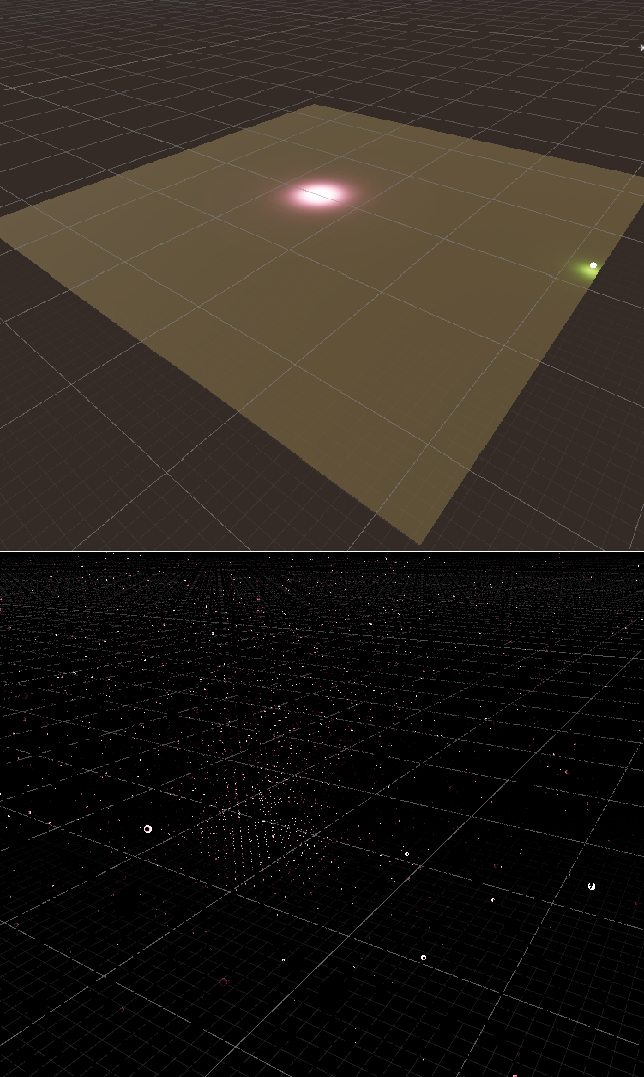
There is the problem with getting GI from very bright small indirect lighting areas for APV (Adaptive Probe Volume). I have baked diffuse reflections into lightmaps, which are given by glowing ball with emissive (green) material and area light (purple). Since my intention is to get intense indirect lighting from bright objects, both of them are very contrast GI sources though. So, it looks like the result in the top image:
I also baked APV and as you can see, when I enable Display Probe SHs in Rendering Debugger (bottom image), the light is distributed inconsistently and splattered across the whole volume, i.e. not only across the emitter areas.
It produces flickering (inconsistent lighting) when the pawn is walking along the scene. Note that those white balls are much brighter than paper white, so probes affect on the mesh even if it’s very sunny. If I decrease the light intensity (or the emission level for a glowing ball) then it’s not the reason to complain anymore. But. I expect the radial distribution of the linear or exp light attenuation even from such small areas of intense sources.
Is this expected behavior or
Am I doing smth wrong?
Finally: What might be a solution to get rid of this hassle completely or to partially dim it to compromise?
Sampling Noise on, playing with different values, and set
Leak Reduction Mode to Quality.
Result: Global illumination from small intense areas is still inconsistent over the probe volume.
Option B: Filtering with Rendering Layer Mask
Since I rely on the guess that GI is approximately consistent near the emission areas, the idea was to limit the influence of different groups of static geometry inside adjustment volumes.
Note: First of all, I followed instructions from this APV RLM thread. Steps:
I added the Probe Adjustment Volume in Override Rendering Layer Mask mode for both of indirect emitters (say, glowing ball and area light).
I set both of theirs Mesh Renderers to newly created Rendering Layer Mask called APV_Emissive.
I mapped masks in Lighting Window (Ctrl+9), on Adaptive Probe Volumes tab, inside Rendering Layers, keeping lower priority for APV_General and higher one for APV_Emissive.
I rebaked APV with this set of filters.
I even rebaked APV with different set of filters to investigate the result.
Result: Filtering meshes with different rendering masks don’t affect.
I also tried to create bigger Probe Adjustment Volume similar way for Rendering Layer Mask called APV_General. I did it intentionally to be sure, for example, I didn’t have success because adjustment volumes should be nested.
Either way,
Filtering meshes with different rendering masks don’t affect.
Indirect lighting produces inconsistent values over the APV.
Remark: I spent a lot of time to find a possible duplicate of this topic but didn’t find anything like this. I will be glad to know and close this one as duplicate. Any help will be appreciated. Thanx in advance hug.
Finally, short answer is to increase the number of samples with changing the mode of the Probe Adjustment Volume to Override Sample Count. But real answer is to replace emitters from emissive objects with lights. Apologize, I just wasn’t in lighting in games, so it was pretty simple answer. I hope it will help for beginners.
After many tries to revisit my intention to amplify the indirect lighting for small bright sources I rejected any ways to use emissive sources or to increase indirect influence for such areas as they produce probe noise. Because:
As brighter the indirect transmitter, as more inconsistency you’ll get
As further the probe is from the transmitter, as more inconsistency you’ll get
Increase the sample count produces long rebake time, so, I consider it helpful on the final stage or for people with CUDA monsters.
These options helped me to decrease rebake time and to increase artistical or pseudo psycho-optical impact of intense GI areas and reduce probe noise at the same time:
Do not use emissive objects as light sources as they do not produce shadows.
Replace material emission with local light to drastically dim the noise.
If it’s possible, replace the Contribute GI for reflector with local light. It makes sense for small overlit areas.