need to add setup to increase the top of largest file and option to select file with shift and click because now when want to select file to delete unused assets is select all
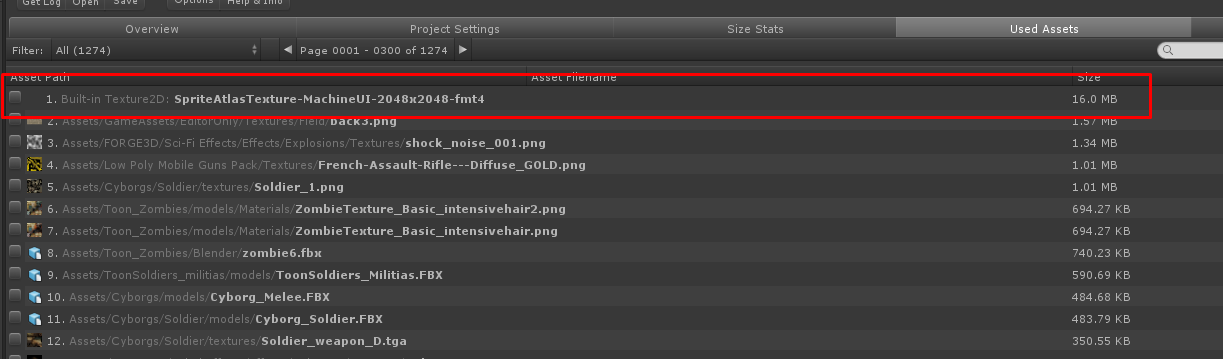
It is default sprite packer.
Hi, I’ll try adding those suggestions in a new version update when I can. Thanks!
Yes those are from your 2d sprites, packed by Unity into a single texture. I’m not sure how you can see that resulting texture since I’m not familiar with the 2d tools. But I think you can tweak this atlas using the Sprite Packer (https://docs.unity3d.com/Manual/SpritePacker.html) and/or the Sprite Atlas settings (https://docs.unity3d.com/Manual/SpriteAtlas.html)
Will be awesome because will clean much faster the project(Please add fast as you can xD), your plugin is the best on market , keep working and add new feature in future, i have a little bug also = when i delete all unused file also deleted me prefab from bullet , texture hand , im using unity 5.5.3f1, Thanks.
I have a version update coming up. It will change the behaviour of asset selection to be more like how file explorers work:
Click to select, ctrl + click to toggle selection, shift + click to select all from previously clicked to the current one.

The checkbox for selection is replaced with a “Ping” button, which will show the asset in the project window.
You can now also change the number of displayed entries in the Top Largest Used/Unused Assets in the Overview screen:

Also fixed a bug with Top Largest Assets not showing the same file size as those in the Used/Unused Assets List screens.
I’ve already submitted this to the Asset Store, so hopefully it’ll go live in 1 to 2 weeks.
EDIT: Version 3.3 is out!
2 Likes
good job bro is what im looking, im very happy now, ill download soon . thanks for added like i tell you
@AnomalusUndrdog
I have used the BRT to get a report for my project. But I want my teammates to see the right report together, so maybe I tansfor the report as a common file formate (for example .txt or .html), I can post the file on a web server. That way we can disscuss the report at the same time.
So can I do this with BRT?
Right now the reports are saved as XML files. You can view those in notepad and it will be readable, but it won’t look fancy. If it’s a priority for you, I can try working on an web browser-based viewer for those xml files.
Appreciation for your reply。In fact, I need to post the build report on my web server for the requirement of my co-worker.The report content of Build Report Tool is exhaustive, is very useful for us.
So if you can ,please try wrorking on this function.I think it is very useful for team work.Thank you.
@AnomalusUndrdog
Hi, I use the commandline to build my unity project, and the commandline is as follow:
/Applications/Unity/Unity.app/Contents/MacOS/Unity --importPackage {BuildReportToolsPath} --projectPath {projectPath}
But, after build this, the logfile : ~/Library/Logs/Unity/Editor.log do not change, the .xml file do not generated too.
As a comparison, In File/Build Setting, and chose platform IOS, I can get the .xml file.
So, what’s the problem?
I don’t think you should do a --importPackage each time, as that imports the package every time. You should only import a package to the project once.
A typical command line way to build would look like this:
/Applications/Unity/Unity.app/Contents/MacOS/Unity -quit -batchmode --projectPath {projectPath} -executeMethod MyEditorScript.MyMethod
(Notice that there’s no mention of Build Report Tool in the command line at all.)
MyEditorScript would be a script in your project that would typically look like this:
using UnityEditor;
class MyEditorScript
{
     static void PerformBuild ()
     {
         string[] scenes = { "Assets/MyScene.unity" }; // include the rest of the scenes here
         BuildPipeline.BuildPlayer(scenes, "BuildOutputFolder",
                       BuildTarget.StandaloneOSXUniversal, BuildOptions.None);
     }
}
There’s no need to activate Build Report Tool from that script since it will automatically generate a report after a build (it makes use of PostProcessBuildAttribute to get notified after a build has been made). Unless Build Report Tool was disabled from doing this in the options, so make sure it is checked as well:

1 Like
Thanks for your reply.
I think I should describe the process of my automatic building.
-
Fetch changes from the remote Git repository, and the Build Report package imported last time would be removed.
So, I use --importPackage each time to make sure the tool is in the project. -
Use the command line way to build the project.
And I use -executeMethod BuildPackage_iOS to run my script. The “BuildTarget” and “ProjectPath” is defined as follow:
PlayerSettings.SetApplicationIdentifier( build_target == BuildTarget.iOS ? BuildTargetGroup.iOS : BuildTargetGroup.Android, bundle_id );
string build_message = BuildPipeline.BuildPlayer( _GetScenePaths(), target_path, build_target, build_option );
The BuildTarget and targetPath is defined .
3.Use XCode and make plist
Above all, I can get a .ipa package. But I can not get the Editor.log file and .xml report file. It confused me a lot, why I build manually ,the Editor.log generated normally, but command line way don’t.


Quite strange cause I use the command line a lot. I have a huge builder process based on command line and I can get an Editor.log file and create it anywhere I want. Cause after the building I parsed it and send it by mail if there is some error message in it.
Earlier this year, I used Build Report Tools with my process and all was generated nicely even in command line so it’s quite odd that didn’t work for you 
I stop using it cause unity seems to think my licence isn’t bought on the store whereas it isn’t true… anyway your system must work with this awesome tool !
Hi, apologies for the delays in replies. Incredibly busy at work right now prepping for a convention booth. But when I get the time I will try to recreate your situation so I can diagnose the problem easier.
I checked Build Report Tool’s source code a bit and I remembered, it doesn’t allow itself to activate during batch mode builds by default. (I set that to false by default because some customers complained about it).
What you can try is to create a Build Report Options file with batch-mode-use set to true. You can put it in your home/My Documents folder as that is one of the locations that Build Report Tool will look for it:
- Add a folder in your home directory called “UnityBuildReports” if there isn’t any yet (it has to be this name because that is where it is searched for).
- Inside that folder create an xml file named “BuildReportToolOptions.xml” (again it has to be this name).
- Then copy-paste this into the xml file (I tried attaching this file to my post but it seems Unity forum doesn’t allow attaching xml files):
<?xml version="1.0" encoding="utf-8"?>
<BuildReportToolOptions xmlns:xsi="http://www.w3.org/2001/XMLSchema-instance" xmlns:xsd="http://www.w3.org/2001/XMLSchema">
  <EditorLogOverridePath />
  <IncludeSvnInUnused>true</IncludeSvnInUnused>
  <IncludeGitInUnused>true</IncludeGitInUnused>
  <AllowDeletingOfUsedAssets>false</AllowDeletingOfUsedAssets>
  <CollectBuildInfo>true</CollectBuildInfo>
  <BuildReportFolderName>UnityBuildReports</BuildReportFolderName>
  <SaveType>0</SaveType>
  <FilterToUseInt>0</FilterToUseInt>
  <AssetListPaginationLength>100</AssetListPaginationLength>
  <UnusedAssetsEntriesPerBatch>1000</UnusedAssetsEntriesPerBatch>
  <NumberOfTopLargestUsedAssetsToShow>20</NumberOfTopLargestUsedAssetsToShow>
  <NumberOfTopLargestUnusedAssetsToShow>3</NumberOfTopLargestUnusedAssetsToShow>
  <IncludeUsedAssetsInReportCreation>true</IncludeUsedAssetsInReportCreation>
  <IncludeUnusedAssetsInReportCreation>true</IncludeUnusedAssetsInReportCreation>
  <IncludeUnusedPrefabsInReportCreation>true</IncludeUnusedPrefabsInReportCreation>
  <IncludeBuildSizeInReportCreation>true</IncludeBuildSizeInReportCreation>
  <GetImportedSizesForUsedAssets>true</GetImportedSizesForUsedAssets>
  <ShowImportedSizeForUsedAssets>false</ShowImportedSizeForUsedAssets>
  <GetImportedSizesForUnusedAssets>true</GetImportedSizesForUnusedAssets>
  <GetProjectSettings>true</GetProjectSettings>
  <AutoShowWindowAfterNormalBuild>true</AutoShowWindowAfterNormalBuild>
  <AutoShowWindowAfterBatchModeBuild>true</AutoShowWindowAfterBatchModeBuild>
  <UseThreadedFileLoading>false</UseThreadedFileLoading>
</BuildReportToolOptions>
Notice that AutoShowWindowAfterBatchModeBuild is set to true, this is what’s needed to make it work I believe. Disregard the fact that it’s named AutoShowWindow, no window will be shown in batch mode build if it’s all in command line, just a bad variable naming decision on my part.
This xml is auto-generated with default values into a project’s ProjectSettings folder if it isn’t found yet, but since your setup requires not keeping BRT inside the project, putting this xml file into your home folder might be more suitable.
If somehow that doesn’t work, you can try forcing that variable to true by editing the source code in the file BuildReport/Scripts/Editor/Options/BRT_Options.cs, line 52:

Set that variable to true.
If all of that still doesn’t work, let me know, and I will look further into it.
Thank you a lot.
I have found the reason why I couldn’t get the Editor.log file after auto building.My auto build script will execute two function with the command argument “-executeMethod”,one function is “-executeMethod BuildPackage”,and the other is “-executeMethod UploadPackage”.In function “BuildPackage”, BuildPipeline.BuildPlayer will execute to build the project, but function “UploadPackage” just upload the package after building and don’t call BuildPipeline.BuildPlayer .
So,if I just execute “BuildPackage”,the Editor.log is normal,information about the building package is included.But if I execute “UploadPackage” after “BuildPackage”,the Editor.log won’t include those information.
I will continue this auto build work,and want to learn more about this awesome tool.Do you have
illustration document for this tool? I want learn more the process and method about how to collect package information in building.Thank you a lot.
Oh,I think I am doing the similar things with you.Now my work is to use command line to build a project automatically,then send a message include compile error(if any) and build package report information.
Can you get the .xml file when you use command line at batch mode?I use the way " true" to try,but I think it is strange to pop up a windows in batch mode build.I want to get the xml file without any unity windows appeared.
I build my project in Android and IOS paltform,and get tow Editor.log file.But when comparing them, I find a hug difference between them.
Anyone has an idea about this question?

I almost purchased this asset today, but I could not agree to the additional license, (Eclipse Public License -v 1.0), that was required by the asset store as a prerequisite to purchasing Build Report Tool. Sorry.
That’s totally fine! Just a note: The Eclipse Public License notice is required because this editor extension makes use of FuzzyString. It will not mean your game/app needs to conform to the Eclipse Public License.