Cloud Project Linking: An Explanation and Some Changes

Update: a new beta version of the Hub has rolled out and you can learn about it here

Howdy everyone, I wanted to take a moment to clarify a few points about the changes we’ve been rolling out to ensure we’re being as transparent as possible and provide some insight into the intention behind these updates.

Whether it’s understanding how players engage with your game, identifying performance bottlenecks, or spotting issues before they escalate, having access to accurate and actionable data is critical in modern game development.

That’s why we’ve added new and improved diagnostics tools, tools that are intended to give you better insights into how your games are performing. You can read more about that here. Access to project data is also a critical component to making Unity faster and more stable, and enabling us to roll out fixes as quickly as possible. Right now, we’re relying on our users to report issues to us to be fixed, and that just doesn’t scale. We want to be able to do better. Relying on diagnostic data will enable us to:

  • Identify Issues at Scale: With thousands of developers working on millions of projects, it’s impossible to anticipate every possible combination of workflows, platforms, and use cases. Diagnostic data helps us identify recurring issues that may not surface during internal testing but are causing friction for developers in the real world.
  • Fix Faster: Without diagnostic data, our ability to address engine bugs and performance issues is slowed significantly. It’s like trying to fix a car without being able to look under the hood. By understanding how the engine performs in real-world scenarios, we can prioritize fixes and roll them out faster to ensure your projects stay on track.
  • Optimize Proactively: Diagnostic data doesn’t just help us fix problems - it helps us identify opportunities for optimization. For example, we can track trends in how developers are using certain features and ensure those features are as efficient and robust as possible.
  • Stay Ahead of the Curve: The game development landscape is always evolving, and new challenges arise as platforms, hardware, and player expectations change. Diagnostic data allows us to adapt quickly and ensure the Unity engine remains a cutting-edge tool for your projects.

This is not about tracking users or individual projects - it’s about understanding the bigger picture so we can deliver the stability, speed, and reliability you need. And to make sure you stay in control, we also introduced the Developer Data Framework - a system designed to make data collection more transparent and give you the ability to manage these settings directly.

Automatic Project Linking and Cloud IDs

To support these new features, we made a change in the Unity Hub to automatically link projects to Cloud IDs so that they could be managed through the Dashboard. The intention here was to make it easier for you to access the new diagnostics and data tools, and allow us to continue development with the assumption that all projects going forward would automatically have a Cloud ID, so there was no need for additional checks, dialogs, or workflows. Many of you felt surprised by this change, and some didn’t like it. For now we’ve reverted the change (though the UI is a little bit different now) while we consider the best way to surface these controls. To be clear, we remain committed to the concept of cloud connectivity for all the reasons outlined above, but appreciate the dialogue and a bit more time to work through the details. For example, we’ve made one immediate improvement: The inability to delete cloud projects without contacting support or jumping through hoops is clearly suboptimal. You’ve been asking for this feature for a long time, and we’re happy to say it’s finally here. Starting today, owners and managers in your organization can delete projects directly from the Unity Dashboard - no support tickets needed.

How to Try The Delete Cloud Projects Feature Out

  1. Log into the Unity Dashboard as an owner or manager.
  2. Select the project you want to delete and go to its settings. First, archive the project.
  3. Navigate to the Archived Projects tab, click Delete, and confirm the operation.
  4. And that’s it - you’re in control.

Why the Extra Steps?

We want to make project deletion simple - but also safe. Here’s why we require you to archive a project before deleting it:

  • Preventing Mistakes: Deleting a project is irreversible. If it’s a production project with live apps or critical data, the consequences of accidental deletion could be severe. Archiving first creates a buffer to help prevent those mistakes.
  • System Harmony: Archiving ensures that all Unity services connected to your project (like UVCS or other backend systems) can process the change properly. This step helps avoid disruptions or data inconsistencies.

We know this might feel like an extra step, but it’s a safeguard to protect your work while we continue improving the system.

Important Notes:

  • If your project has an associated Asset Manager project with at least one asset, you won’t be able to delete it just yet. You’ll see a message explaining why. We’re working on full integration with Asset Manager, and it’s scheduled for release by the end of the year.
  • This feature is rolling out gradually but should be available to everyone by the end of the weekend.

Moving Forward

Thank you for your patience and for being a part of this incredible community. If you have any questions, concerns, or suggestions, please don’t hesitate to share them here.

16 Likes

It is ok for me to connect to Unity cloud if I need it but if I just want to open an example project or try out something in a safe env I don’t want it to be linked to the cloud, would be useless. As things are now is ok to me, just show more cleary how to NOT connect a project to the cloud, exactly like before the HUB Update.
BTW Thank you for the clarifications @Mike-Geig

12 Likes

Thanks for allowing us to delete the cloud projects. I had to resort to creating a dump organization where I chuck all my test projects on there when I was testing Unity services. Nice that I won’t have to do that anymore.

Wondering if we can ask that you allow us to recreate deleted organizations in the past. If I recall, Unity Organizations have unique names and after they are deleted, they cannot be recreated again. Assuming no one is using that organization, can you allow us to recreate it back again?

My situation is that years back, I created an Organization and deleted it when I was cleaning my cloud projects. Now I have established a proper business LLC using the name of the deleted Organization and I had to resort to "OrgName"Games because I can’t reuse the previous one.

1 Like

This is wrong move

Even the opt in cloud linking by default is already nearly controversy. To force us to link it and must go delete it to unlink is heinous and feel like bad agenda. We just want to create plain project as fast as possible

Cloud link should be option and should be project type. And it actually fine if it was asked when we try to report problem, making some popup to ask that we need to create cloud project and opt in the analytics for report problem is OK

This is not what we ask for. We have been ask many feature for hub but nearly nothing had been made, instead you just make a hub become more like spyware now

8 Likes

I don’t think a post explaining your intentions is going to do much to quell the outrage over this. Bottomline is that this was a massive cock up and shouldn’t happened in the first place.

The best way to address everyone’s furor would be to start adding the features we have actually been asking for.

13 Likes

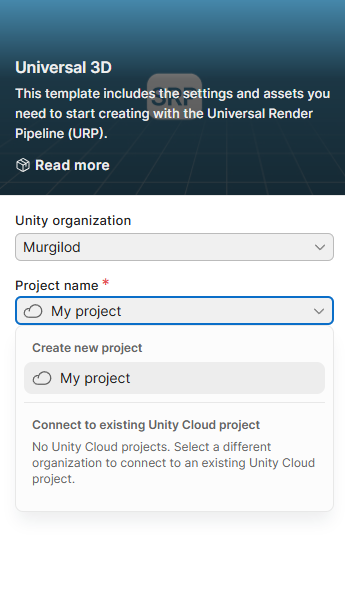
I had problems finding the option in the UI since “project name” is just for… the project name? If I didn’t know to look for it, I’d probably have been adding projects to the cloud without knowing - nobody reads random text that shows up when they’re trying to type a project name, or spot that there’s something important underneath (which I believe is by design).

You know what would actually be a good spot for a checkbox that’s both easy to find, and inform the user about the feature? Behold my UI skills:

11 Likes

The current ui designed so much like apple’s malicious compliance

7 Likes

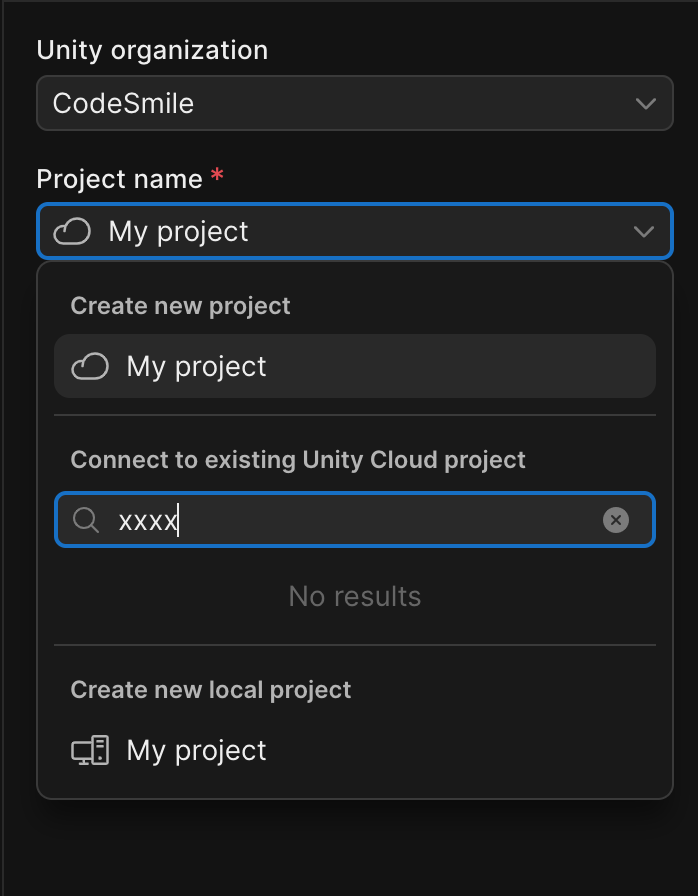
I literally do not even have the option still to not make a project tied to Unity Cloud.

Yes we do. This has been added as a hotfix update to the Hub:

It’s the Create new local project option at the bottom. To hide a possibly loooong list of cloud projects listed before it, enter some bogus string in the search field until you get “No results”.

4 Likes

This is the wrong way to approach data collection. Setting aside entirely the invasive nature of opting-in by default, you enabling this automatic linking to Unity Cloud only introduces annoyances and waste, because the vast majority of the Unity projects created is NOT going to be carried to productions (and I’d not be surprised if a majority of them are actually just Unity bug reproductions :upside_down_face:), and there are more hobbyist than large game studios out there that most project created won’t even see enough volume of production usage, if any at all, for any Unity bugs to even register as significant statistics on your backend, but one can always prove me wrong.
If any live service game has the amount of impact that requires Unity to be proactive in bug fixing at all, i.e. any top 10 gacha games, you probably should have already negotiated diagnostics analytics sharing directly with the game studio through your sales or other direct communication channels. Being Unity, you should already have the capability to identify which projects of your paying customers is seeing wide success and thus become a good candidate for such proactive support. Introducing this opt-in-by-default measure to everyone is only going to spook people at best.

2 Likes

How does that fit into the Opt-in GDPR laws in the EU though? And ability to erase data

7 Likes

As far as I understood, we as developers using Unity have the responsibility to make sure we have our users’ consent for data collection. Honestly, I never used Analytics, but I think this is standard practice as far as this goes.

However, now that “essential data” collection is opted-in by default beginning with 6.2, does this mean that for every new project that isn’t manually opted-out of this, we have to ask for our users’ consent? Even if we don’t use any service, only the engine itself?
If yes, I’d say this is a pretty unsafe default setting for developers - because many of us might just never recognize the setting and don’t even know that their builds perform data collection which we are responsible for.

Maybe I’m just getting something wrong though, so some clarification on that would be greatly appreciated.

6 Likes

I didn’t say anything about you not having access.

To get ahead of whatever you’re going to say next: yes I have closed and reopened Hub. Several times. Probably a dozen at this point. I also tried reinstalling Hub completely.

Ah I think the delete feature is a separate thing

I make a small edit to make it clearer

No one really wanted cloud setup in the hub. It was added as optional. Then added as default. Then suddenly mandatory for every project.

Dont forget the mandatory integration of cloud and AI now in the editor.

New data collection in 6.2 that isnt configured locally in the project seems risky.

I appreciate we can finally delete cloud projects though.

2 Likes

Thank you for staying vigilant, identifying bottlenecks and optimizing my project BrackeysTutorial27.

What’s a little unclear to me is what this means for my game BrackeysTutorial86 when I release it and players engage with it?

If I created the project with whatever the default cloud connection settings in Hub are, what does the build do on the devices of the players? Will it silently phone home to Unity if it crashes or something? Without the player’s (or even the developers) knowledge?

The default for all end-user (players) analytics / data gathering should be OFF unless explicitly turned ON. Especially after the Runtime Fee debacle. I haven’t checked the latest Hub version yet, but I think Unity users should be clearly told in plain language what kind of data a new project collects, and where it goes. And who the data is collected from - does it only affect the Unity developer / editor or end users too?

Hiding the option of creating a local project at the bottom of a dropdown somewhere feels a bit like a dark pattern, sorry. It’s like hiding the “Reject all”button behind multiple hurdles in cookie popups. There should just be a checkbox next to the Version Control checkbox. That’s it. I have a lot of throwaway projects that I toy with for 20 minutes and then forget.

Ps. No Per-Project Billing, please. I don’t want to be bankrupted by BrackeysTutorial451.

4 Likes

Hmmm .. maybe there’s a bug where, if you don’t have any Cloud projects at all, you cannot create an offline project. :dizzy_face: :grinning_face_with_smiling_eyes:

1 Like

Except that’s not the case either. There were cloud projects there that I deleted after the hotfix was supposed to be deployed to see if having any in there in the first place was causing the problem.

It’s almost like they deployed Beta software to the Production channel and didn’t have a proper way of dealing with that.

just a small tip:
Pretty much every unity “PR” problem would had been avoided, if you would had asked the community about it at planning stage.. (pretty sure even basic AI would had told you that this will most likely backfire)

i mean why waste all the effort and reputation, when you could create new post:
“new Poll about: …” (and explain the reasoning or benefits)

4 Likes