I am using Unity free to create a NavMesh (blue):
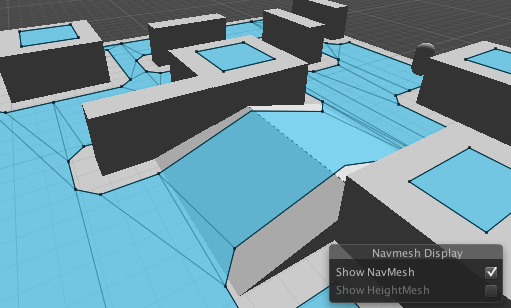
This is the part of my editor script that converts the Unity NavMesh to a regular mesh, so I can use it for my own pathfinding solution.
NavMeshTriangulation triangles = NavMesh.CalculateTriangulation ();
 Mesh mesh = new Mesh ();
 mesh.vertices = triangles.vertices;
 mesh.triangles = triangles.indices;
I then save my asset and show it in the scene, which generally works fine. However, in the shown example (green = myConvertedMesh) there is a difference to the original NavMesh at the slope. What am I doing wrong?

1 Like
Is anybody know this problem?
I am using the Unity2017 and met the same problem, the NavMeshTriangulation mesh data seems different with the navmesh the unity use.
I noticed this a while ago as well and was sort of confused from the inconsistency. I reached to a conclusion that the NavMeshTrianguation version is in triangles while the one in the Unity Editor isn’t all in triangles. I kinda wished the triangulated version wasn’t that off from the original.
Necro, but, there isn’t a lot of (good )information about this stuff so just to clarify for anyone looking, NavMesh.CalculateTriangulation gives you the simplified mesh that is used for pathfinding. As far as I can tell the blue mesh is a more detailed mesh that contains more height information, you can visualize all of the different data with this Unity - Scripting API: AI.NavMeshEditorHelpers.DrawBuildDebug, I don’t think you can actually access it though. It would be really nice if there were a “CalcuateTriangulationDetail”.
A work around if to get a potentially more detailed result from “CalculateTriangulation” might be to have a very small tile size.
1 Like