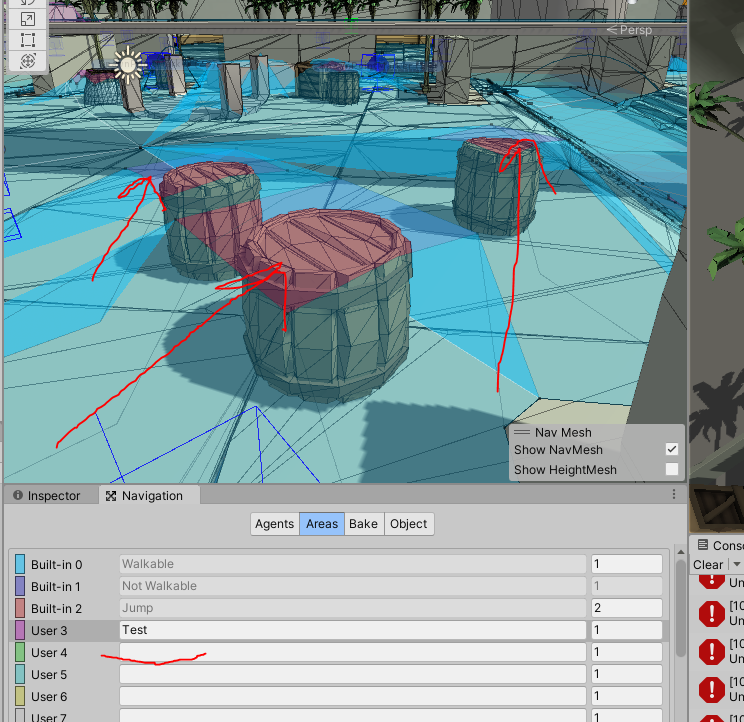
i am attempting to create an in-game visualization of the NavMesh so QA can quickly identify issues related to pathfinding. For the example I’m about to show, we are using a larger than usual step height, which is a deliberate choice at this time for reasons I won’t bore you with. Anyway, here is the situation…
var triangulation = NavMesh.CalculateTriangulation();
var vertices = triangulation.vertices;
var indices = triangulation.indices;

var mesh = new Mesh();
mesh.vertices = vertices;
mesh.SetIndices(indices, MeshTopology.Triangles, 0);

AssetDatabase.CreateAsset( mesh, assetFileName);
AssetDatabase.SaveAssets();

NavMesh as it appears in the editor
First red flag here is that there are no black dots being rendered on some of the vertices…

Then when I export the data using the results from NavMesh.CalculateTriangulation(), those bits that are not rendering black vertex dots seem to be omitted completely…

In Blender

In Unity
This is in Unity 2021.2.17f1.4580
The NavMesh data obviously exists as per the first screen shot. Does anyone know what the solution for this issue may be?
Thx in advance