Hey this looks really cool. What is does the planet icon on some textures mean?
1 Like
This icon shows that the texture is set as a global texture that all shaders and render passes in the scene can use.
Huh. Sorry I might be missing some context, is there a new API to communicate this? I’m on 2022.3 still, can’t find anything looking at SRP Core 17 docs
This API is related to the new RenderGraph API introduced in 2023.3. You can find more info in the section “Setting Global Textures” in the alpha documentation linked in the first post. Does this help?
2 Likes
I’ve been working at my dayjob with UE sources for a couple of months now. We are writing custom render passes and shading models. Unfortunately this requires engines moddifications but not a big deal though, UE sources are clean.
I can already see some design similatiries with Unity’s RG (minus raw pointers and RHI API differencies). But I wanted to mention that this is a great move by Unity. I have a custom renderer for two of our existing Unity projects that I will soon start upgrading to the new RenderGraph.
I will provide feedback as I move forward with. 
4 Likes
Yes, thanks! This is quite nice actually, I was just revisiting some AO code and thought would be great to have better support for globals in render graph
Hopefully this will help to reduce code coupling somewhat with my SRP
2 Likes
Thank you for the “jump to source” button, I tried it and it is a very pleasing way to read the URP RG source code in the order of rendering event.
1 Like
I’ve just spent the last couple of hours trying to convert my asset to use render graph. all my asset needs is a simple blit using a material. I was using cmd.Blit before, which sets “source” to “_MainTex” in the shader. but now i have to use Blitter, which sets “_BlitTexture”. changing the shader to be blitter compatible sucks, but its something i can live with. the part that I cant seem to solve, is how can I make my asset work with both Render Graph and Compatibility mode?
Why is there no simple example for using Blitter to Blit to a temporary destination texture, then back to the camera color target, that works in both Render Graph mode and compatibility mode? This whole upgrade process has been extremely frustrating so far.
1 Like
Hi, the Blitter (URP 14 and above) also works in non-RG mode and is the replacement of cmd.Blit.
1 Like
Imagine how it is with very complex effects, that implement temporal AA and multiple render targets.
It has been a real hell and i am not even supporting currently both RG and older methods in same time globally, plus everything need months more work at the least, after multiple months porting work already.
That is if nothing breaks or changes again.
At this point i plan to create a separate 2023 version that will only support Render Graph and leave my 2022 versions for 2023.3 non RG path support. That way remove a MASSIVE complexity factor that will also hit hard when require to remove the old methods.
Thanks for the feedback. We are currently creating Utilities to make this much easier. We hope to be able to release a first version soon. Blits will certainly be different between RenderGraph/No-RG but indeed the plan is to be able to share Shaders (and thus material & parameter setting code as well) between both paths. The design is more compatible with the “old” core engine blit (and thus uses _MainTex by default but this can be configured).
We will share an update in this thread once we are ready. We had to first prioritize to land all required engine changes before we could focus on these utilities.
There is a new Custom Post-Processing template that you can access in the assets window through Create > Rendering > URP Post-processing Effect (Renderer Feature with Volume).
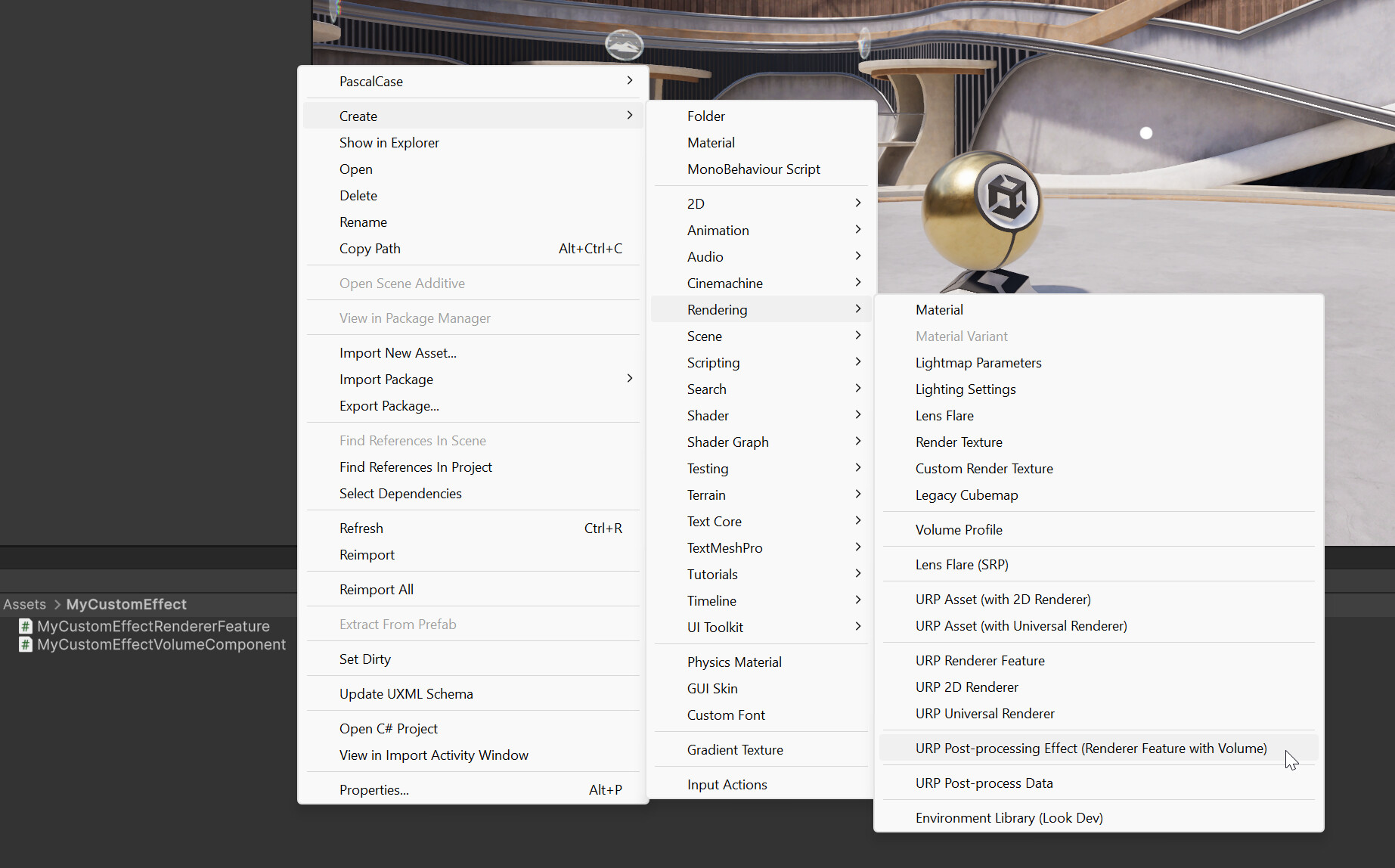
This template has both paths implemented and organizes them nicely in regions:

It simply inverses the colors as soon as you add the Renderer Feature to the Renderer:

The template also creates a Volume component that controls the intensity of the effect:
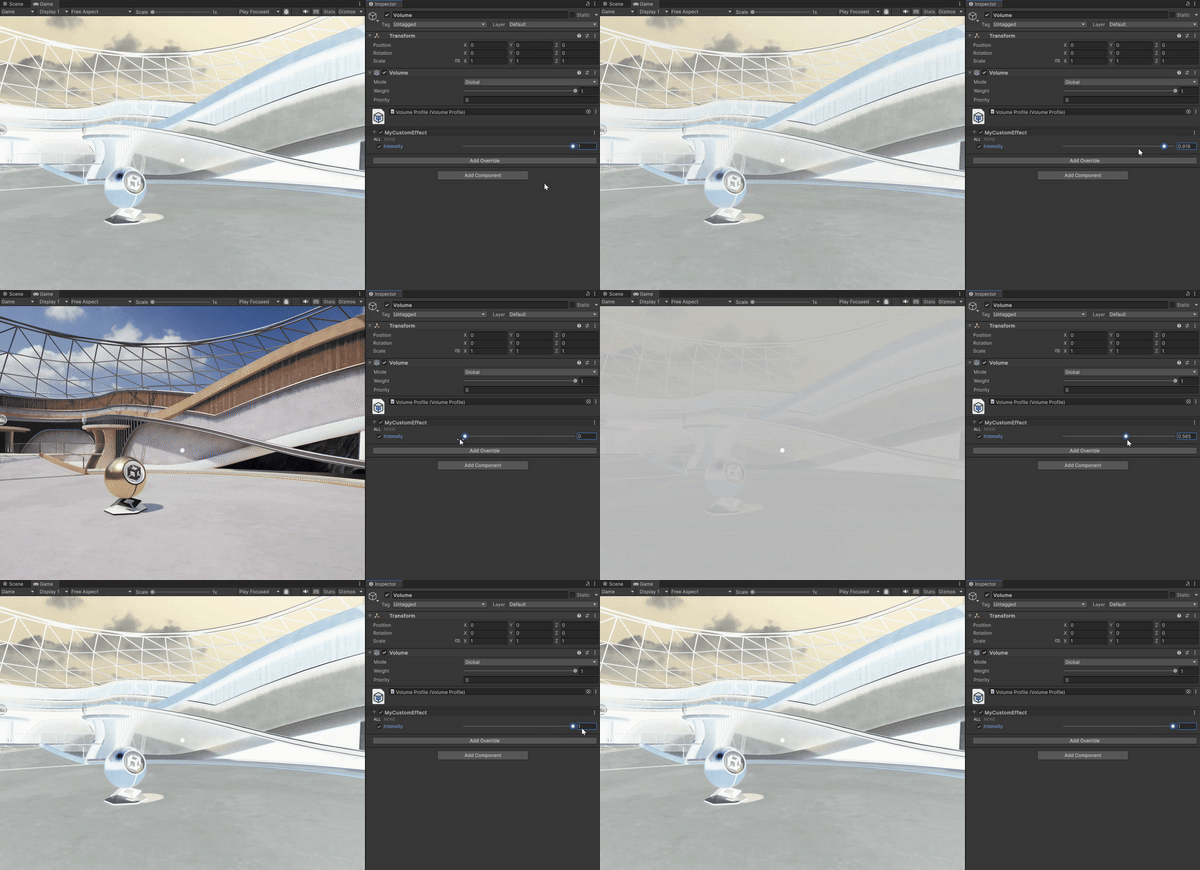
Let us know if this example helps you to support both pathes at the same time. We are also happy to support you here with other concrete questions.
7 Likes
Thanks, though if have to port hundred of image effects and very complex ones, the biggest help would be to release the Graph after lot of trial and testing in end of year and not in April, the fact that the release is so close is extremely scary. We simply not have the time to not only port the effects but make sure are proper optimized and support the old system as well.
It is simply not possible.
Or at least have it as an advanced option until end of year and not the initial default option.
The issue is that blitter sets _BlitTexture, not _MainTex. right now, I can get away with using the same image effect shaders for both URP and BIRP, which is less maintenance on my end. I am okay with doing extra maintenance if it means my system will run faster in URP, but I was not even able to get blitter to work with compatibility mode on, my shaders would produce a full pink screen. I will go over the Custom Post Process template today, and hopefully produce better results.
2 Likes
What is the current timeline for RG introduction? Has anything changed in the past weeks/months or are you still looking at ~April sometime for a release? If so, do you have any closer idea on the date yet? Cheers!
In this case, I think you need to use a shader keyword to make it compatible with both RPs if Unity finally doesn’t provide a solution.
I totally agree with this because non-RG mode will be removed in the future, and then people will have to remove them to keep the code clean.
1 Like
It is still April and Render Graph will be default.
I cant even imagine what will happen when the million of users convert their projects to 2023.3 latest version, with nothing custom working.
But given there is an actual plan to remove the BiRP pipeline, i suppose there is much more devastating events in the calendar than this one
How i miss the days where i was actually productive and created things in Unity, than recreate the same over and over again in different APIs, with zero major differences. The loss of time is just unthinkable.
1 Like
We have a few other posts in this thread that go into the details of how we want to support asset store providers and our users with this transistion (eg, compatibility mode, etc) so I won’t repeat that here and focus on the expected timeline for user adoption.
We expect adoption to start ramping up at the end of this year. Most users stay on an older LTS for quite some time. Also, this 23 cycle is a bit different than before. We added another tech release so 23.3 is a tech release, not the LTS. We typically see adoption of a release increase significantly once it becomes an LTS. This is planned around October.
One thing to note here as well is that we expect the adoption of URP to increase significantly in 23, at the expense of BiRP. We wanted to make sure that this new API is ready before this large increase in users.
1 Like
One thing I want to repeat again is that we really are here to support you and help you with this transition. I hope that is clear from the many people that are here to respond to questions. There are a number of things still in development to simplify the upgrading so it will definitely simplify further and the benefits will become more clear as well.
2 Likes
I have got a 1 star review for Unity crashing because of a Unity bug, user thinking my system had a RAM leak. Has been a month and the review report has not even been considered yet.
When this 1 star reviews become the norm after not a single of my effects work in 2023.3 in April, will there be any actual help to stay in this business when our asset sales turn to zero for example ? Is there any plan for this case ?
The problem is not the responsiveness, is the magnitude of the change coming that we are hardly close to 10% ready for yet. Without your help we would be at 0% though, so this is really very appreciated. But on the other hand would be more appreciated if those changes had a much larger window before become the default and forced to users.
If Render Graph is default when users import their project for 2023.3 conversion and the assets not work at all, will not think about this be a tech release or anything, will just expect everything to just work and it wont.
When a project upgrades the Compatibility mode should be set on by default, ie, RenderGraph turned off. There’s been an issue flagged when a user doesn’t have the right setting asset in their project yet but we’re looking to address that.
The question is, what else can we improve, assuming we have RenderGraph on by default in the 23.3 tech release for newly created projects? What else could we do to make sure that users don’t blame your assets? We’ll definitely consider your ideas that can make sure that you are not impacted by not having RG support yet.