Render Graph Updates in Unity 6.3

The upcoming Unity 6.3 brings a set of focused updates to the Render Graph system, continuing the direction we’ve shared previously - with a strong emphasis on defragmentation, performance, and long-term unification across pipelines.

It builds on improvements made in 6.2, where we refined the Render Graph subpass merging process to reduce overhead and avoid exceeding system limits. We also optimized internal workflows to use native pass data directly, reducing redundant lookups and improving performance.

These updates follow the path laid out in earlier releases, aiming to make the system cleaner, more consistent, and easier to extend.

Smarter Render Graph Helper Passes

We’ve expanded the Render Graph utility passes to support more use cases and provide greater flexibility:

  • AddBlitPass now returns a builder, so you can further customize the pass.
  • You can now blit directly to the backbuffer, enabling simpler full-screen effects.
  • AddBlitPass and AddCopyPass are now used internally in FullscreenPassRendererFeature and CopyColorPass when applicable.
  • Null validation ensures misconfigured blit passes fail early and clearly.
  • WebGL2 and GLES3 fallbacks are handled correctly when required.
  • Depth blit support (landed in Unity 6000.3.0a4) – will enable blitting depth data to both depth and color textures, with automatic MSAA resolve when needed.

These changes make working with fullscreen and copy passes more reliable and extensible - whether you’re writing your own or relying on integrated features.

We’ll be adding documentation and sample usage for these helper passes soon to make it even easier to adopt them in your own custom passes.

Compatibility Mode Now Hidden by Default

Compatibility Mode is now hidden behind the URP_COMPATIBILITY_MODE compiler define. This change brings clear benefits to all URP projects by default:

  • Faster iteration - fewer paths to manage means quicker compilation and easier customization
  • Smaller builds - URP runtime assemblies are now under 1MB, with ~8–10% size savings with this change
  • Cleaner code structure - non-Render Graph paths are clearly separated

When opening a project in Unity 6.3 or newer, Render Graph is now enabled by default for all projects.

In Unity 6.0 to 6.2, Render Graph was already the default for new projects. However, upgraded projects - for example from 2022 LTS - continued using the older non-Render Graph code path. In Unity 6.x, this was known as Compatibility Mode and was controlled via a checkbox in the URP settings. With Unity 6.3, this changes: even upgraded projects now start with Render Graph enabled unless Compatibility Mode is explicitly turned back on.

Without the URP_COMPATIBILITY_MODE define, any effects that haven’t yet been upgraded (i.e. using ScriptableRenderPass.Execute without a RecordRenderGraph implementation) will not run and will display obsolete warning messages. However, these warnings don’t prevent the Editor from opening or running the project.

Note: In earlier Unity 6.3 alphas before 6000.3.0a3, these cases might trigger errors instead of warnings. This has been improved in newer versions to show only warnings.

For projects previously using the older code path - either from 2022 LTS or Compatibility Mode in 6.x - Unity now requires a choice before building. A build-time dialog appears the first time you build in 6.3, helping you decide whether to proceed with Render Graph (recommended) or switch back to Compatibility Mode. Until you make this choice, Unity blocks the build to avoid unintended errors.

If you choose “Keep Compatibility Mode” in the dialog:

  • Unity automatically adds the URP_COMPATIBILITY_MODE define to your Player Settings for your current build target.
  • Existing effects will continue working while you take time to upgrade them to Render Graph.
  • Important: Compatibility Mode is intended only as a temporary solution for upgrading projects. It will be removed in a future release very soon. We strongly recommend migrating your custom effects and passes to Render Graph as soon as possible
  • With the define, Compatibility Mode code remains accessible and can still be used as before.
  • The property RenderGraphSettings.enableCompatibilityMode is read-only and returns false unless you add the URP_COMPATIBILITY_MODE define in your Player Settings.

Most major Asset Store packages that are actively maintained have already upgraded to support Render Graph. If you’re using third-party effects, check if an updated version is available before falling back to Compatibility Mode.

Render Graph Viewer on Devices
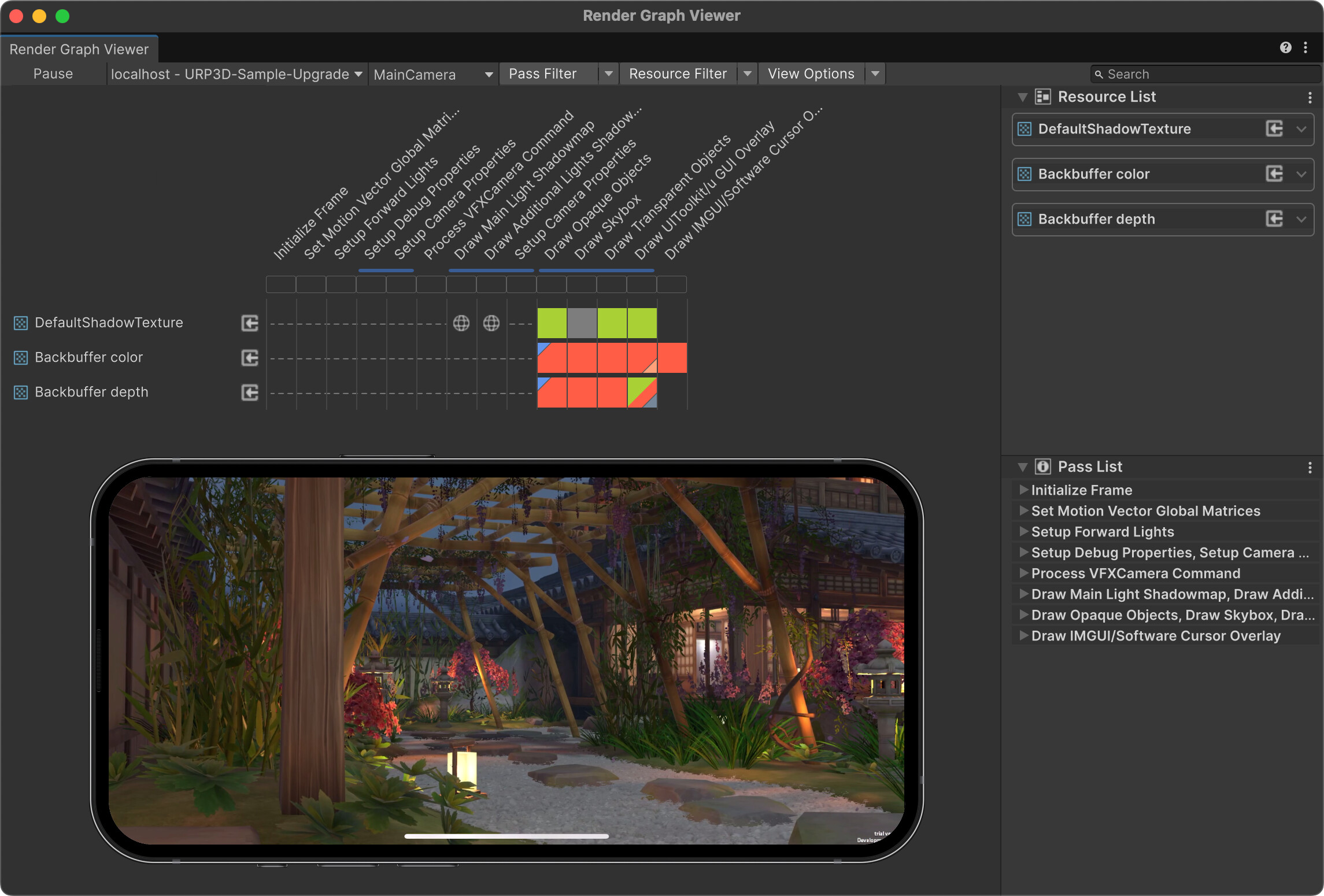
You can now connect the Render Graph Viewer to player builds running on devices. This allows you to:

  • Inspect Render Graph execution on real hardware, including mobile and XR platforms like Meta Quest.
  • Analyze how Native Render Passes are merged at runtime and identify unnecessary load/store actions—insights not visible in the Editor.
  • Track how the render graph adapts based on what’s currently on screen, which helps identify frame-specific or content-dependent performance issues.
  • Use an auto-updating UI that reflects changes live as the graph evolves. You can pause updates at any time, and the viewer automatically pauses if the device disconnects.

This is especially valuable for optimizing bandwidth and performance on untethered XR devices like Meta Quest 3, where real-time visibility into GPU behavior is crucial.

Shared Render Graph Foundation Across URP and HDRP

Unity 6.3 marks the point where both URP and HDRP now use the same underlying Render Graph compiler and API.

This foundational change brings:

  • A shared backend for all Scriptable Render Pipelines.
  • The ability to focus improvements and testing on a single system.
  • The groundwork for future extensibility unification, where developers can build custom Render Graph passes that work across pipelines.
  • New opportunities for platform-specific optimizations, such as on-tile rendering on Tile-based deferred rendering (TBDR) devices in HDRP in the future.

While this doesn’t yet change the extensibility surface for HDRP users, it’s a key enabler for upcoming improvements across the board.

Why This Matters

These updates help make Render Graph:

  • Easier to use – thanks to more capable helper passes
  • Faster to iterate on – with Compatibility Mode hidden and trimmed
  • Easier to validate – with device-side viewer support
  • More future-ready – with a single foundation for all pipelines

Render Graph is now the stable core of Unity’s rendering tech - and we’re committed to continuing to improve its flexibility, performance, and reach.

If you have questions about these updates, or want to share feedback, feel free to post below in this thread - especially if it’s related to the changes we’ve just shared. Just a heads-up that responses might take a bit longer than usual due to the summer period.

For general discussions about Render-Graph, please make use of our Render-Graph tag. Contribute to existing topics with the tag or create additional topics for anything new.

For more in-depth learning and tips, check out How to Use RenderGraph in URP: Learning Resources and Tricks. It’s a great resource for diving deeper into practical usage and best practices.

45 Likes

So does it mean we cannot yet use render graph in custom post process or custom pass? What’s the path forward? Will it be available at some point, and what will happen with custom post process and custom pass in that case?

Yes, that is the plan to get to a unified extension system to have much more alignment between the two pipelines, so that more effects can be shared. First we will fill the Render Graph FrameData with resources from HDRP, and then we will also align the two pipelines on common injection points. Likely there will still be some high-level boilerplate code be different to support upgrades. But most of the render passes can be shared. This is already true in our internal engine development from now on, but we need to expose this in the next steps to developers.

We will share an update on the unified extensibility in a couple of months, but we are sure that both URP and HDRP users will be excited about the new possibilities and outcomes of these.

10 Likes

woooo!
That’s going to kill off a lot of annoying boiler plate stuff.

7 Likes

This is a good update and good signs for the future. Thanks and great work. If Unity progressed always like this and in this direction, we would be in better hands.
Good work ;D

5 Likes

At first glance, these seem like good changes to make Shader Graph easier to use, especially the introduction of the builder in Blits. My experience so far has been awful — I’ve been working with graphics engines for over 15 years, and Shader Graph makes me feel like I did when I first started with OpenGL: completely disoriented, reading the same documentation over and over, and even the simplest things confuse me.

I’ve spent the last 3 days trying to do something extremely simple: render to a render texture before an event and then render that RT in a later event. Something that should be trivial — something I used to do with my eyes closed — I now can’t get to work. It’s frustrating. I follow the documentation and the examples, but as soon as I try to do anything even slightly different from what’s written in the tutorials, it leads me astray.

I find the API confusing, though I suppose it’s just a matter of getting used to it.

Don’t get me wrong — I do think focusing on a single path like URP and Shader Graph is the right move, and I appreciate the effort you’re putting into unifying the mess that came from having divergent pipelines over the past few years. It’s just that adapting to it is proving to be frustrating. In moments of peak frustration, I’ve even considered switching to Unreal.

All I can do now is hope things get better.

7 Likes

@levelappstudios I feel and share your pain. We desperately need more comprehensive tutorials and corner-case examples.

It also does not help that almost every available sample and tutorial is now obsolete. Currently the best learning resource I could find is the PDF “Introduction to URP for advanced creators”.

4 Likes

Hi,

I wanted to know if the 6.2 update fixed the two issues listed in the previous discussion (Introduction of Render Graph in the Universal Render Pipeline (URP) - #850 by Gafda and Introduction of Render Graph in the Universal Render Pipeline (URP) - #851 by AMoulin):

  • The injection point after the final blit not possible in 6.1
  • The AddCopyPass that is not working with the XR Camera in 6.1. In my use case, I needed to make a copy of an XR Texture (texture with 2 slices, left eye and right eye), but the AddCopyPass was not working accoding to @AMoulin

Are those two issues fixed ? I saw in the 6.2 changelog the following line : Graphics: Fixed AddCopyPass rendergraph function not working for XR multiview array texures. (UUM-93821)

I guess it’s now fixed, but I’d like a confirmation before taking a significant amount of time digging again into the RenderGraph

Thanks!

Hey @SpicyKombucha,

  • The injection point after the final blit not possible in 6.1

Yes, it is now possible in 6.2. More info in AfterRendering injection point in URP now executes always after the Final Blit to Back Buffer (starting in 6000.2.0a9).

The AddCopyPass that is not working with the XR Camera in 6.1.

Yes, the utility pass AddCopyPass() is now supposed to work correctly with XR. We fixed the issue in 6.2 and backported the fix back to 6.0 and 6.1. Fix landed in: 6000.0.49f1 / 6000.1.0b15 / 6000.2.0a4

Hi @AMoulin ,

Thank you for this answer! I’ll try to update my “old XRCopyPass” code and will test the behaviour of the injection point.

How should we use
CullContextData it does not allow to cull layers manually (yes i know about FilteringSettings)
This does not seems to do anything

UniversalCameraData cameraData = frameData.Get<UniversalCameraData>();
CullContextData cullContextData = frameData.Get<CullContextData>();
cameraData.camera.TryGetCullingParameters(out ScriptableCullingParameters cullingParameters);
cullingParameters.cullingMask = 0; // any uint tried,
CullingResults customCullResults = cullContextData.Cull(ref cullingParameters);

Recently I have missed a way to pass in a TextureDesc to RenderingUtils.ReallocateHandleIfNeeded.

I was following the tip recommended here while upgrading some of my render features but since I needed some history textures for temporal reprojection I have to import the RTHandle to rendergraph (I don’t know if there is a better way to do this through RenderGraph).

ReallocateHandleIfNeeded seems to be using internal methods to get a TextureDesc already so an overload to take in a TextureDesc or a reliable way to convert a TextureDesc to RenderTextureDescriptor would be very much appreciated.

Indeed, we’re adding it now!

2 Likes

Can you please clarify if existing custom HDRP shaders (hlsl, SG, compute) will need additional work to be compatible?

1 Like

The changes on RenderGraph do not require changes on the shaders in HDRP, everything will keep on working.

2 Likes

It landed in 6.2.f9 and later versions.

3 Likes

Are there any examples of how a simple grab pass would be implemented using RecordRenderGraph instead of Execute? I haven’t been able to successfully migrate my render passes yet after several tries.

I’m confused how to render a custom depth only texture using a layer mask - there was an old example, but as i haven’t used renderer features before, I was not able to upgrade it to RenderGraph.

My goal is simply to render a depth texture, specifically only covering a specific layers, which I can then pass to a shader for comparisons for another operation.

Unfortunately - documentation and samples are proving to be near impossible to find which describes some of these processes or stupid search results/AI spit out inaccurate/old information which does not apply or work in 6.3+.

EDIT: I am trying to do this through a shaders DepthOnly pass, but both Front and Back faces - and then register the result as a global texture for another shader to use - there does not seem to be a way I can see in the RendeGraph API to draw objects while spefiying the shader should not cull backfaces.

what would be the correct way to set the “_Cull” shader property of `“any” material through a rendererfeature? Is there some way to inject a MaterialPropertyBlock for this?

The blog post about 6.3 mentioned “Scriptable Render Pipeline (SRP) batching across renderers with dynamic custom values at runtime, as an alternative to material property blocks.” and linked to this thread, but I don’t see any mention of MaterialPropertyBlocks in the top post or anywhere in this thread. Lack of support for material property blocks has been one of the greatest limitations of new rendering pipelines in my eyes and a key reason for my projects remaining on the built-in pipeline. I’d love to learn any details about any alternatives, if one is now available under HDRP.

If context helps, here are previous discussions about MPBs: What is a viable substitute for MaterialPropertyBlocks in HDRP? - #5 by bac9-flcl & Unique Material Properties per Renderer - #8 by fleity

Edit: I’m guessing that mention referred to the new RSUV feature? Would be great to link this post to the thread about it if that’s the case! https://discussions.unity.com/t/renderer-shader-user-value-customize-your-visual-per-renderer/