I have a simple outline pass using render graph that does the following
render object to depth buffer with stencil ref 1 (ref 1, comp always, replace always)
render object again but larger, render only where stencil != 1 (ref 1, comp notequal)
This produces a simple outline.
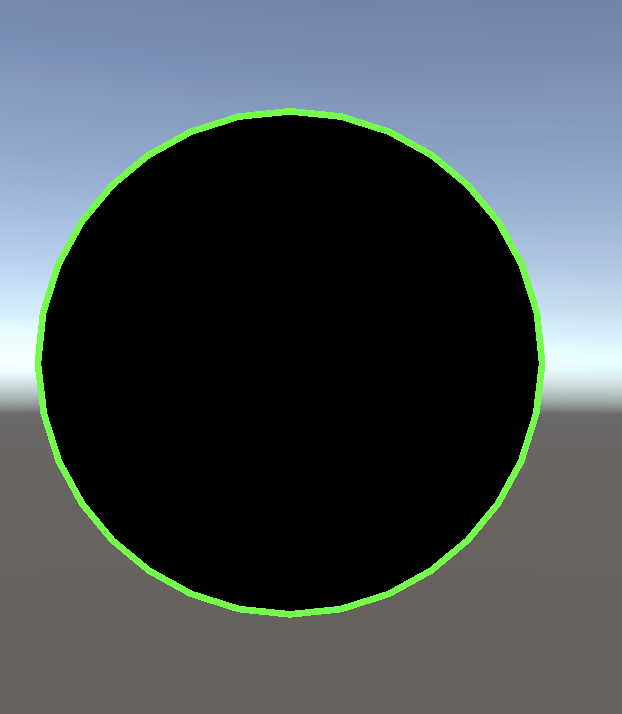
In Unity 6000.0.26f1 this worked fine, but starting from 6000.0.28f1 (maybe even 6000.0.27f1) this behaviour is now broken. My original mesh renders pitch black.
I found a fix, but I would like some clarification why this was changed in 28f1, @AljoshaD is this maybe related to this post of yours? I’m asking since there is a post ‘Unity 6 URP Depth texture is black / not available’ that links to it. However I am not using builder.SetGlobalTextureAfterPass so not sure how it is linked?
My code is like this (with the line that fixes the issue commented out). I am confused because in my initial pass I do not want to render any color, just write to the depth/stencil buffer! But for some reason if I don’t add that line, the stencil data is lost in the next pass.
// 1. Render a mask to the stencil buffer.
using (var builder = renderGraph.AddRasterRenderPass<PassData>(ShaderPassName.Mask, out var passData))
{
    // builder.SetRenderAttachment(resourceData.activeColorTexture, 0); // ADDING THIS LINE FIXES ISSUE
    builder.SetRenderAttachmentDepth(resourceData.activeDepthTexture);

    // use renderer list

    builder.SetRenderFunc((PassData data, RasterGraphContext context) =>
    {
       // draw renderer list
    });
}

// 2. Render an outline.
using (var builder = renderGraph.AddRasterRenderPass<PassData>(ShaderPassName.Outline, out var passData))
{
    builder.SetRenderAttachment(resourceData.activeColorTexture, 0);
    builder.SetRenderAttachmentDepth(resourceData.activeDepthTexture);

    // use renderer list

    builder.SetRenderFunc((PassData data, RasterGraphContext context) =>
    {
        // draw renderer list
    });
}
Is there a place to see a render graph related changelog between patches?
Thank you very much!
PS: this bug got reported and fixed! Happy to know the issue wasn’t on my end.
Hey !
I’m trying to do an Oil Painting effect, but i got an error CS0619 : ‘ScriptableRenderPass.Blit(CommandBuffer, RenderTargetIdentifier, RenderTargetIdentifier, Material, int)’ is obsolete : ‘Use RTHandles for source and destination’
using UnityEngine;
using UnityEngine.Rendering;
using UnityEngine.Rendering.Universal;

public class OilPaintingEffectPass : ScriptableRenderPass
{
    private RenderTargetIdentifier source;
    private RenderTargetIdentifier destination;

    private RenderTexture structureTensorTex;

        private readonly Material structureTensorMaterial;

        public OilPaintingEffectPass(Material structureTensorMaterial)
        {
            this.structureTensorMaterial = structureTensorMaterial;
        }
    public void Setup(OilPaintingEffect.Settings settings)
    {

    }

    public override void OnCameraSetup(CommandBuffer cmd, ref RenderingData renderingData)
    {
        RenderTextureDescriptor blitTargetDescriptor = renderingData.cameraData.cameraTargetDescriptor;
        blitTargetDescriptor.depthBufferBits = 0;

        var renderer = renderingData.cameraData.renderer;

        source = renderer.cameraColorTargetHandle;
        destination = renderer.cameraColorTargetHandle;

        structureTensorTex = RenderTexture.GetTemporary(blitTargetDescriptor.width, blitTargetDescriptor.height, 0, RenderTextureFormat.ARGBFloat);
    }

    public override void Execute(ScriptableRenderContext context, ref RenderingData renderingData)
    {
        CommandBuffer cmd = CommandBufferPool.Get("Oil Painting Effect");

        Blit(cmd, source, structureTensorTex, structureTensorMaterial, -1);
        Blit(cmd, structureTensorTex, destination);

        context.ExecuteCommandBuffer(cmd);
        CommandBufferPool.Release(cmd);
    }

    public override void FrameCleanup(CommandBuffer cmd)
    {
        RenderTexture.ReleaseTemporary(structureTensorTex);
    }
}
how do I update my code to replace the blit function ?
I stumbled upon UniversalCameraData.GetGPUProjectionMatrix() today, but it doesn’t seem to work with RenderGraph (as of 6000.0.30f1). The deeper YFlipped check method seems to use a deprecated access to the color target, which errors out on access outside of Compatibility Mode.
Is the matrix method itself supposed to be deprecated or is it missing a branch for RenderGraph? Would be nice to have this method, as the alternative isn’t very elegant.
var oldProjection = passData.cameraData.GetGPUProjectionMatrix();
//vs
var yFlipped = passData.cameraData.IsRenderTargetProjectionMatrixFlipped(passData.color);
var oldProjection = GL.GetGPUProjectionMatrix(passData.cameraData.GetProjectionMatrix(),yFlipped);
Hello how should I pass multiple Frame data textures to the shader and how should I get them inside the shader I followed the example in the docs :Unity - Manual: Example of a complete Scriptable Renderer Feature in URP
but this is not shown anywhere in the docs, what if i want to have the camera color and the depth at the same time or any two of the frame textures
Thanks @AMoulin. I can now use that method after upgrading Unity.
It seems @BragBiscuitz has asked about the following issue I encountered.
I RecordRenderGraph, I call UniversalCameraData.GetGPUProjectionMatrix(), but it does not work because of the YFlip check.
He seems to use this workaround:
var yFlipped = passData.cameraData.IsRenderTargetProjectionMatrixFlipped(passData.color);
var oldProjection = GL.GetGPUProjectionMatrix(passData.cameraData.GetProjectionMatrix(),yFlipped);
But in my case I have a TextureHandle from UniversalResourceData.activeColorTexture. I don’t know how to do the yFlip check on it.
RenderingUtils.SetViewAndProjectionMatrices(RasterCommandBuffer) can’t be called while executing the render pass. It gives the error:
InvalidOperationException: BaseCameraRenderPass: Modifying global state from this command buffer is not allowed. Please ensure your render graph pass allows modifying global state.
If I call RasterCommandBuffer.SetViewProjectionMatrices with the same matrices, it almost works. The meshes seem to be drawn at the correct place, but they disappear at some places. It is probbaly the depth that differs.
It seems that I need regular projection matrices here, instead of GPU projection matrices. I get correct output with this way, without the depth issue:
// called from RecordRenderGraph
Matrix4x4 GetProjectionMatrix(ContextContainer container)
{
    UniversalCameraData cameraData = container.Get<UniversalCameraData>();
    return cameraData.GetProjectionMatrix();
}
I see that the meshes that are drawn this way are using my own shaders only, so they don’t need the global state set by RasterCommandBuffer.SetViewProjectionMatrices. But my intention was using Unity materials for them in future. Maybe these materials would break without that state.
Edit: it actually works without calling RasterCommandBuffer.SetViewProjectionMatrices at all.
My render pass seems to start with the correct projection/view matrices from the camera. Is that something that is ensured by Render Graph?
In the old rendering path I don’t think this was the case. I had to set up the view-projection matrices to get correct output.
Actually, as I mentioned, it seems to work ok if I don’t even set up projection matrices. Actually I don’t need a camera state different from the main Unity rendering. Can I depend on that? Or can a render pass that is executed in between break that?
Or to state the question differently:
When our pass doesn’t allow global state modification, do we inherit the state from the previous pass (whatever that pass is)? But it is not always easy to see what is that previous pass. Renderer features can be activated or inactivated dynamically.
Or do we start with a well defined state (e.g. maybe the same state Unity uses to render its GameObjects attached to the camera)?
Actually, as I mentioned, it seems to work ok if I don’t even set up projection matrices. Actually I don’t need a camera state different from the main Unity rendering. Can I depend on that? Or can a render pass that is executed in between break that?
Or to state the question differently:
When our pass doesn’t allow global state modification, do we inherit the state from the previous pass (whatever that pass is)? But it is not always easy to see what is that previous pass. Renderer features can be activated or inactivated dynamically.
Or do we start with a well defined state (e.g. maybe the same state Unity uses to render its GameObjects attached to the camera)?
So that’s a good question (multiple ones actually ). Let me try to answer:
During a frame, between passes, we don’t automatically reset global states at the Render Graph level.
Render Graph will execute sequentially all the non-culled recorded passes. You can see all the passes (culled or not) in the Render Graph Viewer. If pass A modifies a specific global parameter GP in its render function (execute node) and your pass B coming after A uses GP, it will be impacted by pass A action and will receive GP updated value (from A).
Having said that, passes modifying the global state might totally reset it before finishing in order to leave no trace.
In your case, if you want to avoid being corrupted by someone’s else custom pass rendered before yours, I guess you can reset the matrix values to the ones of your desired camera at the beginning of your pass to be safe.
Yes, it is currently in review/testing and should land beginning of next year. I was hoping to land it before the holidays, but it touches a core area of the engine and we are trying to prevent any other regression.
If you are impacted by the issue on Windows Standalone, as a hacky and temporary workaround, you can try to:
Call Screen.SetMSAASamples(1) before the beginning of URP rendering OR disable MSAA in your RenderPipeline asset.
Sorry for the delay, I kinda dropped Unity stuff for the past few days since I failed to make my render pass work once more.
I’m not well versed in matrices and the render pipeline API, but if it helps, that code is taken from RenderObjectsPass in URP. As far as I understand, the color target that’s sent to the “flipped” method is a copy of UniversalResourceData.activeColorTexture (TextureHandle being a struct/value type), so as such, it shouldn’t take the same property path and thus bypass the deprecation check.
I realized that a TextureHandle can be converted to a RTHandle, and IsRenderTargetProjectionMatrixFlipped accepts an RTHandle. I got it working by doing something like this:
using UnityEngine.Rendering;
using UnityEngine.Rendering.RenderGraphModule;
using UnityEngine.Rendering.Universal;


public class MyRenderPass : ScriptableRenderPass
{
    readonly MeshData _meshData;

    public MyRenderPass(MeshData meshData)
    {
        renderPassEvent = RenderPassEvent.BeforeRenderingTransparents;
        _meshData = meshData;
    }

    private class PassData
    {
        public UniversalCameraData CameraData;
        public TextureHandle DestColor;
        public MeshData MeshData;
    }

    public override void RecordRenderGraph(RenderGraph renderGraph, ContextContainer frameData)
    {
        UniversalCameraData cameraData = frameData.Get<UniversalCameraData>();
        using var builder = renderGraph.AddRasterRenderPass<PassData>("MyRenderPass", out var passData);

        builder.AllowGlobalStateModification(true);

        UniversalResourceData resourceData = frameData.Get<UniversalResourceData>();
        builder.SetRenderAttachment(resourceData.activeColorTexture, 0);
        builder.SetRenderAttachmentDepth(resourceData.activeDepthTexture, AccessFlags.Write);

        passData.CameraData = cameraData;
        passData.MeshData = _meshData;
        passData.DestColor = resourceData.activeColorTexture;

        builder.SetRenderFunc<PassData>(ExecutePass);
    }

    private static void SetViewAndProjectionMatrices(RasterCommandBuffer cmd, UniversalCameraData cameraData, TextureHandle destColor)
    {
        bool yFlipped = cameraData.IsRenderTargetProjectionMatrixFlipped(destColor);
        Matrix4x4 projectionMatrix = GL.GetGPUProjectionMatrix(cameraData.GetProjectionMatrix(), yFlipped);
        //Matrix4x4 projectionMatrix = cameraData.GetGPUProjectionMatrix();
        Matrix4x4 viewMatrix = cameraData.GetViewMatrix();
        RenderingUtils.SetViewAndProjectionMatrices(cmd, viewMatrix, projectionMatrix, false);
    }

    private static void ExecutePass(PassData passData, RasterGraphContext context)
    {
        SetViewAndProjectionMatrices(context.cmd, passData.CameraData, passData.DestColor);

        foreach (var (mesh, matrix, material) in passData.MeshData)
        {
            for (int i = 0; i < mesh.subMeshCount; i++)
                cmd.DrawMesh(mesh, matrix, material, i, 0);
        }
    }
}
One of my problems was the fact that I was trying to call GL.GetGPUProjectionMatrix at recording time, which tends to give errors. I was also considering UniversalCameraData as unsafe for passing to the pass execution, but I have seen that it is being done in internal Unity code, so I have done the same.
For another pass, I create temporary color and depth textures using RenderGraph.CreateTexture(desc) I set them as color and depth attachments.
During the pass rendering, I need to get RTHandles from them, in order to pass it to cameraData.IsRenderTargetProjectionMatrixFlipped. RTHandle conversion worked ok for the color texture, but not for the depth texture. I was getting the following error:
InvalidOperationException: Trying to use a texture that was already released or not yet created. Make sure you declare it for reading in your pass or you don’t read it before it’s been written to at least once.
It works ok with color texture only, but I will have some passes that will only attach a depth texture. In the end, I chose to call cameraData.IsRenderTargetProjectionMatrixFlipped with null RTHandles. In my case the passed in RTHandles weren’t being used anyway (cameraData has a targetTexture).
–
Another thing I’m unsure about is the AccessFlags that has to be used for render attachments, when there is alpha blending (for color texture) and z-tests/z-writes (for depth buffer) involved. I see that using AccessFlags.Write works in that case. But I wonder, shouldn’t it be AccessFlags.ReadWrite? Or is that “Read” only needed for explicit reads from the shaders?
I am making a planar reflection effect and looking for a way to change the culling when using SetViewProjectionMatrices and DrawRendererList.
renderGraph.CreateRendererList takes in params for culling, but I can only specify the previously culled results via universalRenderingData.cullResults.
I want to use scriptableRenderContext.Cull() to get CullingResults, but it seems inaccessible from RenderGraph or ScriptableRenderPass. There is the old Execute override method
I have the same problem.
It is possible to use the old culling results of the camera using UniversalRenderingData.cullResults (which I think is filtered by Camera.layerMask) and filter it further by means of FilteringSettings.layerMask, but it is not possible to render a layer that is not part of UniversalRenderingData.cullResults already. I have to render such a layer.


 ). Let me try to answer:
