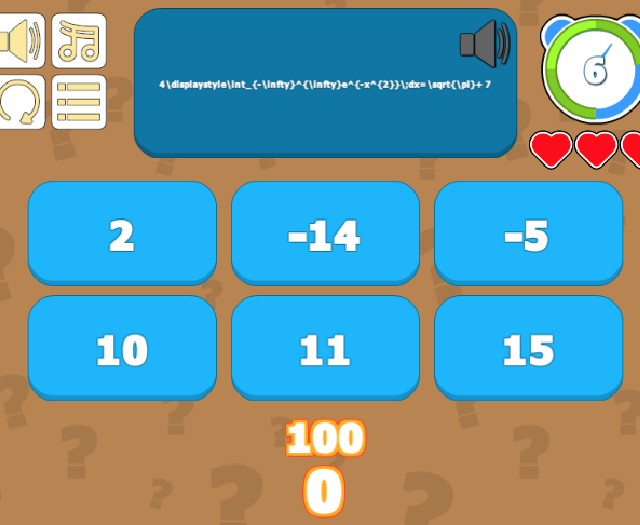
I changed the title from “Pulling Code From Archive And Executing It” since that was one of my original problems with my own code before I was told about the unity tutorial on quiz games, now that I’m using their template instead of my brew I thought I would change the title so it reflects the actually thread now
The initial thread from “Pulling Code From Archive And Executing It” is below this line.
Hey
First of I don’t know if this is a good way of doing this, but since I have no knowledge with coding this is how I imaging it.
I would like to have an archive, can be a list or array. from this archive I want to either pull the next or a random predefined set and place it into gameobject whenever you click a button.
using System.Collections;
using System.Collections.Generic;
using UnityEngine;
using UnityEngine.UI;

public class ButtonController : MonoBehaviour {

public Button NextSetButton, Button0, Button1, Button2;

void Start () {
// attach this to the nextsetbutton gameobject
NextSetButton.onClick.AddListener(NextSetButtonTaskOnClick);
    }

void NextSetButtonTaskOnClick() {

// Here I want a way to find the list/array and get a specific
// or random entry, and then execute the information.
// I think I know how to find and edit the text using the code below
// I just have no idea how I would put this into an archive and pull it out
// when the nextsetbutton is clicked

GameObject.Find("Button0").GetComponentInChildren<Text>().text = "0";
GameObject.Find("Button1").GetComponentInChildren<Text>().text = "1";
GameObject.Find("Button2").GetComponentInChildren<Text>().text = "2";
    }
}
Anyone who can help me with this task?
Edit:
I kind of forgot a major part. My problem is that I don’t know how you pull out the information from the archive and insert into the GameObject.Find(“Button”).GetComponentInChildren().text = “xyz”; I’m not sure if that came across in the original post or no, I’m sorry.
I’m not sure if you mean something more specific by “archive”, but it sounds like you just want to set up a static array of data, and access its information periodically. What kind of data is going into this archive?
At the simplest level, you could set up an array like this in your class:
private static string[] ArchiveData = new string[] {
    "Item 1",
    "Item 2",
    "Yet another item"
};
Accessing the content of this array is simple. Or you can access a random element using ArchiveData[UnityEngine.Random.Range(0, ArchiveData.Length)]
I’m not sure if that helps. Maybe you can be more specific about the data you’re working with.
If I can make something here that I’m happy with then I did like to purchase this product from the unity store, it’s called TEXDraw @ https://assetstore.unity.com/packages/tools/gui/texdraw-51426
And this would then make up a majority of the data
Well, it’s not clear to me whether, with that package, you’re likely to do which of the following:
Just define your LaTeX as a string, and feed it into that asset.
Build individual game objects that each have that TEXDraw component on it, which you then add to the scene as necessary.
In the first case, then it seems fine to keep that data in some constants class, as an array if you like, or as some other data structure that makes it easier to find. (Maybe a dictionary.) If it’s the second case, then you’d probably either end up with a constant list of the names of the objects (prefab names, which you can then use to instantiate the objects), or whether you’d have a public field on one of your controllers that you drag all of these objects into. Either way, you’re dealing with an array of something.
I’m still not 100% clear on what you’re actually doing, but there are lots of fairly simple ways to dealing with arrays of stuff.
What I’m trying to do is to make a program in which you get a problem, math related. You then get prompted with a number of different options from which you have to chose the correct answer. It is important to me that the problems can have intermediate steps. Whenever you finish your the problem you get another one from the “problem list” or what I would rather have is randomly assigning a problem from the “problem list” minus the last 10 problems you solved or something like that.
I don’t know if this answers your question to what I’m trying to do, let me know if I need to expand on this
Well, in general, it sounds like you’re writing a “quiz” game, and you can probably find lots of examples of how to do that. But to get started, you can simply store all your questions in a code. Something like this:
public class QuizItem {
    public string Question;
    public string Answer;
    public string[] IncorrectAnswers;
    public string Explanation;
}

public static class Quizes {

    public static class Quiz1 {
        public static QuizItem[] QuizItems = new QuizItem[] {
            new QuizItem() {
                Question: "What is \sqrt{121}?",
                Answer: "11",
                IncorrectAnswers: new string[]{"10","12","13"},
                Explanation: "Take the square root..."
            },
            new QuizItem() {
                // Etc...more questions
            }
        };
    }
}
The questions and answers can contain latex syntax if you want. You’d use some randomization approach to get a random QuizItem from the list, keeping track of which items you’ve already asked. You’d then populate your UI using the data.
I’m not sure what you mean by “intermediate steps”. Do you mean you want to solve each question with a series of smaller subquestions? If so, you could nest the QuizItems fairly simply.
In any case, I’d recommend just getting started with a really simple quiz that goes through a list of questions. Make the questions easy and silly to get started, and focus on picking a random question, and populating the UI with the data.
Yea this is exactly what I’m looking for! Don’t worry about really simple my equations looked like 2 + 4 - 3 = ? Since I need the code to work before it make sense to do more advanced math.
By intermediate steps I mean that it might be useful to slice problems in smaller steps, so you can actually solve them.
It might be difficult to solve some differential equations, or taking a mixed partial derivative, or whatever the problem might be, 2 + 4 - 3 = ?, (2 + 4) = 6, 6 - 3 = ?
I’ll play around with the sample you made and return to you sensei!
I said I would return when I had read about your suggestions, so I did read about them but honestly I quickly realized that you helped me more by calling it a quiz game, because it made me search for quiz games and unity has a tutorial in 2 parts making a quiz game, https://unity3d.com/learn/tutorials/topics/scripting/intro-and-setup?playlist=17117
So I followed the guide and it gave me a lot more general knowledge on how you can do different things in this scenario, sadly they did skip on some parts and it seems completely neglected answering comments on their youtube.
The last part of their video series is a Q/A session and they have 44 comments on youtube but no answers and pretty much everyone is asking for help making the questions random or adding more rounds to the game. Right now the game ends whenever you complete the first round, and the code is commented:
In the code below I wanted to add an if statement before the else statement that would be similar to the questionPool.Length > questionIndex + 1. however I don’t know where the currentRoundData is stored if anywhere, since there is only one round.
public void AnswerButtonClicked(bool isCorrect)
    {
        if (isCorrect)
        {
            playerScore += currentRoundData.pointsAddedForCorrectAnswer;  // If the AnswerButton that was clicked was the correct answer, add points
            scoreDisplay.text = playerScore.ToString();
        }

        if (questionPool.Length > questionIndex + 1)         // If there are more questions, show the next question
        {
            questionIndex++;
            ShowQuestion();
        }

        else       // If there are no more questions, the round ends
        {
            EndRound();
        }
    }
In the code below in line 32. there is a comment saying we can extend the amount of rounds we have, but that’s all the help you get. This sadly happens a lot, I mean it’s good because it encourage research but I imaging it is a few lines of code and nothing more. Also if I go and search for this there is probably a lot of different ways to do the same thing and I probably wouldn’t know which one would be “correct” or best for my situation. This discourage me a lot from doing so on my own, I mean it can take a lot of time to find and understand and then only to find that it was a waste of time is never fun.
using UnityEngine;
using UnityEngine.UI;
using UnityEngine.SceneManagement;
using System.Collections.Generic;

public class GameController : MonoBehaviour
{
    public SimpleObjectPool answerButtonObjectPool;
    public Text questionText;
    public Text scoreDisplay;
    public Text timeRemainingDisplay;
    public Transform answerButtonParent;

    public GameObject questionDisplay;
    public GameObject roundEndDisplay;
    public Text highScoreDisplay;

    private DataController dataController;
    private RoundData currentRoundData;
    private QuestionData[] questionPool;

    private bool isRoundActive = false;
    private float timeRemaining;
    private int playerScore;
    private int questionIndex;
    private List<GameObject> answerButtonGameObjects = new List<GameObject>();

void Start()
    {
        dataController = FindObjectOfType<DataController>();   // Store a reference to the DataController so we can request the data we need for this round

        currentRoundData = dataController.GetCurrentRoundData();   // Ask the DataController for the data for the current round. At the moment, we only have one round - but we could extend this
        questionPool = currentRoundData.questions;   // Take a copy of the questions so we could shuffle the pool or drop questions from it without affecting the original RoundData object

        timeRemaining = currentRoundData.timeLimitInSeconds;
        UpdateTimeRemainingDisplay();
        playerScore = 0;
        questionIndex = 0;

        ShowQuestion();
        isRoundActive = true;
    }
In the code below can you just add an equality within the brackets to force the next round? I tried that but I didn’t like my attempts, I did look up https://en.wikibooks.org/wiki/C_Sharp_Programming/Operators
but there is clearly something that doesn’t match here.
Edit: To expand on this I tried using the if a < b then keep going, that’s what I thought but then I saw a += b, which I first thought of as a++ which is really what I wanted, so I tried a++i but I really doesn’t want anything other than a single integer in those bracket so I tried with [(0++i)], since I’m used to CAS tools being demanding when it comes to signs =] but yea the input format is wrong so I don’t know what to try next.
public RoundData GetCurrentRoundData()
    {
        // If we wanted to return different rounds, we could do that here
        // We could store an int representing the current round index in PlayerProgress

         return allRoundData[0];
    }
In essence this is what I was looking for with some minor tweaks, I don’t want a timer so I removed that.
A score system doesn’t really make sense for my purpose, but I’ll keep it as I probably would like a way to deduct points if you answer incorrectly. Which leads me to answering the questions, I don’t ever want the next question before the correct answer is given for the current question. As I want this for learning purposes and not as a “game”.
Then I did like some more rounds and extending that to different catagories of questions, so if you want to do multiplication you don’t get subtraction questions in the mix, but I’m thinking this would be a thing you chose in a menu before you begin.
But right now I need to go and buy milk and eggs so I have something to eat in the morning
I don’t know much about LaTex personally. Googling it, it looks like there’s a slightly expensive offering on the Asset store you could buy, if you need it. Otherwise, some other google results for “unity latex” suggest that you could use some web services to convert a latex expression into an image. That might not be what you want though, as I assume the game would only work when there was a valid internet connection.
Another approach, if you can’t get realtime conversion, is to pre-render all your LaTex to images first, and only use the images in your game. That’s a bit clumsier, certainly, but that’s at least one “free” option, as long as you don’t mind the extra work.