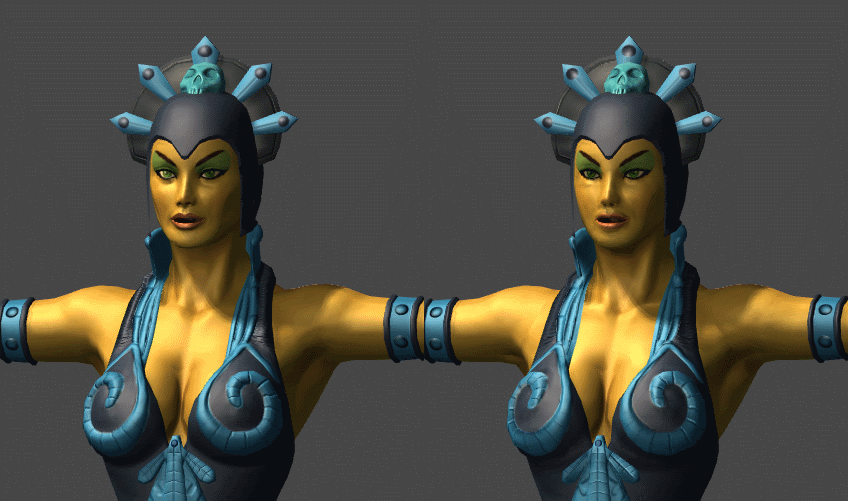
The last days playing with unity i found something that i don’t know if is a Unity error, a Shader error or what’s the problem with it.
I have a character on screen with Diffuse and Normal Map, the shader is “Bumped Specular”, the model looks great but in the game im making, im use a negative size (-X) to turn my player and play all the animations in a mirror form. Imagine like a fighting game, P1 vs P2, where the P2 is the same of P1 but with a negative scale (-X)
This model that i use the negative Scale X show bad the normal maps.
here a comparative pic of the positive and negative scale X.
Any idea if this is a error of the shader, unity3D or something else?
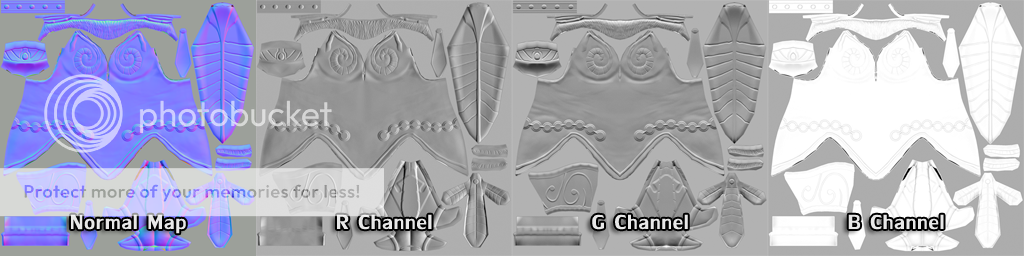
Can you show us the normal map you’re using? It looks to me like more than the green channel needs inverting.
This sort of thing is best to get figured out on your content creation side rather than in Unity, because Unity will convert your normal maps to its internal format before your code gets to see the data.
I understand that the UDK works with flipped channel, that cause the normal map looks orange. there is any way to make normal map works correctly in positive and negative X scale?
Ah, I misread why you were using a negative X scale. In that case, you should use a script to duplicate the mesh using the Mesh class. Then you can iterate through all the vertices and negate their tangent.w values. This will invert your the tangent space bases to compensate for your scaling. I believe this is more efficient than making a custom shader or a custom normal map for the mirrored actor.
Mirroring the verts of the model would not work because the animations would play the same, just that the verts would be mirrored. Unless you did this in lateupdate each and every frame (which is woefully inefficient compared to simply mirroring the object in X).
The shader has a value which contains the object’s scale, you could use that to invert the channel of the normal map;
// In your shader...
o.Normal = UnpackNormal(tex2D(_BumpMap, IN.uv));
o.Normal.x *= sign(unity_Scale.x); // Swap this line for the next line if it still appears wrong.
//o.Normal.y *= sign(unity_Scale.x);
I suggested negating the W components of the tangents to mirror the tangent space. The vertex mirroring would still be done by a negative X scale, allowing the animations to continue working.
Ratonmalo, have you looked at the documentation I linked?
My bad, I misread your post. Yeah, that’d work too I think, and not require the if statement in the shader.
Ratonmalo : Check out the mesh documentation. You copy out the tangent values to a Vector4 array, loop through that and multiply the w component of each entry by -1, then pass the array back into the mesh.
var mesh : Mesh = GetComponent(MeshFilter).mesh;
var tangents : Vector4[] = mesh.tangents;
var i : int = tangents.Length;
while ( i ) {
  tangents[i].w = tangents[i].w * -1;
  i--;
}
mesh.tangents = tangents;
Hi, i still testing it for a couple of days and i can/t get it working.
here what im trying to do.
var mesh : Mesh = GetComponent(MeshFilter).mesh;
var tangents : Vector4[] = mesh.tangents;
var i : int = tangents.Length;

function Update () {

if (Input.GetKey("w"))
{
    while ( i ) {
      tangents[i].w = tangents[i].w * -1;
      i--;
    }
    mesh.tangents = tangents;
    }
}