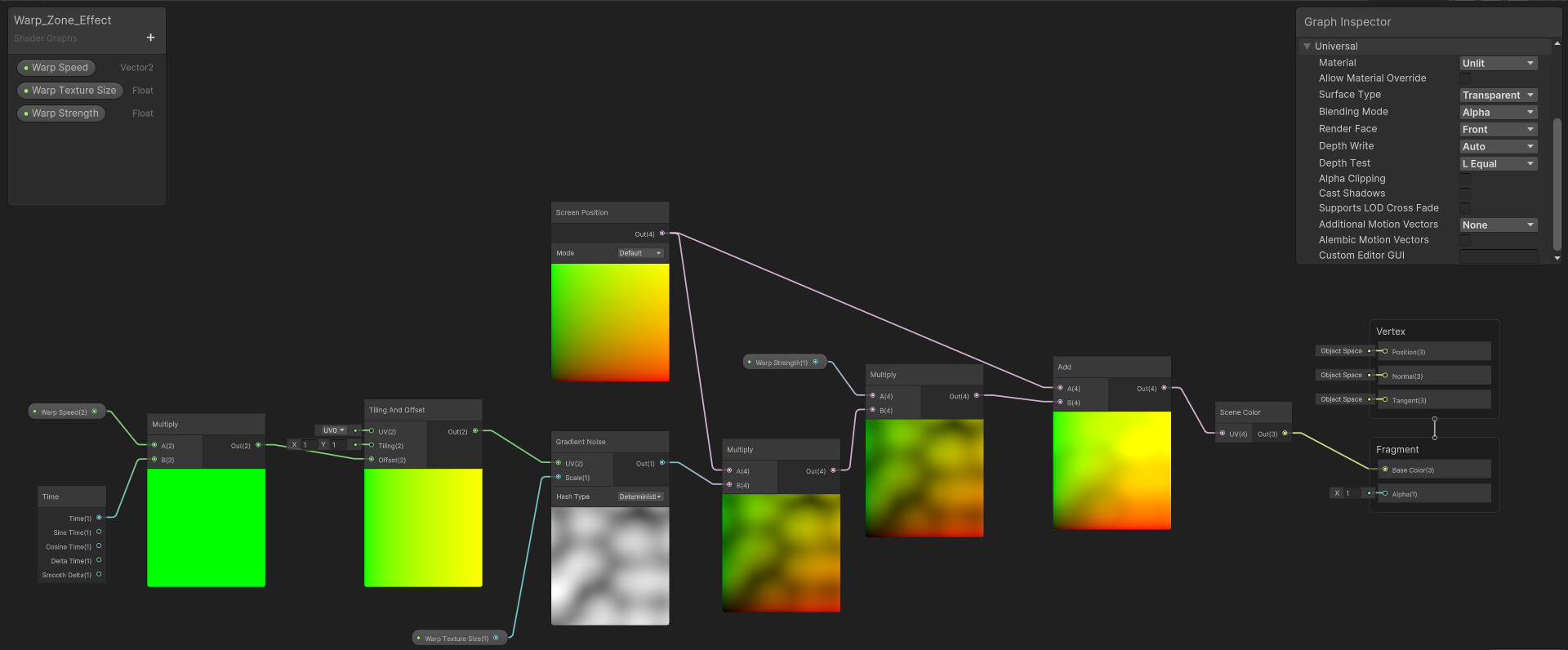
I’ve created a distortion effect that will distort everything behind it using this shader graph:
It works fine for opaque objects but it hides anything that has a transparent material. I’ve tried many potential fixes but no luck so far.
One person suggested scripting a custom Renderer Feature that grabs whatever the camera renders (including transparent objects) and putting it on a Render Texture and using that instead of the Scene Color node.
That makes sense but I haven’t been able to create that custom Renderer Feature. Even powerful AI models are not able to produce functional and error-free scripts.
Could someone please help?
Hello!
Your problem—that your distortion shader hides transparent objects—is due to the Scene Color node sampling the buffer before transparent geometry is drawn. To fix this, you must implement a Custom Renderer Feature that copies the entire scene (including transparent objects) after the AfterRenderingTransparents event into a new texture named _GrabTransparentTexture. You then replace your Shader Graph’s Scene Color node with a Sample Texture 2D node referencing myWisely that exact custom name, which ensures your distortion samples the fully rendered background.
Yes, that’s it. Only I don’t know how to actually achieve this since I’m a beginner-intermediate user and there are no reliable online resources that teach you how to do that.
I even tried following this tutorial on Unity manual: Unity - Manual: Example of a complete Scriptable Renderer Feature in URP and I still got compiler errors and obsolete warnings which is very strange considering this is what the Unity people have come up with.