Could you please remove rendering of the Text Mesh Pro UGUI “T” icon, which appears in the Scene View? It makes designing and reading the UI in the Scene View more difficult. The regular UI Text doesn’t have an icon in the Scene View.

While working on UI, I’m not that much interested in these “T” icons and basically just fighting with them.
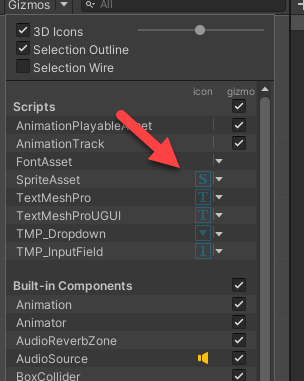
Turning off the “Text Mesh Pro UGUI” Gizmo does not affect rendering of that “T” icon. I’m aware that I can turn off all icons using setting the “3D Icons” slider all the way to the left, but I’m only interested to hide the TMP icon.

Disabling the “TextMeshProUGUI” entry in the Gizmos dropdown only affects the Inspector. It causes all TextMeshProUGUI Components to be collapsed in the Inspector, which is even worse, because I need to change Component values.
If you could remove the “T” icon rendering from the Scene View, that would make working on UI nicer.

 Glad it was that simple, thanks! I’m going to watch Unity Learning Tutorial
 Thank you Stephan_B!