Reflection Probes in a custom surface shader

Hi,

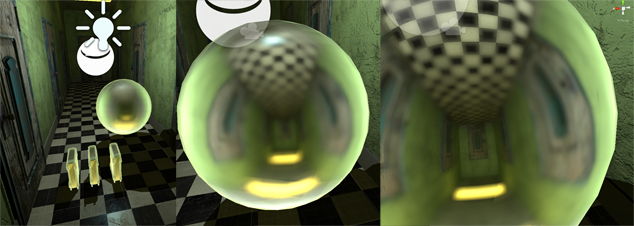
I am trying to make a custom surface shader which uses reflection probes, but I am having difficulty. I found this thread. I am trying to accomplish the same thing but in a surface shader. Ive gotten close but the result is very blurry except when the camera is zoomed in very close. 2456187--168813--halp.png
here’s a code snippet.

inline fixed4 LightingCustom_Reflect (SurfaceCustomOutput s, fixed3 lightDir, half3 halfasview, fixed atten)
{   
    float4 hdrReflection = 1.0;
    float3 reflectedDir = reflect(halfasview, s.Normal);
    float4 reflection = UNITY_SAMPLE_TEXCUBE(unity_SpecCube0, reflectedDir);
    hdrReflection.rgb = DecodeHDR(reflection, unity_SpecCube0_HDR);
    hdrReflection.a = 1.0;


    float4 c;
    c.rgb = hdrReflection;
    return c;
}

Not sure whats going on, hoping someone can point me in the right direction.

Hi, in response to your PM.

You’re doing everything correctly, the only thin you could do is increase reflection probe resolution. Default resolution is quite small, IIRC 128x128 for each cubemap face.

Try increasing reflection probe resolution. That can be done on reflection probe (if you’ve placed it in the scene), or on lighting tab → skybox related settings.

Also, you’re writing surface shader. Surface shaders are supposed to integrate with unity’s PBR, so it is possible that blurred reflection is added on top of your reflection by unity - because unity DOES add blurred reflections to pretty much everything. You can get clean reflections if you write pure vertex/fragment shader.

Lighting kind of functions are supposed to be used to integrate your object with custom lighting system - custom attentuation and such. If I were you I’d try to first plug reflection into emissive channel of surface shader, paint albedo black and see if that works. That’s kinda a hack, but might produce good results.

Also, if you just wanted reflective object, use standard shader, set smoothness to 1, try bringing up “metallic” parameter to 1 too.

Thank you for your quick reply

The probe is already at 1024 resolution. The strange thing is if you look closely at the screenshot the reflection becomes clearer when the camera is nearer.

I tried this in a fragment shader as well but the reflection is still blurry (at least on my machine)

Can you post that shader?

Because I suspect that you’re getting blurry interference from unity standard shader.

Ok heres my surface shader

Shader "Custom/reflect" {
    Properties {


    }
        SubShader{
            Tags { "RenderType" = "Opaque" }
            LOD 200

            CGPROGRAM
            #pragma surface surf Reflect fullforwardshadows

        float4 tint0;


        struct Input {
            float2 uv_MainTex;
            float3 worldRefl;
            INTERNAL_DATA
        };

        void surf (Input IN, inout SurfaceOutput o) {
                      
        }

        inline fixed4 LightingReflect(SurfaceOutput s, fixed3 lightDir, half3 halfasview, fixed atten)
        {
            float4 hdrReflection = 1.0;
            float3 reflectedDir = reflect(halfasview, s.Normal);
            float4 reflection = UNITY_SAMPLE_TEXCUBE(unity_SpecCube0, reflectedDir);
            hdrReflection.rgb = DecodeHDR(reflection, unity_SpecCube0_HDR);
            hdrReflection.a = 1.0;

            float4 c;
            c.rgb = hdrReflection;
            c.a = 1.0;

            return c;
        }

        ENDCG
    }
    FallBack "Diffuse"
}

and the fragment shader is the same one from your thread back in april, which is hella weird because there was a screenshot in that thread showing it working normally

Shader "Custom/CubemapDebug" {
Properties{
                _Cube("Reflection Map", CUBE) = "" {}
            }

                SubShader{
                Tags{ "RenderType" = "Opaque" }

                pass
            {
                //Tags { "LightMode"="ForwardAdd"}

                CGPROGRAM

#pragma target 3.0

#pragma vertex vert
#pragma fragment frag
#include "UnityCG.cginc"

                sampler2D _DiffuseTexture;
                //half4 _Cube_HDR;
                //UNITY_DECLARE_TEXCUBE(unity_SpecCube0);
                //UNITY_DECLARE_TEXCUBE(_Cube);
                samplerCUBE _Cube;

                struct v2f {
                    float4 pos : SV_POSITION;
                    float3 coord: TEXCOORD0;
                };

                v2f vert(appdata_base v) {
                    v2f o;

                    o.pos = mul(UNITY_MATRIX_MVP, v.vertex);
                    o.coord = v.normal;

                    return o;
                }

                float4 frag(v2f i) : COLOR{
                    float3 coords = normalize(i.coord);
                    float4 finalColor = 1.0;
                    float4 val = UNITY_SAMPLE_TEXCUBE(unity_SpecCube0, coords);
                    finalColor.xyz = DecodeHDR(val, unity_SpecCube0_HDR);
                    finalColor.w = 1.0;
                    return finalColor;
                }

                    ENDCG
            }
            }
                FallBack Off
        }

for me these shaders look like this:

Interesting. And you’re absolutely sure that material uses correct shader too?

Here’s the thing though. Accessing reflection probe is not officially documented (well, I never got an answer from unity on the subject), and the shader I posted back in aprel ran on different version of unity, and on windows 7 system.

Also, from what I remember, there was another specCube variable, and that one was unity_SpecCube, unity_SpecCube1_HDR and they refered to second cubemap. So perhaps your shader ended up being compiled differently or due to changes in the engine that older appraoch no longer works.

Either way.

It really looks like you simply want a normal reflective sphere, without fancy effects.

Are you sure you want to mess with custom shaders for that?

Setting metallic to 1 and smoothness to 1 should produce perfect mirror.

I checked your shader.

First.
You shouldn’t be trying to perform reflections within Lighting* (LightingReflect) functions. Those functions are for processing inidividual lights, and they’re not fit for dealing with enviornmental reflections. If the model is hit with multiple lihgts, you’ll get overbrightening. See this aritcle for info: Unity - Manual: Custom Lighting models in Surface Shaders

Second.
I experimented a bit, and apparently unity will rapidly reduce resolution of the cubemap if you’re using a shader with custom lighting model - as you’re doing in your case.
For example:

Shader "Custom/reflect" {
    Properties {


    }
        SubShader{
            Tags { "RenderType" = "Opaque" }
            LOD 200

            CGPROGRAM
            #pragma surface surf Reflect fullforwardshadows
            //#pragma surface surf Standard fullforwardshadows

        float4 tint0;


        struct Input {
            float2 uv_MainTex;
            float3 worldRefl;
            //INTERNAL_DATA
        };

        void surf (Input IN, inout SurfaceOutput o) {          
            o.Albedo = 0.0;
            float3 reflectedDir = IN.worldRefl;
           
            float4 hdrReflection = 1.0;
            float4 reflection = UNITY_SAMPLE_TEXCUBE(unity_SpecCube1, reflectedDir);
            hdrReflection.rgb = DecodeHDR(reflection, unity_SpecCube1_HDR);
            hdrReflection.a = 1.0;
            o.Emission = hdrReflection.rgb;
        }

   
        inline fixed4 LightingReflect(SurfaceOutput s, fixed3 lightDir, half3 halfasview, fixed atten)
        {
            float4 c;
            c.rgb = 0;//hdrReflection;
            c.a = 1.0;

            return c;
        }

        ENDCG
    }
    FallBack "Diffuse"
}

Apparently it is some sort of optimization technique. Also, it is possible that that cubemap doesn’t contain actual image from the probe, but some optimized cubemap solely for making specular highlights, or something like that.

However, I don’t really understand why you WANT to write you own reflective shader in the first place.

The simplest way to get a mirror surface is to set Metallic and Smoothness to 1.0.

You could do that with shader if you wanted.

Shader "Custom/reflect" {
    Properties {


    }
        SubShader{
            Tags { "RenderType" = "Opaque" }
            LOD 200

            CGPROGRAM
            //#pragma surface surf Reflect fullforwardshadows
            #pragma surface surf Standard fullforwardshadows

        float4 tint0;


        struct Input {
            float2 uv_MainTex;
            float3 worldRefl;
            //INTERNAL_DATA
        };

        void surf (Input IN, inout SurfaceOutputStandard o) {          
        //void surf (Input IN, inout SurfaceOutput o) {          
            o.Albedo = 1.0;
            o.Smoothness = 1.0;
            o.Metallic = 1.0;
        }

   
        ENDCG
    }
    FallBack "Diffuse"
}
1 Like

interesting… so your saying a custom lightmodel with reflections is not possible?

I don’t want to use standard shader, because I want a “realish” look, not totally real. I’m of the opinion that PBR takes out a good deal of “artistic license” in rendering, so to speak. Don’t get me wrong PBR looks great I just want something that leaves more room for artistic interpretation, if that makes sense

It is possible, however you can’t grab reflection cubemap from lightprobe.
If you provide your own cubemap, you could plug that into your shader.
Legacy shaders emulate reflections, but can’t grab those reflection cubemaps from light probes.

You won’t look totally real unless you spend A LOT of time, money and effort on art.

There’s not much room for artistic interpretation in mirror ball.
You want mirror ball, there’s simple way to get it with standard model. Why bother with shader? You gain nothing and waste a lot of time.

The point of PBR is that you have less parameters to tinker with and get decent results in both indoors and outdoors quickly.

True. The point of this is not to create a mirrorball, the mirror is just a component I can use to render glossy metals or glass or eyes or other reflective surfaces. In the pre refleciton probe days I had a custom metal shader which used cubemap that I would pre generate using a camera and script, but now that we have reflection probes I find the idea of not having to generate each one quite attractive.

maybe I’m being retarded and PBR would do fine, I still want to try this though…

By this do you mean the old method I just described? I was thinking I could continue doing that if necessary, but the probes are so cool and I’d love to be able to use them

You’ll probably want to write pure vertex/pixel shader for that.

Before that you were writing surface shhader, and that one is expected to interact with PBR lighting, so there’s less control and restrictions on what you can do with that.

Sorta. More than one way to go about it, the only problem is that you don’t get data from reflection probe automatically.
Just download unity shader source, study one of the reflective legacy shaders.

If you want data from the probe, then Metallic = 1/Smoothness = 1 material is the best way to go, as far as I can tell.
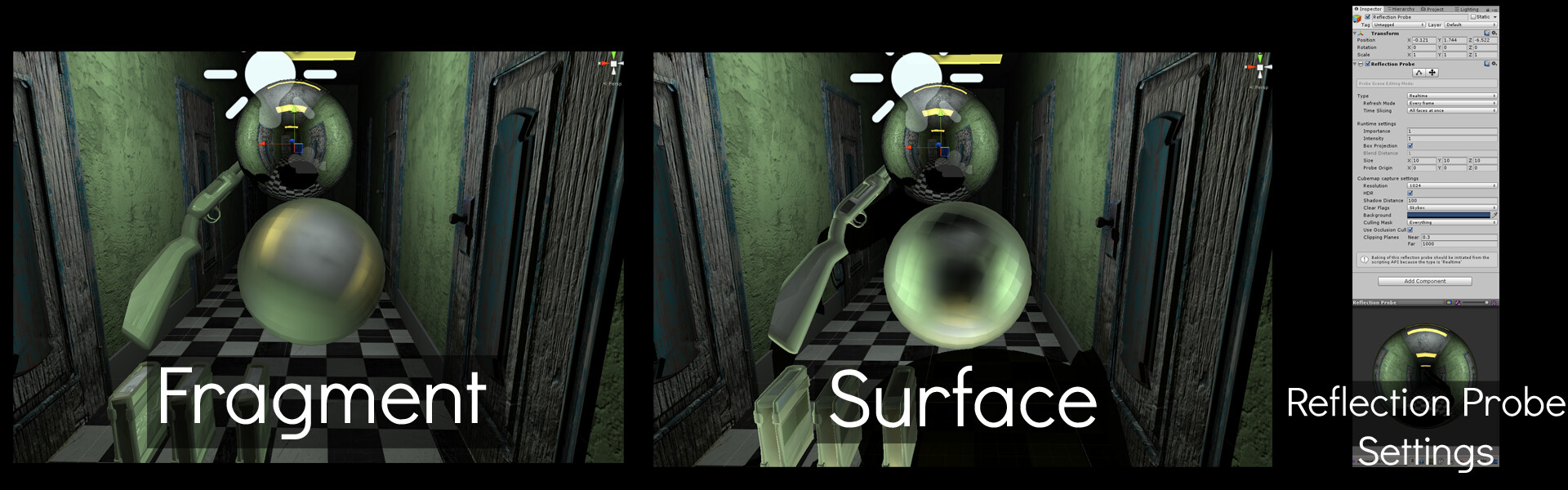
Alright I’m going to use the pre-baked cubemap approach. Thanks for your help, its much appreciated

Alright, have fun. Unsubscribing from the thread.

float4 reflection = UNITY_SAMPLE_TEXCUBE_LOD(unity_SpecCube0, reflectedRay,0);

use this and the blur should disappear

3 Likes

man, thanks for resurrecting this, that works! Where did you find that out?

Thanks guys for figuring this out. I would like to contribute to this with another useful information.
I found out how to blend between the probes.

unity_SpecCube0_BoxMin.w seems to be the key.
It corresponds to the probe weight shown under the mesh renderer component of the game object.

float4 val0 = UNITY_SAMPLE_TEXCUBE_LOD (unity_SpecCube0, input.reflCoord.xyz,0);
fixed3 reflCol0 = DecodeHDR(val0, unity_SpecCube0_HDR);
float4 val1 = UNITY_SAMPLE_TEXCUBE_LOD (unity_SpecCube1, input.reflCoord.xyz,0);
fixed3 reflCol1 = DecodeHDR(val1, unity_SpecCube1_HDR);
fixed3 reflCol = reflCol0 * unity_SpecCube0_BoxMin.w + reflCol1 * (1.0 - unity_SpecCube0_BoxMin.w);

BR

2 Likes

I figured it out before reaching the end of the thread by looking into:
UnityGlobalIllumination.cginc > UnityGI_IndirectSpecular
:wink:

For those interested in a complete solution, this guy has a fairly complete custom shader for accessing Reflection Probes.

He even provides source code here:

As well, Catlike Coding also has a great tutorial along these same lines with a downloadable unity package at the bottom of the page.