But the “mainLight.shadowAttenuation” and “mainLight.distanceAttenuation” always return white if using a “Unlit Shader” as Base. It works with a “PBR” shader but this is not what i need (since i need a fully controllable light model.
Is it a bug or there’s something new that is not documented about it?
The unlit master node was never really meant to support shadows. However I’m almost certain that you only need to add the following lines to support it:
So your tutorial is just wrong and there’s no way to use custom light model anyway?
I’ve added this to the mainlight.hlsl (the custom function file) but it’s not working too. Any other solution?
Hi. This is my shader graph and the mainlight.hlsl file. It’s yet not working and i’m getting this error:
Shader error in 'Shader Graphs/Base': invalid subscript 'shadowCoord' at /Vitor/Trabalho/Cogumelo/Projetos/Game2020/Game2020/Library/PackageCache/com.unity.render-pipelines.universal@7.1.7/Editor/ShaderGraph/Includes/Varyings.hlsl(118) (on d3d11)
That is exactly what I’m doing and what I want to avoid. This is terrible hackish. No way this must be the designed way to do it in a “professional” engine.
That solution still only half works, as even when you set all the PRB parameters to 0 (URP 2019.3.0f3) you still don’t remove all of what PBR seems to do. So that trick which worked in LWRP doesn’t work in URP.
i justed had a quick look into the complied shader code: only one light loop survives the shader compiler which is the custom one. tested with urp 7.1.7.
Is that in specular or metallic mode? In metallic mode I can clearly see that the metallic lighting is surviving, but not in specular mode, can’t say anything about the compilers.
Also, this https://www.youtube.com/watch?v=DOLE4nrK97g
presentation references the article at the top of this thread, but it’s more recent and shadows are quite clearly working on an unlit node so that might be worth looking into.
you have to use specular mode.
metallic does not really exist. it is just an intermediate step which converts metallic to specular. and this step will never set spec to 0,0,0 rather than to a fixed spec value. so in this case some lighting code actually survives…
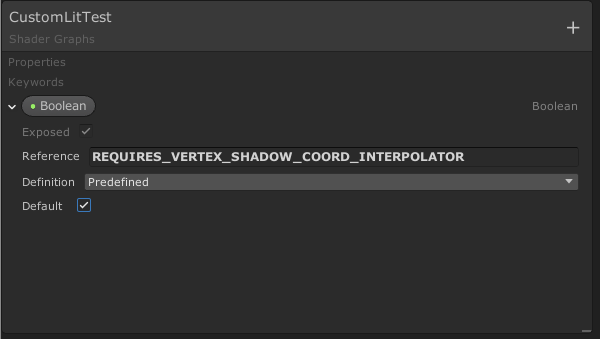
These steps do not work anymore. As @CogumeloSoft pointed out, you get an error. It seems you need to declare another keyword to make it work - REQUIRES_VERTEX_SHADOW_COORD_INTERPOLATOR. If you do not define this keyword, then the Varyings struct does not contain shadowcoord interpolator. But there is no way to define keywords in the shadergraph?
The shader graph lets you add a ‘predefined’ keyword… For example, I enter this:
But it still doesn’t seem to work.
How do we just get main light information, including shadows?