I can’t find a single redeeming quality about it… like nothing …this POS GUI is even worse to use, I know I commented on it last year when pictures were posted around it… but like you’ve done nothing on it… therefore I can only assume 2019.3 alpha might aswel be the final.
Seriously who the fuck is responsible for this crap … if it wasn’t for the asset store stuff I’ve bought this would be enough for me to consider UE or even CryEngine going forwards if this the future of your editor UX/GUI. Kinda wonder what is the point in improving the engine features when you set your GUI back to the effing stone age of garbage design, it’s meant to be improving not getting worse!
The absolute worst thing about it is the darker grey background on everything, underneath black text… like who the f uck recommended these shite design changes?
The previous light skin is at least a little more contrasting.
…no gradients on icons, no gradients anywhere!! now just a bunch of flat icons, and flat shit shades of grey on everything …disgusting really.
…drop down menus, practically blend in with the gui and even look like disabled elements with the grey shades…
Even the in game view stats panel is this ugly fking light colored grey blob (think that was the only darker gui part that showed on the light skin previously)… with …wait for it… square corners on the bottom, and really curved bevelled edges on the top?.. so basically like the previous one but even bloody worse! … the only fking place for a curved bevel on that, should be the bottom left corner…
Inspector area… where to mess up the most on everything I guess, because it’s the most used part of the GUI… so why not really herp derp!
Sliders, somehow with the entire gui going to square corner crap, you then use circles for the sliders?? this is disgusting, at least stick to some consistency in shapes.
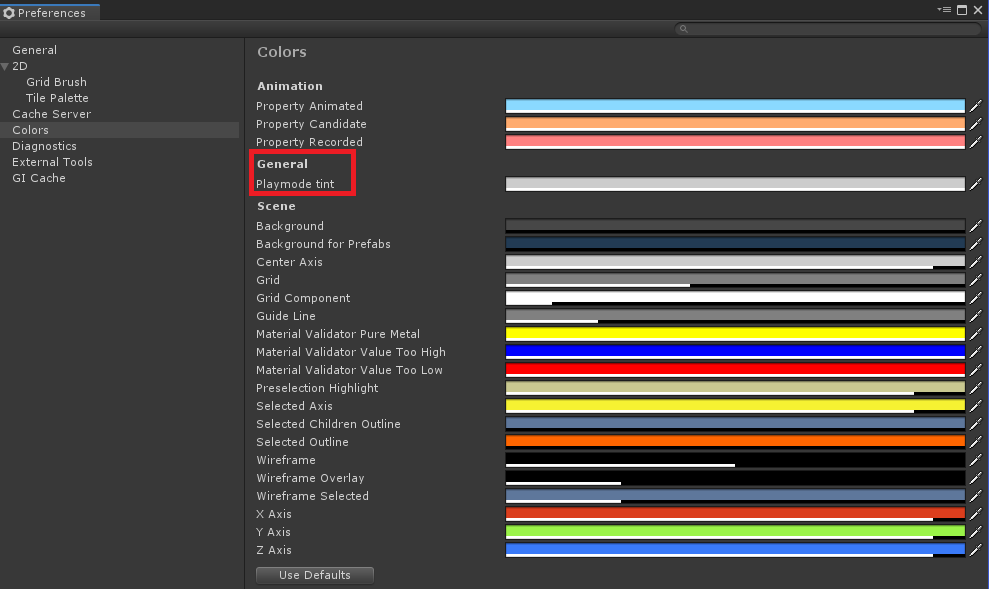
Could it be that this is because in the second screenshot the editor is in play mode? In play mode, the editor UI gets tinted with whatever color is stored in the preferences.
I don’t even want to open 2019.3 to check that, suffice to say it would still look just as ugly and unfinished to me.
I’d be amazed if they actually did bother to include the playmode tinting option in the preferences, seeing as so little is exposed in preferences for things… but I don’t even like play mode tinting, I still use the editor inspector etc while in playmode, plenty of actual useful things they could do when going into playmode, tinting the gui ain’t really one of them.
…well this changes everything… suddenly I’ve seen the light, a single color customization option for an entire gui, that has existed for years has been brought to my attention… I can now finally not look at this 2019.3 gui with contempt and indignation.
I’m joking clearly this is still awful … the playmode tinting just looks worse I guess with everything being so fffking flat in color styling.
Good bye gradients, bevels and good use of color (actually surprised the active tab button hadn’t been stripped of the top color strip)… as we head into the future of shitting bland monotone interfaces.
I mean really a single redeeming quality of gui, is it even faster? nope
is there any ux improvement in workflow? nope
is there any layout improvement? nope
Nothing has improved to me, you don’t even add theming support or more color customization options into the preferences… there is so much more that could be done to improve unity’s gui/ux and nothing is demonstrating that is going on here…
I didn’t want to get into the drama but I think you’re going a tad too far with your whinning.
That’s your personal opinion, and you can give it in a respectful way. There was a thread a while ago where lots of people have their feedback and, mind you, actually addressed problems in a constructive way and hinted at solutions. Yo may as well try to do just that.
You’re both disrespecting the person who tried to give you useful help and showing you’re not interested in actually solving anything.
They’ve been working on a new UI backend called UIElements that actually is faster and more customizable. Most new editor features are built on top of it and the older ones are being ported.
As for UX, the team already said they’re doing the editor redesign in phases. The new UI style comes first, then a deeper redesign will arrive.
If you want the editor to actually imtpove, start by resepcting the team’s work and voicing your disagreement in a constructive way. Either that or just use a tool that suits you more.
I’m not going far enough actually, this stuff was brought up ages ago and enough feedback was given on it… what did they do with it… sweet f-all. Pointless giving ‘constructive’ feedback now, though gradients, bevels, and colors would be a good start for the blind who don’t read good.
Well, to be a bit out of character, I’ll be a bit positive. They did take some feedback, I see less wasted vertical space and it has a tad more contrast than the older previews we saw. I’d say this is overall an improvement than the earlier previews.
I still think it’s a step down than what we currently have. I’m hoping it will be ever so slightly faster, although I’m not holding my breath, somehow Unity seems unable or unwilling, or both, to make an editor that feels as snappy as pre 5.x used to feel.
To me, it makes no difference. They are basically the same GUI and no improvements to UX. Who gives a sh*t about the flat icons? It’s just different and the matter of the personal tastes.
Just focus on making the editor faster.
It’s getting freaking slower with every release with no apparent reasons.
For example, I often have to click on a checkbox three times.
First Click → not responding, hmm… it leads me to click again.
Second Click → It responds late but it puts back the checkbox to before.
Third Click → Thank god, finally, it worked. This story repeats several times a day.
Is this a joke? We are in the 21st century I’m using the fastest CPU and lots of memory and yet I’m struggling with checkboxes
If you can’t improve perf, please do me a favor. Stop waiting your (and our time) on this bullsht theme make over and just improve Editor UXs. There so many small yet important UX improvements you can make to save our lives. Unity is simply a cancer-causing sht but unfortunately, I’m locked in for this project.
Could say there were things wrong with the previous gui theme but instead of improving it they just made it all bloody worse. Grey text on light grey shades, interactive elements all just shades of light and grey, no color separation! just pure uglyfied everything, flat color checkboxes, buttons, no borders… complete and utter basic noob design.
Good use of coloring, contrast, borders, bevels … it all just all got thrown out the window…for those saying it ain’t bad I think you need your eyes testing. And those saying it ain’t bad are using the dark theme… go figure darker themes hide the ugly design of it all.
If anything think this new light skin theme should be a driving point for new users to look at other engines that just provide what I would still consider mostly shit flat gui’s now, but at least in darker styled themes, where looking at such stale flat and boring light color gui styles is slightly less of an eye strain in working with visually dumbed down aesthetic retardation.
That ‘Tier Settings’ panel (and all similar options that use that style) in the light theme is a dark shade of grey with grey text on top… Unlike the dark theme where the text is white with dark grey… which works fine. … in the light skin it should be a lighter shade in order to provide some contrast, ie just like it was done the pre 2019.3 gui… before this regressive gui change.
Its like for every 1 little thing that is better in the new gui, its setback by a number of other issues like some other icons looking rubbish or having all the color taken out, no gradients, no bevels…etc. …Project settings dialog has layout issues with small widths, the inspector view and component expand/collapse areas just look awful and bland as do all the input field areas like all drop down buttons look terrible with flat coloring, sometimes its not even crystal clear if they are disabled… same goes for text fields etc
hate it… dark theme is tolerable that’s it, light theme is just plain broken… it’s alpha though right, maybe they’ll have time to fix it otherwise I hope in 2020 hindsight edition they will support theming so people with better design taste can just fix all this so they don’t have to be stuck with flat monotone gui ?
And just look at the padding difference from the old and new… you just end up with more scrolling to do with the new gui… I mean anyone with a gameobject with a crap ton of components on it is gonna be pissed (I am, dgaf about those who think this new theme is better in anyway) because this overbloat pad styling between each label and element is just another issue that is wrong with it…



 this is still awful
  … the playmode tinting just looks worse I guess with everything being so fffking flat in color styling.

