Hello everyone, I’m in a bit of a pickle.
I created a shader using shader graph for a screen space global snow effect. All this does is sample the scene normals and if they are facing upwords, after a certain angle, draw a white pixel, easy enough. Add this to a full creen render feature and it works wonderfully. I now wish to have some volumes where this effect does is not applied. My idea is to create a new layer and use that to render just the volumes using the red channel and then in my shader sample that texture and overlay it to the scene normal and if i see red at that uv point, discard the snow fragment.
Now, I think the correct approach is to use a custom render feature which renders just that layer and then outputs the result to a texture in my shader (which I have called “_OcclusionTex”), but for the end of my I can’t find how to output to a texture and set it to a material. I’ve followed a couple of tutorial on youtube like this, directly from Unity but the they are not using RTHandles, which apprently is the correct way to do this.
This is what I’ve managed to come up so far, needless to say I’m very much lost and I don’t know how to approach this problem
public Material SnowMaterial;
public LayerMask TargetLayers;

class CustomRenderPass : ScriptableRenderPass
{
    private Material snowMaterial;
    private LayerMask targetLayers;
    private RTHandle tempTexture;
    private RTHandle source;
    private FilteringSettings filteringSettings;
    private ShaderTagId shaderId = new("Shader Graph/ScreenSpaceSnow");

    public CustomRenderPass(Material material, LayerMask mask) : base()
    {
        snowMaterial = material;
        targetLayers = mask;
        filteringSettings = new FilteringSettings(RenderQueueRange.opaque, mask);

        renderPassEvent = RenderPassEvent.BeforeRenderingShadows;
    }

    public void SetTarget(RTHandle source)
    {
        this.source = source;
    }

    public override void Configure(CommandBuffer cmd, RenderTextureDescriptor cameraTextureDescriptor)
    {
        int width = cameraTextureDescriptor.width / 2;   // Example: 50% of screen width
        int height = Mathf.RoundToInt(width / (Screen.width / (float)Screen.height));  // Maintain aspect ratio

        RenderTextureDescriptor rtDesc = new RenderTextureDescriptor(width, height, RenderTextureFormat.R8, 0);
        tempTexture = RTHandles.Alloc(rtDesc, FilterMode.Bilinear, TextureWrapMode.Clamp, name: "_TempOccluders");

        ConfigureTarget(tempTexture);
        ConfigureClear(ClearFlag.Color, Color.black);
    }

    public override void OnCameraSetup(CommandBuffer cmd, ref RenderingData renderingData)
    {
        RenderTextureDescriptor cameraTextureDesc = renderingData.cameraData.cameraTargetDescriptor;
        cameraTextureDesc.depthBufferBits = 0;
        cmd.GetTemporaryRT(tempTexture.GetInstanceID(), cameraTextureDesc, FilterMode.Bilinear);
    }

    public override void Execute(ScriptableRenderContext context, ref RenderingData renderingData)
    {
        CommandBuffer cmd = CommandBufferPool.Get("OccludeSnow");

        Blit(cmd, source, tempTexture, snowMaterial, 0);
        Blit(cmd, tempTexture, source);

        context.ExecuteCommandBuffer(cmd);
        CommandBufferPool.Release(cmd);
    }

    // Cleanup any allocated resources that were created during the execution of this render pass.
    public override void OnCameraCleanup(CommandBuffer cmd)
    {
        cmd.ReleaseTemporaryRT(tempTexture.GetInstanceID());
    }
}

CustomRenderPass m_ScriptablePass;
public RenderPassEvent renderEvent;

/// <inheritdoc/>
public override void Create()
{
    m_ScriptablePass = new CustomRenderPass(SnowMaterial, TargetLayers);

    // Configures where the render pass should be injected.
    m_ScriptablePass.renderPassEvent = renderEvent;
}

// Here you can inject one or multiple render passes in the renderer.
// This method is called when setting up the renderer once per-camera.
public override void AddRenderPasses(ScriptableRenderer renderer, ref RenderingData renderingData)
{
    m_ScriptablePass.SetTarget(renderer.cameraColorTargetHandle);
    renderer.EnqueuePass(m_ScriptablePass);
}
Then in my shader I just output the result of the texture and see if it produces anything at all.
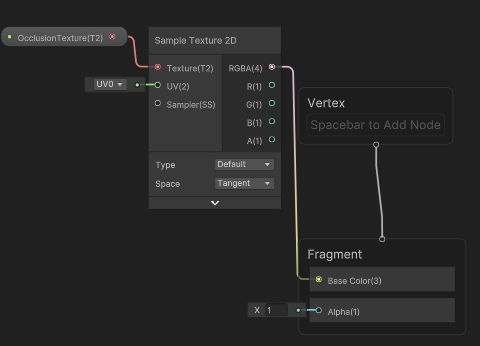
my full screen effect render event is set to AfterOpaques, while the custom renderer is set to BeforeRenderingShadows, but the order does not seem to fix the issue…
Sorry for asking a probably obvious question but I’m really stuck and I dont know where to bang my head…