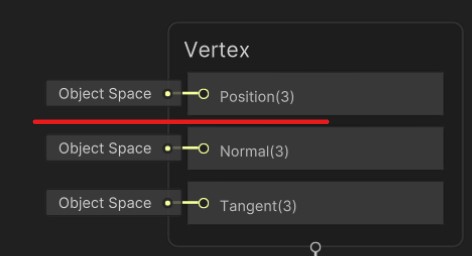
If someone could convert this shader to a lit shader I would appreciate it, shader graph or script it doesn’t matter as long as it has the properties and reacts to light so it should be a lit shader. I have been trying to convert it for several weeks but so far I have not succeeded with any method.
I’m using Unity Universal Pipeline and in 2020.3.6f1 version, if that matters.
Shader "Custom/WindLeafShader" {
    Properties{
        _MainTex("Main Texture", 2D) = "white" {}
        _Cutoff("Alpha Cutoff", Range(0, 1)) = 0.5
        _WindSpeed("Wind Speed", Range(0, 5)) = 1
        _WindAmplitude("Wind Amplitude", Range(0, 1)) = 0.1
        _LeafShakeSpeed("Leaf Shake Speed", Range(0, 10)) = 2
        _LeafShakeAmount("Leaf Shake Amount", Range(0, 0.1)) = 0.02
    }
        SubShader{
            Tags { "Queue" = "Transparent" "RenderType" = "TransparentCutout" }
            LOD 100
            ZWrite On // Enable ZWrite for all fragments
            Pass {
                Cull Back // Enable backface culling
                CGPROGRAM
                #pragma vertex vert
                #pragma fragment frag
                #include "UnityCG.cginc"
                struct appdata_t {
                    float4 vertex : POSITION;
                    float2 uv : TEXCOORD0;
                };
                struct v2f {
                    float2 uv : TEXCOORD0;
                    float4 vertex : SV_POSITION;
                };
                sampler2D _MainTex;
                float _Cutoff;
                float _WindSpeed;
                float _WindAmplitude;
                float _LeafShakeSpeed;
                float _LeafShakeAmount;
                v2f vert(appdata_t v) {
                    v2f o;
                    o.vertex = UnityObjectToClipPos(v.vertex);
                    // Apply wind animation
                    float windFactor = sin(_Time.y * _WindSpeed + v.vertex.x * 0.1) * _WindAmplitude;
                    o.vertex.y += windFactor;
                    // Add leaf shaking effect
                    float shake = sin(_Time.y * _LeafShakeSpeed + v.vertex.x * 0.5) * _LeafShakeAmount;
                    o.vertex.x += shake;
                    o.uv = v.uv;
                    return o;
                }
                half4 frag(v2f i) : SV_Target {
                    half4 col = tex2D(_MainTex, i.uv);
                    // Use alpha cutout threshold
                    clip(col.a - _Cutoff);
                    return col;
                }
                ENDCG
            }
        }
}
https://docs.unity3d.com/Packages/com.unity.render-pipelines.universal@15.0/manual/writing-custom-shaders-urp.html
Take a look at the documentation. It has samples on how to get lighting to work.
In shader graph you can change it easier, so if it’s easy to convert your shader to shader graph that should also work
DevDunk:
Writing custom shaders | Universal RP | 15.0.7
Take a look at the documentation. It has samples on how to get lighting to work.
In shader graph you can change it easier, so if it’s easy to convert your shader to shader graph that should also work
Thank you for your respond, I’ve already tried several lighting techniques in my shader, but they all had issues, I already tried everything, I even read that documentation before but didn’t help. So I kinda gave up tbh. I can show you my attempts with lighting if you want, but it displays completely incomprehensible errors, and I don’t understand why.
Maybe convert it to shader graph in that case?
That’s what I wanted to do, but the problem was that I don’t understand the shader graph at all because I’ve only ever done shaders in code.
I’d suggest recreating it in Lit shader graph because it’s much easier.
The exposed “Object Space Position(3)” slot is the appdata_t.vertex.xyz in your custom shader.
You can get the (vertex or pixel) position with position node and apply changes to it. For example, converting the o.vertex back to object space after modifying it (in clip space).
There’s also a custom function node that lets you create or execute code-based functions (ex. loop) in shader graph.
wwWwwwW1:
I’d suggest recreating it in Lit shader graph because it’s much easier.
The exposed “Object Space Position(3)” slot is the appdata_t.vertex.xyz in your custom shader.
You can get the (vertex or pixel) position with position node and apply changes to it. For example, converting the o.vertex back to object space after modifying it (in clip space).
There’s also a custom function node that lets you create or execute code-based functions (ex. loop) in shader graph.
Hello, I appreciate your suggestion, but my current knowledge of shader graphs is quite limited, and I believe it would be more efficient for me to address this issue using a script. If someone could help me identify and debug the issues in my script, I would be very grateful. However, if someone is willing to fully solve the problem in shader graph and share the solution, that would be equally helpful to me. Thank you for your understanding.
My attempt with light in script:
Shader "Custom/WindLeafShader" {
    Properties
    {
        _Color("Color", Color) = (1,0,0,1)
        _MainTex("Main Texture", 2D) = "white" {}
        _Cutoff("Alpha Cutoff", Range(0, 1)) = 0.5
        _WindSpeed("Wind Speed", Range(0, 5)) = 1
        _WindAmplitude("Wind Amplitude", Range(0, 1)) = 0.1
        _LeafShakeSpeed("Leaf Shake Speed", Range(0, 10)) = 2
        _LeafShakeAmount("Leaf Shake Amount", Range(0, 0.1)) = 0.02
        _EmissionColor("Emission Color", Color) = (0,0,0)
        _EmissionMap("Emission Map", 2D) = "white" {}
    }

        SubShader
    {
        Tags
        {
            "RenderPipeline" = "UniversalPipeline"
            "IgnoreProjector" = "True"
            "Queue" = "Transparent"
            "RenderType" = "Transparent"
        }
        LOD 100
        Blend SrcAlpha OneMinusSrcAlpha
        Pass
        {
            Name "ForwardLit"
            Tags{ "LightMode" = "UniversalForward" }
            CGPROGRAM
            #pragma vertex vert
            #pragma fragment frag
            #pragma shader_feature _EMISSION
            #pragma multi_compile _ _MAIN_LIGHT_SHADOWS
            #pragma multi_compile _ _MAIN_LIGHT_SHADOWS_CASCADE
            #pragma multi_compile _ _ADDITIONAL_LIGHTS_VERTEX _ADDITIONAL_LIGHTS
            #pragma multi_compile _ _ADDITIONAL_LIGHT_SHADOWS
            #pragma multi_compile _ _SHADOWS_SOFT
            #pragma multi_compile _ _MIXED_LIGHTING_SUBTRACTIVE

            #pragma multi_compile _ DIRLIGHTMAP_COMBINED
            #pragma multi_compile _ LIGHTMAP_ON

            #pragma multi_compile_instancing

            #include "Packages/com.unity.render-pipelines.universal/ShaderLibrary/Core.hlsl"
            #include "Packages/com.unity.render-pipelines.universal/ShaderLibrary/Lighting.hlsl"
            #include "UnityCG.cginc"

            struct appdata_t {
                float4 vertex : POSITION;
                float2 uv : TEXCOORD0;
                float3 normal : NORMAL;
            };

            struct v2f {
                float2 uv : TEXCOORD0;
                float4 vertex : SV_POSITION;
                float3 normal : TEXCOORD0;
                float3 worldPos : TEXCOORD1;
            };

            sampler2D _MainTex;
            float _Cutoff;
            float _WindSpeed;
            float _WindAmplitude;
            float _LeafShakeSpeed;
            float _LeafShakeAmount;
            half4 _EmissionColor;
            sampler2D _EmissionMap;

            v2f vert(appdata_t v) {
                v2f o;
                o.vertex = TransformObjectToHClip(v.vertex);
                o.worldPos = TransformObjectToWorld(v.vertex);
                o.normal = v.normal;
                // Apply wind animation

                float windFactor = sin(_Time.y * _WindSpeed + v.vertex.x * 0.1) * _WindAmplitude;
                o.vertex.y += windFactor;

                // Add leaf shaking effect
                float shake = sin(_Time.y * _LeafShakeSpeed + v.vertex.x * 0.5) * _LeafShakeAmount;
                o.vertex.x += shake;

                o.uv = v.uv;
                return o;
            }

            float4 _Color;

            float3 Lambert(float3 lightColor, float3 lightDir, float3 normal)
            {
                float NdotL = saturate(dot(normal, lightDir));
                return lightColor * NdotL;
            }

            half4 frag(v2f i) : SV_Target {

                float4 color = _Color;
                float3 lightPos = _MainLightPosition.xyz;
                float3 lightCol = Lambert(_MainLightColor * unity_LightData.z, lightPos, i.normal);
                uint lightsCount = GetAdditionalLightsCount();
                for (int j = 0; j < lightsCount; j++)
                {
                    Light light = GetAdditionalLight(j, i.worldPos);
                    lightCol += Lambert(light.color * (light.distanceAttenuation * light.shadowAttenuation), light.direction, i.normal);
                }

                color.rgb += lightCol;

                half4 col = tex2D(_MainTex, i.uv);

                // Use alpha cutout threshold
                clip(col.a - _Cutoff);

                // Handle emission if it's enabled
                #ifdef _EMISSION
                half4 emission = tex2D(_EmissionMap, i.uv);
                col.rgb += _EmissionColor.rgb * emission.rgb;
                #endif

                return col;
            }
            ENDCG
        }
    }
}
In that case, you can copy the URP shader and modify it instead of creating one from scratch.
There’s a lambert lighting function in your custom shader, but:
The shader finally returned col which is the color of _MainTex.
Usually we don’t add (but multiply with) the _Color (albedo) to lighting results.
The i.normal is in object space while light direction is in world space.
You should normalize the main light position to get the light direction before passing it to lambert function.
You can refer to URP Lit to receive shadows in this shader.
And more if you need to support (rendering) features:
To cast shadows, you need to add a shader pass with “ShadowCaster” tag. (refer to URP Lit)
…
It can be problematic and need maintenance after upgrading URP so I still suggest creating it in shader graph or modifying URP Lit instead.
wwWwwwW1:
In that case, you can copy the URP shader and modify it instead of creating one from scratch.
There’s a lambert lighting function in your custom shader, but:
The shader finally returned col which is the color of _MainTex.
Usually we don’t add (but multiply with) the _Color (albedo) to lighting results.
The i.normal is in object space while light direction is in world space.
You should normalize the main light position to get the light direction before passing it to lambert function.
You can refer to URP Lit to receive shadows in this shader.
And more if you need to support (rendering) features:
To cast shadows, you need to add a shader pass with “ShadowCaster” tag. (refer to URP Lit)
…
It can be problematic and need maintenance after upgrading URP so I still suggest creating it in shader graph or modifying URP Lit instead.
Every time I try to edit the script it gives this error code for some reason:
I remember that you don’t need to define _Time because shader graph already defined it internally.
There’s a time node and you can either pass it to your custom function or use _Time directly in your code.
I recommend using the first method because, for example, shader graph can automatically modify the motion vectors pass when upgrading to URP 14 (2022 LTS).
wwWwwwW1:
I remember that you don’t need to define _Time because shader graph already defined it internally.
There’s a time node and you can either pass it to your custom function or use _Time directly in your code.
I recommend using the first method because, for example, shader graph can automatically modify the motion vectors pass when upgrading to URP 14 (2022 LTS).
Problem is, I can’t even make a cutoff in the shader graph, if you could show me how to do it, or at least how to get started, I’d appreciate it.
No problem, to enable cutoff (alpha clip transparency), you need to tick the alpha clipping checkbox in graph settings. If “allow material override” is enabled, you should make sure that it’s ticked in the foliage material.
Then, the “alpha clip threshold” slot will appear in fragment stage. You can connect the _Cutoff to it. It discards pixels with alpha less than the given threshold.
wwWwwwW1:
No problem, to enable cutoff (alpha clip transparency), you need to tick the alpha clipping checkbox in graph settings. If “allow material override” is enabled, you should make sure that it’s ticked in the foliage material.
Then, the “alpha clip threshold” slot will appear in fragment stage. You can connect the _Cutoff to it. It discards pixels with alpha less than the given threshold.
What am I doing wrong. I have ticked the alpha clipping but still no transparency on my material.
https://ibb.co/FxNWPFx
I’m not sure why, but you can try adding it yourself.
Select the fragment stage (the frame with BaseColor slot)
Enter space key to add other slots
Add “Alpha” and “Alpha Clip Threshold” to fragment stage
It should work unless the added slots are grey
It works, but there is one problem, all my leaves are merged into one model, the order the transparent polygons are rendered isn’t going to be sorted from back to front, unlike when they are separate objects. So when a face that happens to be behind another face is actually rendered after it, you end up with an incorrect looking order. So that means I can see other leaves through leaves. In coding we can solve this by turn on the Zwrite, but I don’t know how to solve this in shader graph.
Sadly the shader graph in Unity 2020 doesn’t expose this feature (Depth Write & Depth Test). You need to upgrade to 2021 LTS or higher if possible.
Or you can click the “view generated shader” button and copy the generated shader to an empty one before modification.