Hi Everyone,
The Graphics team and I are thrilled that you can now access all the new graphics and rendering features in Unity 6, designed to enhance your project’s performance and elevate visual fidelity.
Let’s begin with a high-level overview of the performance features you can look forward to first.
Boost rendering performance
In Unity 6, Universal Render Pipeline (URP) and the High Definition Render Pipeline (HDRP) both see significant performance enhancements that speed up production across platforms. Depending on your content, and based on testing on various game productions, we have seen improvements reducing in some cases CPU or GPU workload by up to 50% while providing smoother, faster rendering across various platforms.
As you know performance is a complicated subject, so to make sure you leverage the best of our improvements, check out the Graphics rendering: Getting the best performance with Unity 6 session from Unite 2024.
The new GPU Resident Drawer allows you to efficiently render larger, richer worlds reducing the need for complicated manual optimizations. You can optimize your games with up to 50% CPU frame-time reduction for GameObject rendering of complex scenes across platforms, including high-end mobile, PC, and consoles.

Optimize your games with up to 50% CPU frame-time reduction for GameObjects when rendering large, complex scenes.
To further improve CPU performance, we introduced the new Split Jobs threading mode on DX12, Vulkan and compatible consoles. This mode enables the multithreaded processing and submission of native graphics commands, which can significantly accelerate the render loop. Split Jobs is also supported in the Editor’s game and scene view rendering, when targeting DX12.

Enabling Gfx Jobs in the Editor for DX12
Working alongside the GPU Resident Drawer, GPU Occlusion Culling boosts the performance of GameObjects by reducing the amount of overdraw and vertex processing for each frame, which means the renderer is not wasting resources drawing things that are not seen.

Using a GPU-driven approach, GPU Occlusion culling ensures you are not rendering things that aren’t visible in a scene.
You can optimize GPU performance and significantly enhance visual quality and runtime performance with Spatial-Temporal Post-Processing (STP). STP is designed to take frames rendered at a lower resolution and upscale them while maintaining visual fidelity, delivering consistent, high-quality content to platforms with varying levels of performance capabilities and screen resolutions. STP is compatible with both URP and HDRP, across desktops, consoles, and, notably, compute-capable mobile devices.

STP optimizes GPU performance and significantly enhances visual quality and runtime performance.
Render Graph for URP is a new rendering framework and API that simplifies the maintenance and extensibility of the render pipeline and improves rendering efficiency and performance. The new system introduces various key optimizations, such as the automatic merging and creation of native render passes, in order to reduce memory bandwidth usage along with energy consumption – especially on tile-based (mobile) GPUs.
The new Render Graph API also streamlines the custom pass injection workflow, allowing you to extend the render pipeline with your own custom Raster and Custom passes, as well as to reliably access all of the pipeline resources needed using the new Context Container.
Lastly, with the new Render Graph Viewer tool, you can now analyze the Engine’s render pass creation and frame resource usage directly in the Editor for both URP and HDRP, simplifying render pipeline debugging and optimization.

Analyze the render pipeline, passes, and resources using Render Graph Viewer
You can find more information on Render Graph in our documentation.
Foveated Rendering API in URP allows you to configure the Foveation Level, improving GPU performance at the cost of reduced fidelity around a user’s mid/far peripheral.
Two new foveation modes are available. With Fixed Foveated Rendering, regions in the center of the screen space benefit from higher quality, while Gazed Foveated Rendering uses eye tracking to determine which regions of the screenspace will benefit. For more information, see our documentation.
The Foveated Rendering API is compatible with the Sony PlayStation®VR2 plug-in and Meta Quest through the Oculus XR plug-in, with support for the OpenXR plug-in coming soon.
Volume framework enhancements in both HDRP and URP optimize CPU performance on all platforms to make it viable even on low-end hardware. It allows you to set global and per-quality levels volumes in URP, similar to what was possible in HDRP with an improved user interface across the board. Additionally, it’s now easier to leverage the Volume framework with Custom post-processing effects for URP to build your own effects like a custom fog (check out this demo from our December live stream to learn more).

URP custom post-processing
Ray Tracing API and HDRP features are out of preview. We’ve made stability and performance improvements to DirectX 12 and ray tracing, as well as increased compatibility with the engine’s existing feature set (decals and VFX Graph with raytracing, and decals and disc+tube+box lights for pathtracing) and console support.
New optimizations such as Solid Angle Culling help greatly reduce the Ray Tracing CPU overhead:

You can set the culling mode through the HDRP settings.
Various optimizations were introduced to greatly reduce ray tracing memory usage that you can now track using the Frame Debugger.

With this, the Ray Tracing API and HDRP’s ray-traced effects such as ray-traced shadows, reflections, AO, Global Illumination, path tracing, and recursive rendering are officially out of preview.
Achieve more engaging visuals
Unity 6 delivers new ways of applying global illumination to your worlds that streamline the light creation process and deliver enhanced visuals.
Adaptive Probe Volumes (APV) is a new way for you to build global illumination lighting in Unity. They enable more streamlined authoring and better iteration times for Light Probe-lit objects with automatic placement, better visual fidelity thanks to per pixel or per vertex lighting, and open new possibilities like time-of-day scenarios and streaming. It can diminish or even reduce entirely the need for lightmaps in many cases reducing baking time and memory usage. It is available for both HDRP and URP.
APV Scenario Blending allows you to easily blend between baked probe volume data for day/night transitions or managing different lighting scenarios in scenes on a wide range of platforms.
APV Sky Occlusion enables you to achieve more color variations in static indirect lighting from the sky when applying time-of-day lighting scenarios to your virtual environments compared to APV scenario blending.
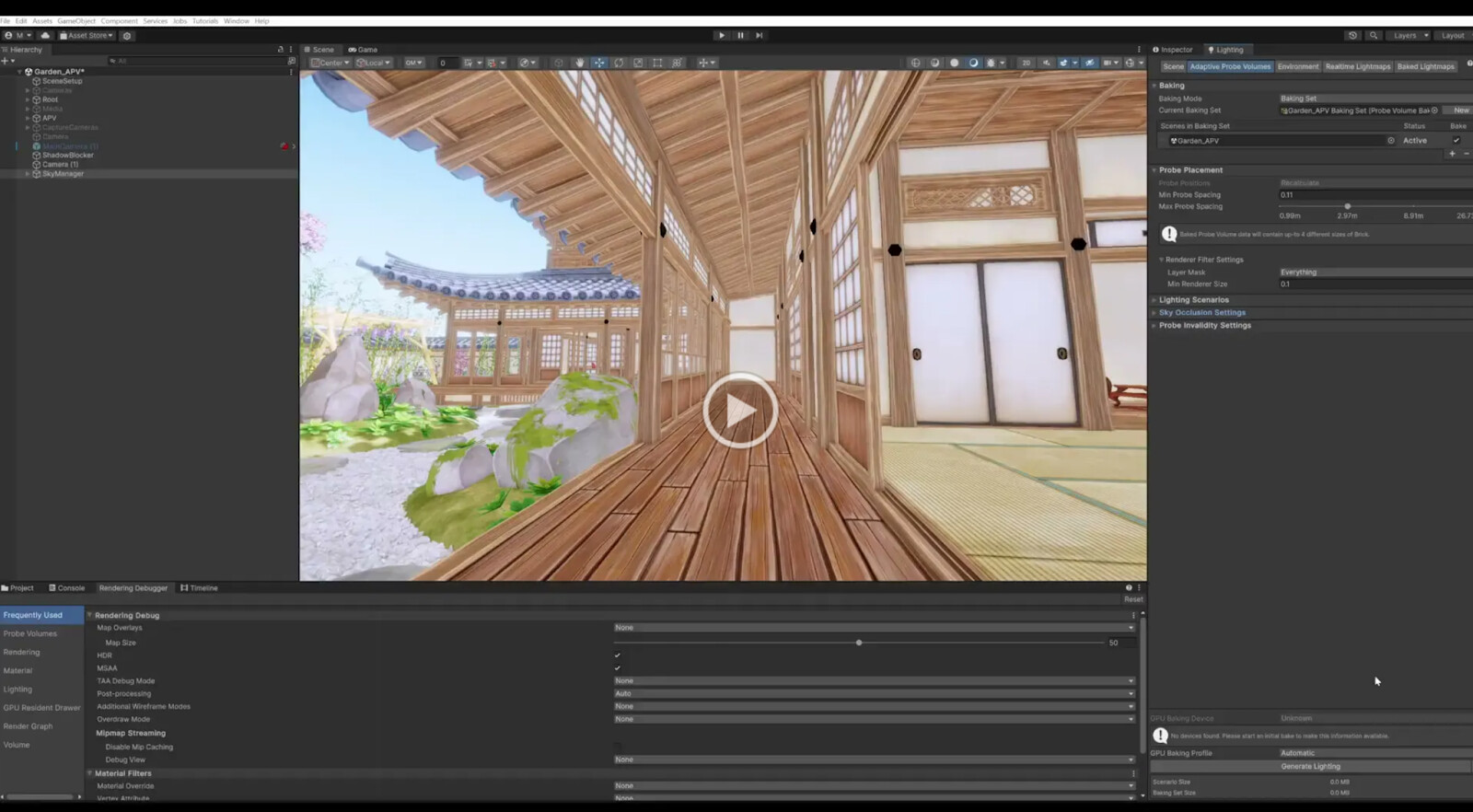
Using Sky Occlusion can achieve more color variations of static indirect lighting from the sky compared to APV scenario blending. Asset credit: Azure[Sky] Dynamic Skybox
Probe Adjustment Volumes are an important tool at your disposal when fixing-up problem situations in probe-based lighting setups. In Unity 6, automatic isolation of probes is a new feature, where probes that are not affected by the Adjustment Volume can be hidden when placing and sizing the volume. This makes it easier to see what you are affecting when working in crowded Scenes.

Automatic isolation of probes is a new feature, enabled by default when placing Adjustment Volumes.
New Light Baking Architecture
Processing lighting data like lightmaps, light probes and reflection probes, now uses Unity’s new light baking architecture for on-demand bakes to provide you with a more predictable and stable light baking experience. When baking with the GPU backend in on-demand mode, you can use the Baking Profile in the Lighting window to select the tradeoff between performance and GPU memory usage.
The production release of the GPU Lightmapper is a game-changer, providing lightning-fast baking of lightmaps and probes that surpasses the capabilities of the CPU Lightmapper. The GPU Lightmapper can more than halve the time it takes to process your lighting data as compared to the CPU Lightmapper, and it is ideal for larger scenes and higher-resolution lightmap textures.
Additionally, the new Interactive Debug Preview functionality works similarly to the “Auto Generate” lighting mode (which has been removed), but is completely non-destructive, and will not affect any existing baked lighting data. This allows you to experiment while troubleshooting baked lighting, without having to do a full On Demand rebake after each change.
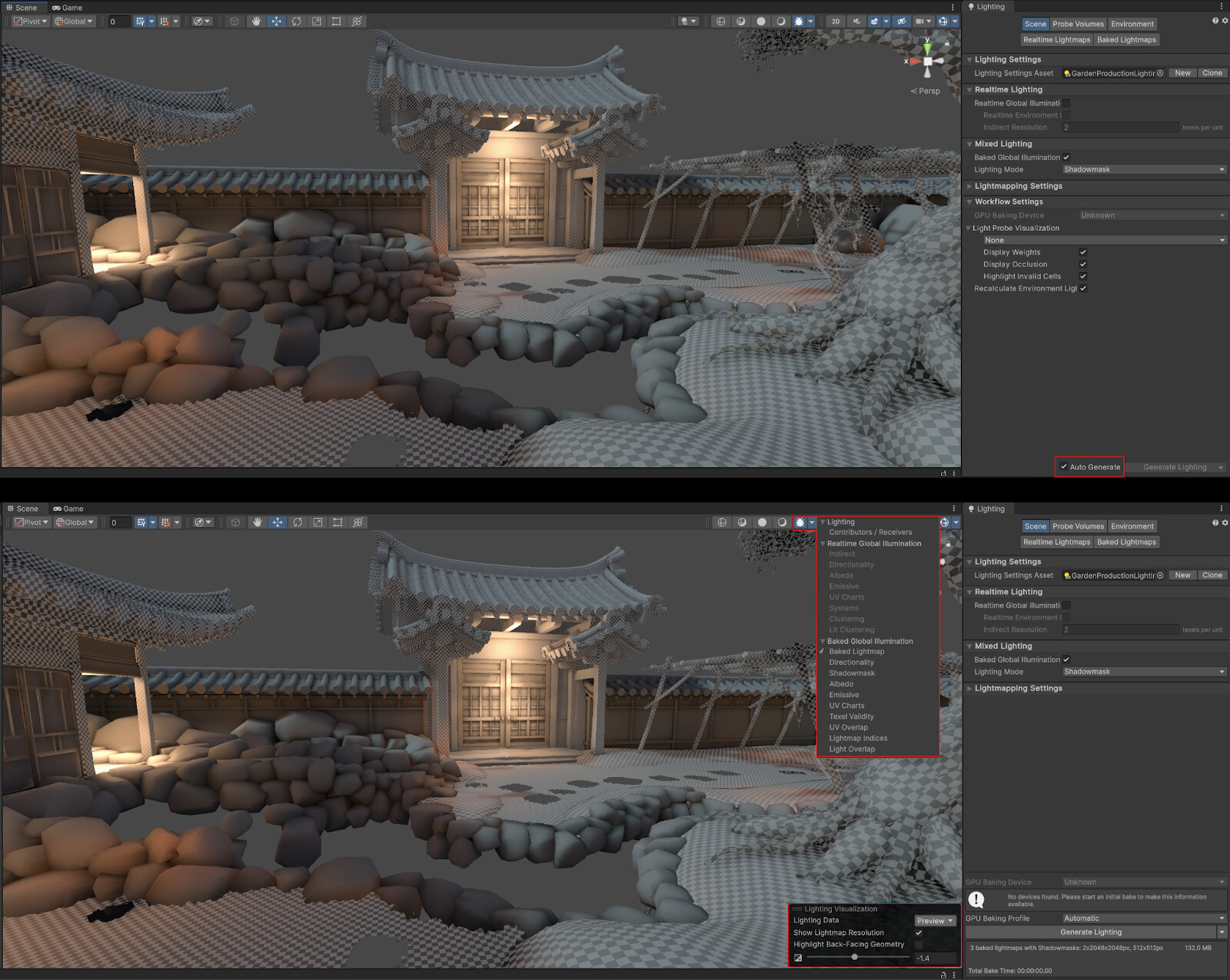
“Auto Generate” has been replaced with an interactive, non-destructive preview in the scene view debug modes.
Make sure to check out the New lighting features and workflows in Unity 6 session from Unite 2024 to learn how to achieve high-quality lighting with Unity 6.
For a final touch on the look, we also added Screen Space Lens Flares available for both URP and HDRP to easily and automatically generate procedural lens flares and light streaks based on lights and specular highlights intensities, perfect for sci-fi and racing games.

Screen Space Lens Flares.
HDR tone mapping

Unity 6 also introduces cross-platform support for HDR tone-mapping and display for the Scriptable Render Pipelines.
High dynamic range (HDR) displays are capable of reproducing images with higher peak brightness and a wider color gamut to achieve better contrast (highlights/shadows) and color saturation. This results in more realistic variations in luminance across scenes, increased surface detail, and improved depth perception.
You can now easily enable and configure HDR output for both URP and HDRP. We recommend implementing a custom HDR calibration screen in your game, to provide players with control over HDR calibration. For this purpose, you can use and modify our latest HDR calibration sample project
Create richer environments
Unity 6 offers a smoother SpeedTree workflow. Users can easily import .st and .st9 files thanks to the new Importer and SpeedTree’s lightweight wind that is now available in Unity, makes the trees run faster with better texture handling on the GPU.
EDIT: Not ready yet. Coming soon.
We will also release a free mobile pack available to all Unity 6 users that can import the .st9 files to any project and drop them in the scene. Like any SpeedTree, users are able to adjust the size, LODs and wind directly in Unity 6.
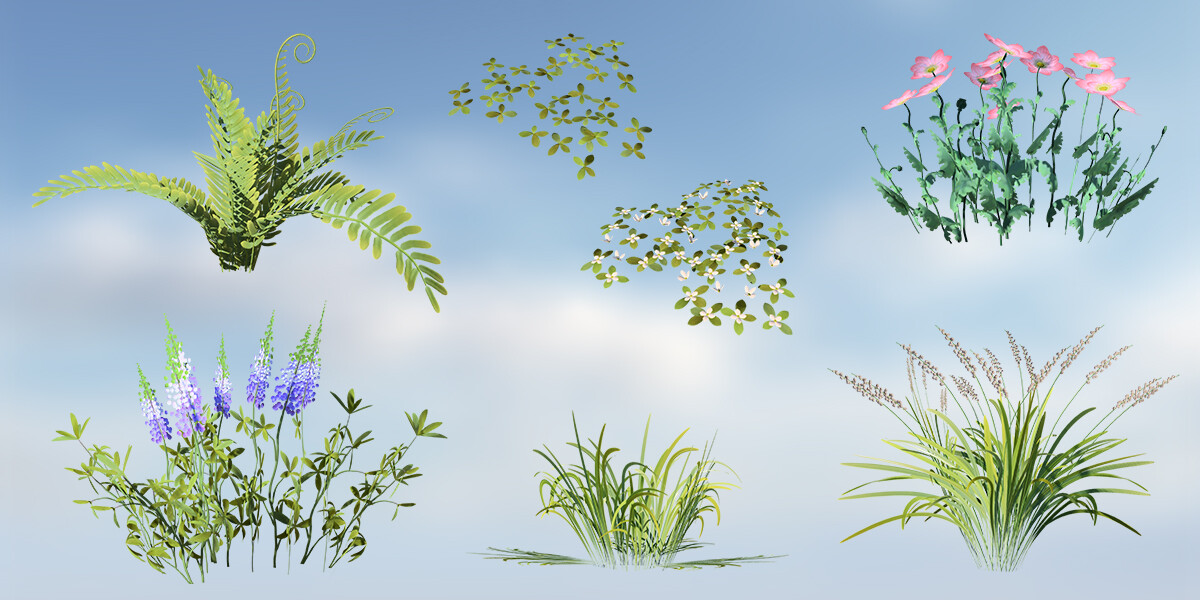
Free SpeedTree mobile pack featuring 18 .spm file and a Unity sample scene
In HDRP, we improved sky rendering for sunset and sunrise to better enable your project’s time-of-day scenarios. This adds ozone layer support and atmospheric scattering to complement fog at long distances.

Sky atmospheric scattering

Sky ozone layer
HDRP Night Sky now supports time-of-day transitions, integrating stars and celestial bodies like the moon for more immersive scenes. Volumetric Clouds have also received significant visual quality improvements through better shadow maps, delivering more realistic and visually appealing self-shadowing effects.

To help you expand on your environment lighting, you can now include a new HDRP night sky in your time-of-day scenario.
Water has been improved with support for Underwater Volumetric fog that samples caustics to create volumetric light shafts. Performance optimization now includes an option to read back simulation from the GPU with a few frames of delay instead of replicating the simulation on the CPU. We also added support for transparent surfaces with mixed tracing mode to mix raytraced and screen space effects when rendering surfaces like water together with terrains and vegetation.

Underwater Volumetric fog Underwater Volumetric fog
The HDRP Water System introduces both functional and visual enhancements, allowing for more precise water creation that integrates seamlessly with the world and gameplay. The Water Excluder can dynamically remove water from areas like the inside of a boat or cave, while the Water Deformer creates localized water effects, such as waves, vortices, or deformations around a moving ship.
Foam Generator allows you to simulate white water for a boat trail or around rocks in open oceans, and Current maps creates local currents by both managing surface waves to follow the currents and the water query API to allow for objects to drift. You can also take advantage of great control to customize the Water Line when the camera crosses the water surface.
To get started with water, we created multiple samples available in the HDRP package from the Package Manager, as well as various demo scenes available on GitHub.
VFX Graph
For VFX artists, Unity 6 delivers improved tooling and better URP support so you can efficiently reach more platforms. VFX Graph profiling tools allow a VFX artist to find what could be optimized within a graph by getting feedback about memory and performance to tweak certain effects and maximize performance.

VFX Graph Profiling Tools
Build VFX shaders with the support of Shader Graph Keywords, and more complex effects with URP with URP depth and color buffers for fast collision or for spawning particles from the world.
In 2022 LTS, we introduced VFX Graph 6-way lighting for HDRP, and now it’s available for URP. These tools allow you to bake lightmaps and simulate the lighting in sprite sheets at runtime, so you can create customizable effects, like smoke, clouds, or steam, that work under different lighting conditions.

You can now create customizable visual effects with 6-way lighting in URP.
VFX Graph Motion Vectors support, in conjunction with URP Object Motion Blur support, allows artists to blur objects moving faster than the camera’s exposure time. This enables you to deliver impressive visual effects that are seamlessly integrated with systems like Temporal Anti-Aliasing.
The new VFX Graph Templates and Wizard gives you access to a template window that provides predefined effects, acting as a starting point for creating unique effects with ease or to manage your own VFX library.
Additionally, for more seasoned VFX artists and developers, we have added a Custom HLSL Block. This extends the possibilities of VFX Graph, so you can add effects like flocks (through neighbor search) or reading back from a buffer to trigger audio.
VFX Graph Volumetric Fog Output allows you to inject particles into HDRP’s Volumetric Fog to generate clouds, smoke, mist, fire effects, or to make Volumetric Fog more dynamic and procedural. Different Blend modes (add, multiply, min-max) allow you to use particles to add, remove, or combine with existing fog. For example, you could use smoke to add density to the fog, show wind chasing, mist, or create underwater streams.
Note that VFX Graph is supported on all mobile devices compatible with Vulkan (still in preview) and officially supported on portable consoles and Meta Quest 2 and above.
To get you started check our brand-new VFX Graph Learning Templates, available for import now in Unity 6. Whether you’re an experienced VFX artist or someone eager to explore the mesmerizing world of VFX Graph, this collection of VFX assets are designed to help you learn, elevate your skills and deepen your understanding.

Shader Graph
Shader Graph for UGUI allows you to create an infinite array of animated effects and tune the behavior and appearance of the UI while also reducing performance and memory costs.

In Shader Graph, you can now select Canvas as a new Material Type in the Graph Inspector for HDRP, URP, and the Built-in Render Pipeline. PNG
Shader Graph-based decals can now interact with transparent objects, enabling the creation of procedural effects such as raindrops, ripples, custom engravings, dirt on glass, and more.
In Unity 6, we have improved UX with keyboard shortcuts, faster undo/redo, and added a new Heatmap Color mode allowing tech artists to quickly identify the relative performance cost of shader graph nodes.
To help you get started with Shader Graph, there are three new samples:
- Node Reference Samples, featuring a collection of Shader Graph assets. Each graph illustrates a specific node, with detailed explanations of the underlying math and examples of how the node can be applied. For further guidance, check out the Node Reference Samples Tutorial video.
- Feature Examples, featuring a wide range of effects and techniques, such as parallax mapping, interior cube mapping, angle blending, flow mapping, and custom lighting. Over 30 different feature examples available in this set. More in this video.
- Production Ready Shaders, a set of samples containing more than 25 Shader Graph assets and dozens of subgraphs that are ready to be used directly in your projects. The sample shaders work in both HDRP and URP. Watch the video for more details.

To learn more about what’s new for artists, watch the Achieve your vision faster with technical artist tools in Unity 6 session from Unite 2024.
Get started with SPRs in Unity 6
URP and HDRP powered the majority of Unity games released in 2023, and to help you get up to speed quickly with Unity 6, we’ve made them the default options in the Hub.
But rest reassured that the Built-in render pipeline is maintained in the Unity 6 cycle. However, we encourage you to use URP or HDRP for your new projects and consider upgrading your existing projects to SRPs to make the most of the incredible performance and visual features that Unity 6 has to offer. To help you through the process, we have a Built-in to URP guide available to you. You can also see our Unite talk Transitioning from the Built-in Render Pipeline to URP and HDRP that show major steps necessary for you to take to upgrade from the Built-in Render Pipeline.
We’re excited to share two new Unity 6 demos with you today, giving you the chance to explore some of the latest features in Unity 6.
Fantasy Kingdom in Unity 6 highlights the impressive rendering performance, advanced lighting features, and robust mobile optimization of the Universal Render Pipeline (URP), all in a stylized setting.
FK ( video )
Time Ghost is a Unity Originals real-time cinematic that pushes the boundaries of visual quality and complexity, showcasing the advanced graphics capabilities of Unity 6.
TG ( Video )
There’s plenty more to discuss, and even more content on the way! Be sure to watch our Unite 2024 session on The Unity Engine Roadmap to explore the future of Graphics. Don’t forget to join the conversation on our graphics discussion channels—we’re excited to hear your feedback!
If you have feature requests vote for existing cards or the “Submit a new idea!” cards on our public roadmap.